visStatistics: automated test selection, visualised
Sabine Schilling
2026-08-13
Source:vignettes/visStatistics.Rmd
visStatistics.RmdAbstract
visStatistics provides a workflow for routine two-variable frequentist inference in R.
Given two vectors, visstat() first dispatches by variable classes, factor levels, sample sizes, expected cell counts, and explicit user options.
Its assumption-driven branch concerns tests of central tendency for a numeric response grouped by a factor. There, in the default setting, sample size and residual diagnostics from a fitted linear model choose between rank-based and mean-based tests and, within the latter, between equal-variance and Welch-type variants.
The output is deliberately visual: diagnostic plots are shown together with assumption-test \(p\) values, the selected test, effect size, and post-hoc results where applicable. This shifts attention from ad-hoc test selection to visual diagnostic assessment and statistical interpretation.
The workflow serves quick data exploration; its automation makes it suited to server-side R applications, where users select solely variables through a web interface and receive the full analysis. It also supports time-constrained work such as statistical consulting, where less time spent on test selection leaves more room for interpretation.
1 Introduction
In the frequentist tradition, the majority of routine data analyses reduce to a comparatively small set of inferential frameworks, including group comparisons, regression models and contingency-table analyses (Fritz et al. 2012; Hayat et al. 2017; Sato et al. 2017; Brodeur et al. 2020). The correct use of these frameworks depends on assumptions that are often checked informally or not at all (Hoekstra et al. 2012; Shatz 2024).
visStatistics targets this gap by making routine frequentist test selection assumption-aware, visual, and reproducible.
Rather than requiring users to choose the test function first, visstat() starts from two variables and routes common two-variable settings through a fixed decision workflow.
The function selects a test from the variable classes, distributional assumptions, sample size, and expected cell counts; displays the diagnostics that led to the selected route. It then returns an R object whose print() and summary() methods expose the complete test results, including the reported effect size.
The scripted workflow is well suited to browser-based applications where sensitive data (such as highly confidential medical records) are stored securely on a server and cannot be directly accessed by users. This approach has already been successfully applied to develop a medical scoring tool (Bijlenga et al. 2017).
2 Packages with related scope
For group comparisons, packages with related scope include compareGroups (Subirana et al. 2014), boxTest (Sau et al. 2025), autotestR (Garcia 2026), automatedtests (Zeevat 2025), and agrobox (Salinas Angeles 2026).
compareGroups is primarily designed for bivariate descriptive tables and reports.
boxTest covers only the two-group numeric-response case.
autotestR provides automated recommendations for t-tests, ANOVA and correlation.
automatedTests provides the most extensive range of coverage of the packages under consideration, incorporating one-sample, paired, repeated measures, regression, correlation, and contingency-table cases.
agrobox automates the choice between Fisher’s and Welch’s ANOVA from residual-normality and variance diagnostics, covering the one-way layout alone; when residual normality is rejected it reports the group means without any test, rather than falling back to a rank-based alternative.
For tests within the general linear-model framework like Student’s t-test or Fisher’s one-way ANOVA and linear regression, the normality assumption concerns the model residual errors (each observation minus its predicted value), not the raw data itself; the belief that the raw data must be normal is a widespread myth (Kéry and Hatfield 2003).
Yet, autotestR and boxTest test the response separately within groups, whereas automatedtests and compareGroups test the response variable as a whole, ignoring the grouping.
Among the reviewed automated test-selection packages, only visStatistics and agrobox base the central-tendency route on explicit residual diagnostics from the common linear model rather than on marginal or groupwise normality checks, and only visStatistics continues to a rank-based test when those diagnostics reject normality.
Note that packages such as rstatix (Kassambara 2025), ggstatsplot (Patil 2021), and, in Python, pingouin (Vallat 2018) provide individual diagnostic and test functions but leave the actual test choice to the user rather than automating it.
3 Purpose of the vignette
The purpose of this vignette is two-fold: On the one hand it documents (Section 5), justifies (Sections 7 and 8) and illustrates (Section 6) the decision logic of visstat().
On the other hand its Appendices serve as reference of all implemented tests, correlations
and effect-sizes, so that the user easily understands the output without having to consult
the code or literature.
4 Package overview
4.1 Installation
visStatistics (Schilling 2026) is available on CRAN as the latest stable release.
This article refers to the latest development state in the GitHub repository (https://github.com/shhschilling/visStatistics), which may include minor changes between CRAN submissions.
4.2 Minimal function call
Given two input vectors x and y of class "numeric", "integer", or "factor", its main function visstat() can be called in two equivalent forms:
An exemplary function call is
# Standardised form
visstat(npk$block, npk$yield)
4.3 Automated test selection
From this single entry point, the package automatically selects among the implemented hypothesis tests,
t.test(), wilcox.test(), aov(), oneway.test(), kruskal.test(), chisq.test(), fisher.test(), lm().
The underlying selection algorithm is detailed in Section 5.
4.4 p-values and effect size
Among the returned components, visstat() reports the \(p\) value of the selected test quantifying evidence against the null hypothesis and a complementary effect_size() estimate describing the magnitude of the selected comparison, association, or model fit on the scale
defined in the effect-size table (Fritz et al. 2012; Levine and Hullett 2002), Appendix F.
While \(p\) values are strongly affected by sample size, effect-size, estimates are intended to support comparisons across studies regardless of sample size (Levine and Hullett 2002). Effect size is therefore an important determinant of power or required sample size or both (Cohen 2013, 10).
The effect size takes the value zero when the null hypothesis is true and some other, test-specific non-zero value when the null hypothesis is false, it is an index of degree of departure from the null hypothesis (Cohen 2013, 10).
To avoid additional package dependencies, the function effect_size() extracts, where possible, the effect sizes from base R stats output. Otherwise, it implements the remaining formulae internally.
4.5 Implemented functions
Unless stated otherwise, R function names for selected tests refer to functions from the stats package distributed with R (R Core Team 2026).
To reduce dependencies on other packages, visStatistics implements levene.test() for the variance gate in grouped mean-based tests (Eq. (A.3)), bp.test() for regression diagnostics (Eq. (A.5)), games.howell() for Welch-ANOVA post-hoc comparisons using the Welch statistic (Eq. (B.4)), and effect_size() for the effect size reported with the selected test (Appendix F).
Definitions of all implemented test statistics, rank-correlation coefficients, and effect sizes are given in Appendices B–F.
4.6 The visstat methods
Objects returned by visstat() are of class "visstat" and support the S3 methods print(), summary(), and plot().
Each is demonstrated on a worked object in Section 6.1.1.2.
-
print()lists the returned components. -
summary()prints the full returned object, including assumption tests, post-hoc comparisons, confidence level, andeffect_sizewhere available. -
plot()lists the available plots by default; withwhich, it either replays a captured plot (in an interactive R session) or reports the selected saved file path.
4.6.1 Saved graphics
When visstat() is called with graphicsoutput specified, plot() lists the generated file paths instead.
All generated graphics can be saved in any file format supported by Cairo() (Urbanek and Horner 2025), including “png”, “jpeg”, “pdf”, “svg”, “ps”, and “tiff”.
If plotName is provided, the main result plot uses this name.
The assumption-diagnostic plot adds the prefix "glm_assumptions_".
If plotName is not provided, file names are generated from the selected plot type and the input variable names.
5 Decision logic
The decision logic of visstat() is layered: The general branching, summarised in Figure 5.1, is driven by the class and number of factor levels of its input vectors.
Only for a numeric response with a categorical predictor, the selection among tests of central tendency further depends on residual diagnostics from a fitted linear model (Section 5.3.1).
5.1 Top-level routing by input class
The main branching logic consists of four default routes summarised in Figure 5.1.
- Route 1. Numeric responses with categorical predictors enter the central-tendency branch detailed in Section 5.3.1.
- Route 2. Ordered categorical responses with categorical predictors follow the non-parametric Wilcoxon or Kruskal–Wallis route (Section 5.3.2).
- Route 3. Two numeric variables enter simple linear regression (Section 5.3.3).
- Route 4. Two unordered factors enter the proportion-comparison branch (Section 5.3.4).
Rank-correlation analyses are optional user-requested alternatives for ordered–ordered and numeric–numeric inputs.
They are reached only when correlation = TRUE is set explicitly.
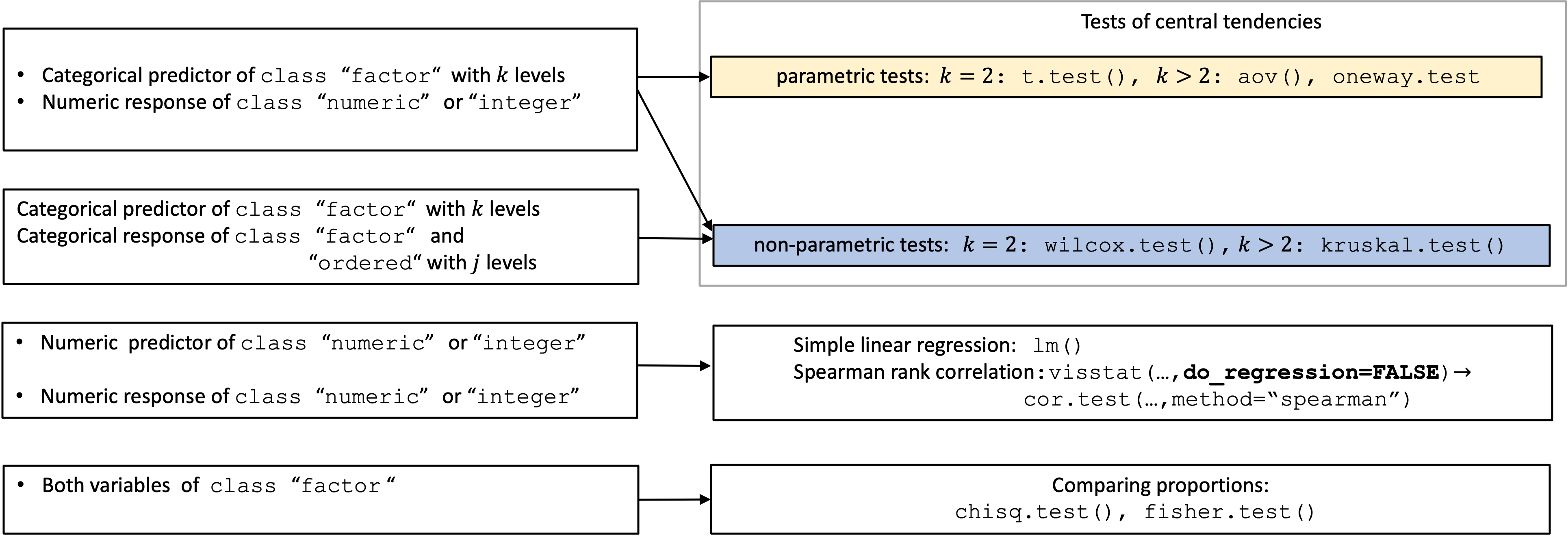
Figure 5.1: Overview of all implemented tests selected based on input class.
5.2 General linear model framework
Student’s t-test, Fisher’s one-way ANOVA (both belonging to Route 1) and simple linear regression (in Route 3) are special cases of the general linear model framework (Thompson 2015) and share the same model assumptions: the expected value of the response is a linear function of the predictors, the error terms are mutually independent and normally distributed with expectation 0, and the error variance is constant.
Residuals are the empirical realisations of these error terms.
To check whether the residuals fulfil the linear model assumptions, visstat() both visualises (see Section 5.2.3) and formally assesses the normality and homoscedasticity of the residuals by assumption tests (see Section 5.2.2) for tests belonging to Route 1 and Route 3.
Note that only in Route 1, \(p\) values derived from these assumption tests influence the test selection (Section 5.3.1).
Below, Section 5.2.1 formally defines the general linear model framework in the context of the implemented tests.
5.2.1 General linear model definition
In the general linear model, a response \(Y\) is modelled as a linear combination of \(k-1\) predictors \(x_j\). The general linear model for observation \(i,\;i = 1, \ldots, N\) is then
\[\begin{equation} \tag{5.1} Y_i = \beta_0 + \beta_1 x_{i1} + \cdots + \beta_{k-1} x_{i,k-1} + \varepsilon_i, \end{equation}\]
where \(Y_i\) is the response for observation \(i\), \(x_{ij}\) is the value of predictor \(j\) for observation \(i\), \(\beta_0, \beta_1, \ldots, \beta_{k-1}\) are the \(k\) parameters, and \(\varepsilon_i\) is the model error term assumed to be independent and normally distributed with expectation 0 and constant variance \(\sigma^2\), in short \[\varepsilon_i \sim \mathscr{N}(0, \sigma^2), \quad\mathrm{mutually\; independent}. \]
The variance \(\sigma^2\) represents the variation of the data about the regression, \(\operatorname{Var}(Y_i)=\operatorname{Var}(\varepsilon_i)=\sigma^2\), as both the (unknown) model parameters and predictors are not random.
From Eq.
(5.1), the special cases used by visstat() follow from the predictor structure:
Student’s t-test uses one binary indicator variable \(x_{i1}\), with \(x_{i1}=0\) for group 1 and \(x_{i1}=1\) for group 2. Let \(\mu_1\) and \(\mu_2\) denote the expected mean values in the two population groups. For the expected values of the response, we then obtain \[E(Y_i \mid x_{i1}=0)=\mu_1=\beta_0\] for group 1 and \[E(Y_i \mid x_{i1}=1)=\mu_2=\beta_0+\beta_1\] for group 2. Testing \(H_0: \beta_1 = 0\) is therefore equivalent to testing \(H_0: \mu_1 = \mu_2\).
Fisher’s one-way ANOVA generalises this coding to \(k-1\) binary indicator variables for \(k\) groups; testing \(H_0: \beta_1 = \cdots = \beta_{k-1} = 0\) is equivalent to testing equality of \(k\) group population means.
Simple linear regression uses one continuous predictor; \(H_0: \beta_1 = 0\) examines whether a linear relationship exists.
5.2.1.1 Residuals
The observable counterparts of the model error terms \(\varepsilon_i\) in Eq. (5.1) are the residuals. After fitting the data with the corresponding linear model, the raw residual is
\[\begin{equation} e_i = y_i - \hat{y}_i, \tag{5.2} \end{equation}\]
where \(y_i\) is the observed value and \(\hat{y}_i\) the fitted value for observation \(i\);
\[\begin{equation} \hat{y}_i = b_0 + b_1 x_{i1} + \cdots + b_{k-1} x_{i,k-1} \end{equation}\] with the estimated values \(b_0, b_1, \ldots, b_{k-1}\) for the unknown model parameters \(\beta_0, \beta_1, \ldots, \beta_{k-1}\).
The magnitude of the raw residuals depends on the unknown model error variance \(\sigma^2\), which gets estimated by the square of the standard error \(SE_\text{res}^2 = \frac{\sum_{i=1}^{N} e_i^2}{N-k}\). Dividing the raw residuals by the standard error we obtain the z-residual
\[\begin{equation} z_i = \frac{e_i}{SE_\text{res}}, \tag{5.3} \end{equation}\]
which facilitates model comparison across different scales of the raw data.
5.2.1.1.1 Standardised residuals
The residual standard error \(SE_\text{res}\) is a global estimate for the unknown \(\sigma\), but not an estimate for the variance of the individual residual \(\operatorname{Var}(e_i)\). It can be shown (Cook and Weisberg 1982, 14) that
\[\begin{equation} \operatorname{Var}(e_i)=\sigma^2(1-h_{ii}), \tag{5.4} \end{equation}\]
where the leverage \(h_{ii}\) of observation \(i\) is the \(i\)-th diagonal element of the \(N \times N\) hat matrix \(\mathbf{H}\), which maps the observed values onto the fitted values (Cook and Weisberg 1982, 11). \(h_{ii}\) measures how strongly observation \(i\)’s own observed value \(y_i\) influences its fitted value \(\hat{y}_i\).
Equation (5.4) shows that the raw residuals carry an unequal, leverage-dependent variance even when the errors are homoscedastic: observations with higher leverage have a smaller individual residual variance. Internally studentised (“standardised”) residuals correct for this artefact. Dividing \(e_i\) by its estimated individual standard error gives
\[\begin{equation} r_i =\frac{e_i}{\sqrt{ SE_\text{res}^2\,(1-h_{ii})}}= \frac{z_i}{\sqrt{1-h_{ii}}}. \tag{5.5} \end{equation}\]
5.2.2 General linear model assumption tests
Normality tests The normality of the standardised residuals is formally assessed using both the Shapiro–Wilk (SW) test (Shapiro and Wilk 1965; Royston 1982; Royston 1995) (shapiro.test(); Eq.
(A.1)) and the Anderson–Darling test (Anderson and Darling 1952) (ad.test(); Eq.
(A.2)).
These tests offer complementary strengths: Anderson–Darling is highly sensitive to tail deviations in larger samples (Yap and Sim 2011), while Shapiro–Wilk generally exhibits greater power across non-normal distributions in small samples.
Among the normality tests compared by Razali and Wah (2011) the Shapiro–Wilk test was the most powerful against both symmetric and asymmetric alternatives, although all of them had low power below about 30 observations.
Therefore, the Shapiro–Wilk test is used as the normality gate in the automated test selection (Section 5.3.1).
Homoscedasticity tests For grouped central-tendency analyses, variance homogeneity of standardised residuals (Cook and Weisberg 1982) is assessed using the package-implemented mean-centred Levene test (Levene 1960) (levene.test(); Eq.
(A.3)) and Bartlett’s test (Bartlett 1937) (bartlett.test(); Eq.
(A.4)).
Bartlett’s test is powerful under normality but sensitive to non-normality; Levene-type tests trade some power for greater robustness when distributions depart from normality (Brown and Forsythe 1974).
Therefore, Levene’s test is used as the variance gate in the automated workflow.
For simple linear regression, group-based variance tests are not applicable.
There, visStatistics uses its package implementation bp.test() of the Breusch–Pagan test (Breusch and Pagan 1979) (Eq. (A.5)) on raw residuals (Schützenmeister et al. 2012).
5.2.3 Visualisation of the assumptions of the general linear model
Since algorithmic logic based on \(p\) values of assumption tests cannot replace expert visual judgment, visstat() visualises the assumptions of the underlying linear model for the selection of tests of central tendency (Route 1) and for simple linear regression (correlation = FALSE) (Route 3).
For numeric responses with categorical predictors (Route 1), the diagnostic panel displays the residual histogram, the normal Q–Q plot with simultaneous tolerance band (STB) and point-wise tolerance band (TB) (Schützenmeister et al. 2012), and the absolute standardised residuals \(|r_i|\) (Eq. (5.5)) by group. The last panel shows whether residual spread is comparable across factor levels, the pattern assessed formally by the Levene (Eq. (A.3)) and Bartlett (Eq. (A.4)) variance checks.
For Route 3 (simple linear regression), the first two diagnostic panels follow the layout of Route 1, whereas the third panels displays z-scaled residuals versus fitted values.
The first row of the outer tile of the diagnostic plot reports \(p\) values of residual-normality checks with the Shapiro–Wilk test and Anderson–Darling tests. The second row reports \(p\) values of variance checks: Levene and Bartlett for grouped central-tendency analyses, or Breusch–Pagan for simple regression.
Note that among the displayed assumption tests, only the Shapiro–Wilk and Levene test results enter automated routing, and only in the central-tendency branch (see Section 5.3.1). Anderson–Darling, Bartlett, and Breusch–Pagan are diagnostic output only.
The Route 1 and Route 3 diagnostic-panel designs are illustrated in the examples in Figures 6.4, left, and 6.9, left.
5.3 Route-specific decision rules
The general branching is driven by input class and factor levels (Section 5.1). Within the selected route, additional rules determine the selected test and output; these route-specific rules are detailed below.
5.3.1 Route 1: Numeric response, categorical predictor
A numeric response with a categorical predictor with \(k\) “levels” (in the following “groups”) asks whether the response differs between groups, Figure 5.2 expands the default routing logic in this pairing of response and predictor.
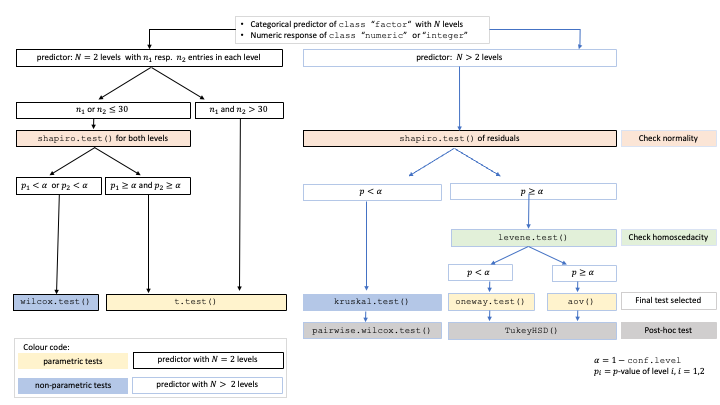
Figure 5.2: Decision tree for the default Route 1 test selection (group_test = NULL). Shapiro–Wilk on model residuals determines whether the route remains mean-based or switches to rank-based tests; the Levene test then selects equal-variance or Welch-type procedures.
A linear model of Eq.
(5.1) is fitted between the numeric response and the categorical predictor, and the model residuals of Eq.
(5.2) are extracted.
In the default setting (group_test = "gated"), Route 1 uses the displayed residual diagnostics of the Shapiro–Wilk (SW) and Levene test (L) (Levene 1960) as automatic gates:
If the SW-test rejects residual normality (\(p_\text{SW} \le \alpha\)), robust non-parametric tests are selected: wilcox.test() (Eq. (C.1)) for two groups, or kruskal.test() (Eq. (C.3)) followed by Holm-adjusted dunn.test() (Dunn 1964) for more than two groups.
If residual normality is not rejected, the mean-centred Levene test (L) (Levene 1960) (Eq. (A.3)) gates the variance assessment:
For homoscedastic data (\(p_\text{L} > \alpha\)), t.test(var.equal = TRUE) (Eq. (B.1)) is applied for two groups, or Fisher’s aov() (Eq. (B.2)) for more than two groups.
For heteroscedastic data (\(p_\text{L} \le \alpha\)), Welch’s t.test() (Eq. (B.4)) is applied for two groups, or Welch’s oneway.test() (Eq. (B.6)) for more than two groups.
Independent of assumption testing, the user can enforce group mean comparisons by the option group_test = "welch" which defaults to Welch variants of the t-test (t.test()) and ANOVA (oneway.test()), otherwise the option group_test = "rank" switches to the non-parametric alternatives wilcox.test() and kruskal.test().
The two overrides differ in what they display: group_test = "welch" shows a per-group normality panel, since Welch’s tests assume normality within each group, and warns when the smallest group falls below 50 observations for up to four groups, or below 100 for more, whereas group_test = "rank" enters the rank branch directly and does not generate an assumption plot with its corresponding test statistics.
The rationale for the automated gating, and the mean- and rank-based alternatives and the limitations of each approach are discussed in Section 7 and Section 8.
Post-hoc tests
ANOVA, Welch ANOVA, and Kruskal–Wallis are omnibus tests: a significant test result tells us that some group differs, but not which.
To identify the differing pairs, visstat() tests all pairwise comparisons among the factor levels, defining a family of tests.
Because the three omnibus tests rest on different assumptions, each branch uses a matching post-hoc procedure:
TukeyHSD()(Eq. (B.3)) afteraov()controls the family-wise error rate through the studentised range distribution under a common-variance assumption.games.howell()afteroneway.test()uses the Welch statistic (Eq. (B.4)) with separate variance estimates and Welch-adjusted degrees of freedom for each pair, making it the appropriate post-hoc procedure for the heteroscedastic Welch branch.dunn.test()afterkruskal.test()(Dunn 1964) compares mean ranks from the same joint ranking the Kruskal–Wallis statistic uses, so each pairwise decision concerns the quantity the omnibus test rejected, with Holm’s step-down adjustment.
The graphical results panel of these omnibus tests consists of box plots (see examples in Section 6.1) enriched with significance letters to visualise the post-hoc analysis: Pairs whose adjusted post-hoc \(p\) value falls below \(\alpha\) are marked with different green significance letters below the box plots; pairs sharing a letter are not significantly different.
5.3.2 Route 2: Ordered response
An ordered categorical response with a categorical predictor or ordered categorical predictor is treated as a rank-based group comparison. The ordered response is converted to integer level codes and analysed with the Wilcoxon rank-sum test for two groups or the Kruskal–Wallis test for more than two groups.
5.3.3 Route 3: Numeric response, numeric predictor
Two numeric variables ask whether a numeric response changes with a numeric predictor.
By default, visstat() fits a simple linear regression (Eq. (6.1)),
and the diagnostic panel described in Section 5.2.3 is displayed.
If general linear model assumptions are violated, the corresponding \(p\) values trigger warnings and recommendations, but no automatic model replacement.
The regression output is shown in Section 6.3.1.
5.3.4 Route 4: Two unordered factors
Two unordered factors ask whether two categorical variables are independent.
visstat() uses Pearson’s \(\chi^2\) test or Fisher’s exact test, depending on expected cell counts following Cochran’s rule (Cochran 1954): the \(\chi^2\) approximation is used if no expected cell count is less than 1 and no more than 20% of cells have expected counts below 5.
Yates’ continuity correction is applied by default to \(2 \times 2\) tables when the \(\chi^2\) approximation is used.
5.3.5 Optional rank-correlation mode
The four routes above describe the default, automatic test selection behaviour.
For ordered–ordered and numeric–numeric input vectors, the user can instead request a rank-correlation analysis by setting correlation = TRUE.
Both optional analyses test monotone association and are computed by cor.test(): Kendall’s \(\tau_b\) (Eq. (D.1)) with method = "kendall", exact = FALSE for two ordered variables, and Spearman’s \(\rho\) (Eq. (D.2)) with method = "spearman" for two numeric variables.
Kendall’s \(\tau_b\) corrects for ties present with few ordered levels (Agresti 2010; Xu et al. 2013).
Note that for numeric–numeric input, Pearson correlation is not implemented as a separate optional mode, as in simple linear regression with an intercept, the two-sided test of zero slope and the two-sided Pearson correlation test return the same \(p\) value.
6 Usage and examples
The examples follow the routes outlined in Section 5.1 and are chosen to trigger every branch.
Within the group-comparison routes, examples are ordered such that the two-group case is followed by its generalisation to more than two groups: Student’s t-test by Fisher’s one-way ANOVA, Welch’s t-test by Welch’s one-way ANOVA, and Wilcoxon rank-sum by Kruskal–Wallis.
Where needed, the example descriptions add interpretive details on the graphical output, such as significance letters, regression bands, or mosaic plots.
6.1 Route 1: Numeric response, categorical predictor
6.1.1 Student’s t-test and Fisher’s one-way ANOVA
6.1.1.1 Student’s t-test
The ToothGrowth dataset records odontoblast length in 60 guinea pigs given vitamin C by orange juice (OJ) or ascorbic acid (VC).
With delivery method as predictor and length as response, the assumption-diagnostic panel shows no residual-normality or variance-homogeneity violation.
visstat() therefore selects Student’s t-test, and the result panel shows the two-group box plot with the selected test result.
student_ttest <- visstat(ToothGrowth$supp, ToothGrowth$len)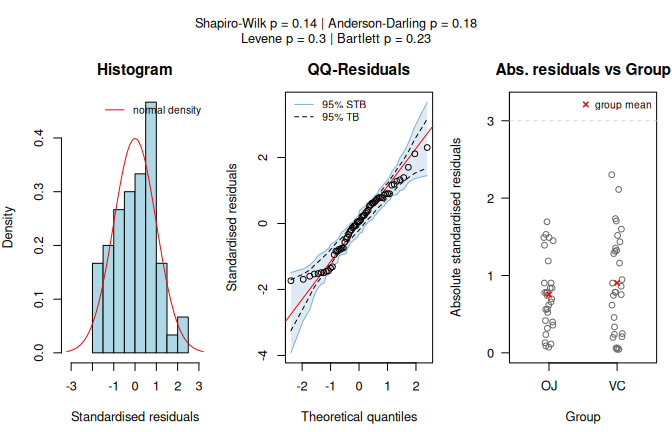
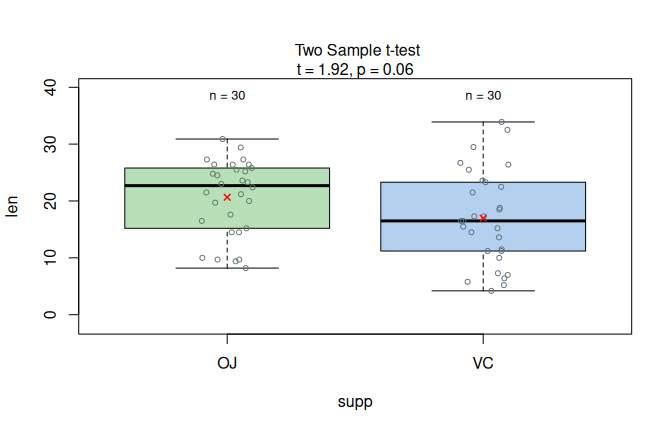
Figure 6.1: Student’s t-test applied to the ToothGrowth dataset (len vs. supp). Assumption diagnostics (Shapiro–Wilk does not reject residual normality; Levene does not reject residual variance homogeneity) select the equal-variance mean-based path, followed by box plots with the Student t-test result.
6.1.1.2 Fisher’s one-way ANOVA with Tukey HSD post-hoc comparisons with methods demonstration
The PlantGrowth dataset records yields (as measured by dried weight of plants) for a control group and two treatment groups.
This dataset serves a double purpose: it demonstrates both a branching result and the visstat() S3 methods print(), summary(), and plot() (Section 4.6).
anova_plantgrowth <- visstat(PlantGrowth$group, PlantGrowth$weight)In this branch visstat() generates two plots: the assumption-diagnostic panel (which = 1) and the result panel with box plots and post-hoc significance letters (which = 2).
Figure 6.2(a) replays the assumption-diagnostic panel (which = 1).
With control and treatment groups as predictor and plant weight as response, Shapiro–Wilk does not reject normality of the model residuals and levene.test() does not reject homoscedasticity, so visstat() takes the equal-variance mean-based path.
Figure 6.2(b) replays the result panel (which = 2).
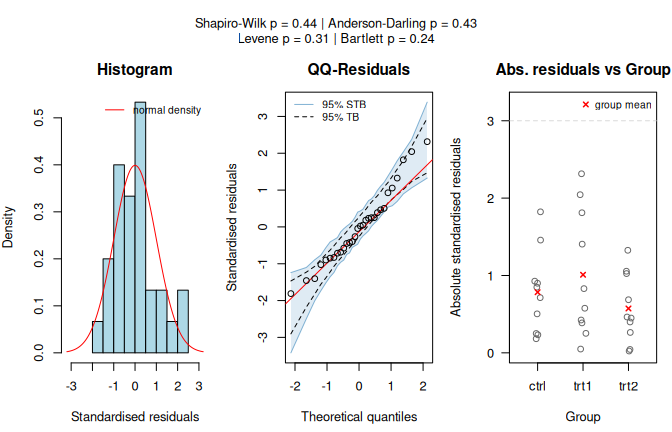
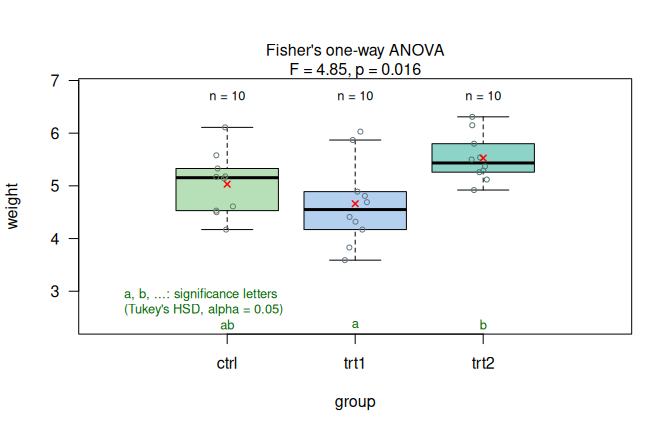
Figure 6.2: PlantGrowthdata set: Fisher’s one-way ANOVA (weight vs. group). (a) Assumption-diagnostic panel. (b) Result panel with Tukey HSD significance letters (\(\alpha = 0.05\)).
The omnibus F-test is significant at \(\alpha = 0.05\), and the Tukey HSD post-hoc comparison finds no significant difference between the control group and either treatment, but the difference between trt1 and trt2 is significant.
To save the graphics, call visstat() with graphicsoutput; the file paths are stored in the "plot_paths" attribute.
Here, plotName is set explicitly so that the output names are stable.
anova_plantgrowth_stored <- visstat(
 PlantGrowth$group,
 PlantGrowth$weight,
 graphicsoutput = "png",
 plotName = "anova_plantgrowth",
 plotDirectory = tempdir()
)
paths <- attr(anova_plantgrowth_stored, "plot_paths")
print(basename(paths))
## [1] "glm_assumptions_anova_plantgrowth.png"
## [2] "anova_plantgrowth.png"print() lists the returned components:
print(anova_plantgrowth)## Object of class 'visstat'
##
## Available components:
## [1] "summary statistics of ANOVA" "post-hoc analysis "
## [3] "conf.level" "effect_size"summary() prints the full object, including assumption tests, post-hoc comparisons, and effect size.
summary(anova_plantgrowth)## Summary of visstat object
##
## --- Named components ---
## [1] "summary statistics of ANOVA" "post-hoc analysis "
## [3] "conf.level" "effect_size"
##
## --- Contents ---
##
## $summary statistics of ANOVA:
## Df Sum Sq Mean Sq F value Pr(>F)
## fact 2 3.766 1.8832 4.846 0.0159 *
## Residuals 27 10.492 0.3886
## ---
## Signif. codes: 0 '***' 0.001 '**' 0.01 '*' 0.05 '.' 0.1 ' ' 1
##
## $post-hoc analysis :
## Tukey multiple comparisons of means
## 95% family-wise confidence level
##
## Fit: aov(formula = samples ~ fact)
##
## $fact
## diff lwr upr p adj
## trt1-ctrl -0.371 -1.0622161 0.3202161 0.3908711
## trt2-ctrl 0.494 -0.1972161 1.1852161 0.1979960
## trt2-trt1 0.865 0.1737839 1.5562161 0.0120064
##
##
## $conf.level:
## [1] 0.95
##
## $effect_size:
## $name
## [1] "omega-squared"
##
## $estimate
## [1] 0.2040788
##
## $effect_size_method
## [1] "Omega-squared for one-way ANOVA"6.1.2 Welch’s t-test and Welch’s one-way ANOVA
6.1.2.1 Welch’s t-test
The Motor Trend Car Road Tests dataset (mtcars) contains 32 observations, where mpg denotes miles per (US) gallon and am represents the transmission type (0 = automatic, 1 = manual).
With binary factor am and continuous response mpg, the assumption-diagnostic panel shows that Shapiro–Wilk does not reject normality of the model residuals, while the Levene test detects heteroscedasticity.
The routing therefore leads to Welch’s t-test rather than Student’s t-test, and the result panel shows the corresponding two-group comparison.
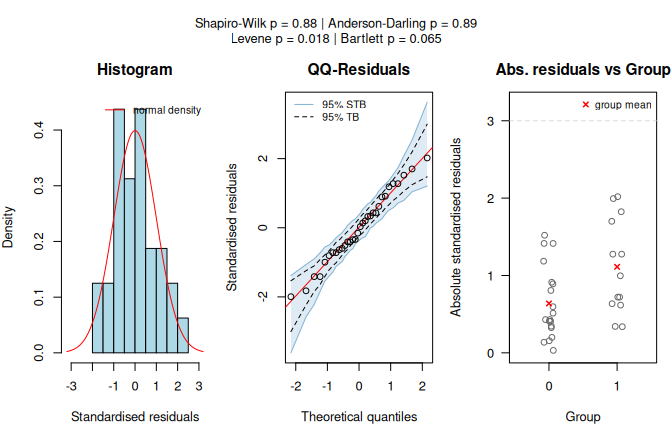
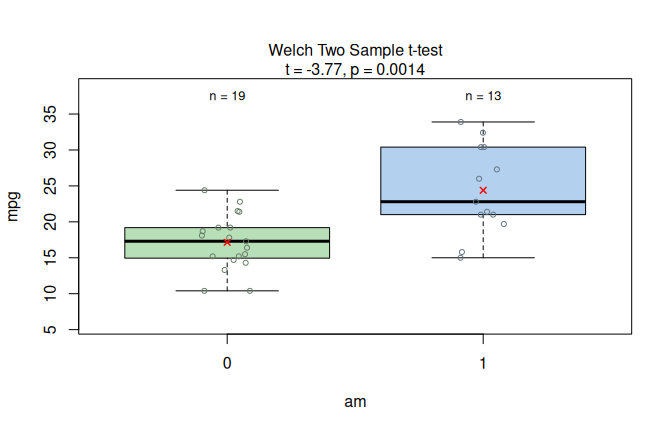
Figure 6.3: Welch’s t-test applied to the mtcars dataset (mpg vs. am). Assumption diagnostics (Shapiro–Wilk does not reject residual normality; Levene rejects residual variance homogeneity) select the unequal-variance mean-based path, followed by box plots with the Welch t-test result.
6.1.2.2 Welch’s heteroscedastic one-way ANOVA with Games–Howell post-hoc comparisons
In the iris dataset, using Species as predictor and Sepal.Length as response, the assumption-diagnostic panel shows that Shapiro–Wilk does not reject normality of the model residuals, whereas the Levene test rejects homoscedasticity at the given \(\alpha = 5\%\).
visstat() therefore selects Welch’s heteroscedastic one-way ANOVA (oneway.test()) and applies Games–Howell post-hoc comparisons.
The result panel shows the box plots and Games–Howell significance letters.
welch_anova_iris <- visstat(iris$Species, iris$Sepal.Length)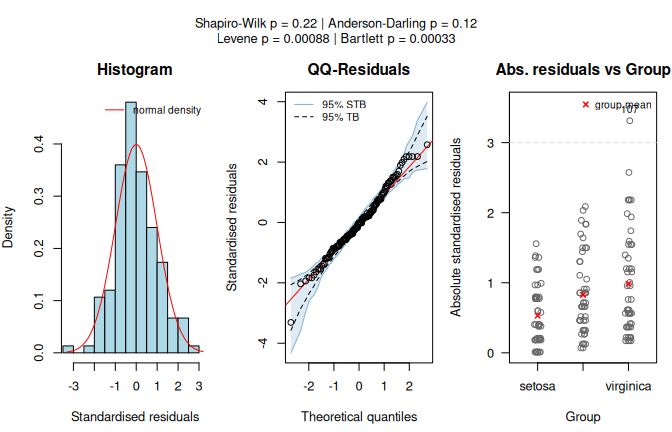
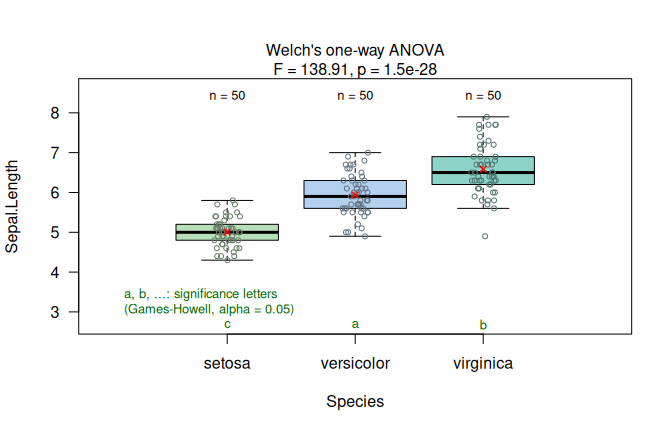
Figure 6.4: Welch’s heteroscedastic one-way ANOVA applied to the iris dataset (Sepal.Length vs. Species). Assumption diagnostics (Shapiro–Wilk does not reject residual normality; Levene rejects residual variance homogeneity) select the unequal-variance mean-based path, followed by box plots with Games–Howell significance letters (\(\alpha = 0.05\)).
The user can eforce the Welch type analysis, by setting group_test="Welch, this changes the assumption panel from the GLM assumption panel to normality tests by density plots and QQ plots for each group.
welch_anova_iris_assumption <- visstat(iris$Species, iris$Sepal.Length, group_test = "welch")
plot(welch_anova_iris_assumption, which = 1)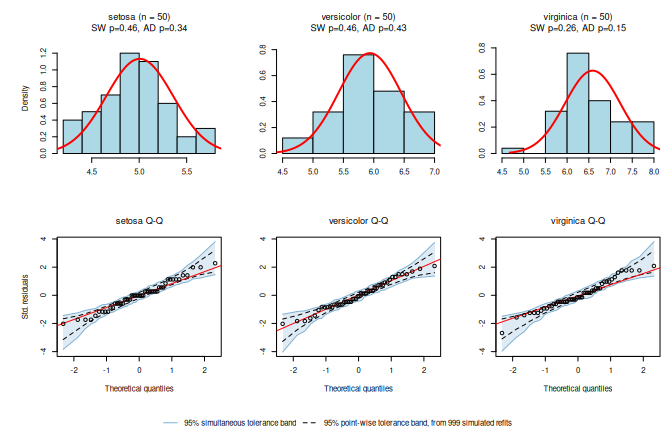
Figure 6.5: Enforcing Welch tests changes the assumption panel to normality density and Q-Q plots for each group, The test statistics are Shapiro-Wilk (SW) and Anderson-Darling (AD) normality tests.
6.1.3 Wilcoxon rank-sum test and Kruskal–Wallis test
6.1.3.1 Wilcoxon rank-sum test
The warpbreaks dataset records thread breaks during weaving.
Using wool type (A or B) as predictor and the number of breaks as response, the assumption-diagnostic panel shows that the Shapiro–Wilk test rejects normality of the model residuals.
visstat() therefore selects the Wilcoxon rank-sum test, and the result panel shows the rank-based two-group comparison.
wilcoxon_stats <- visstat(warpbreaks$wool, warpbreaks$breaks)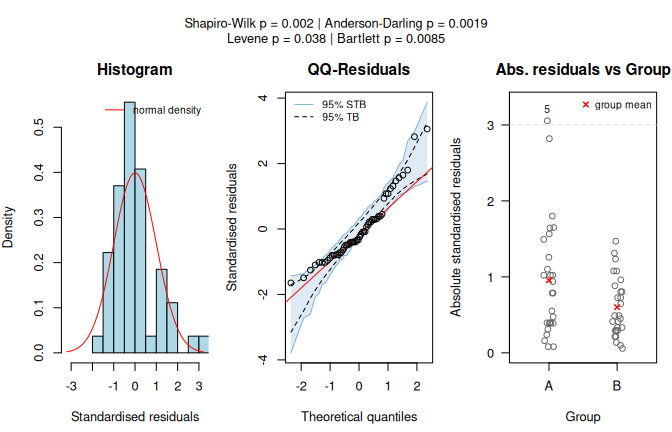
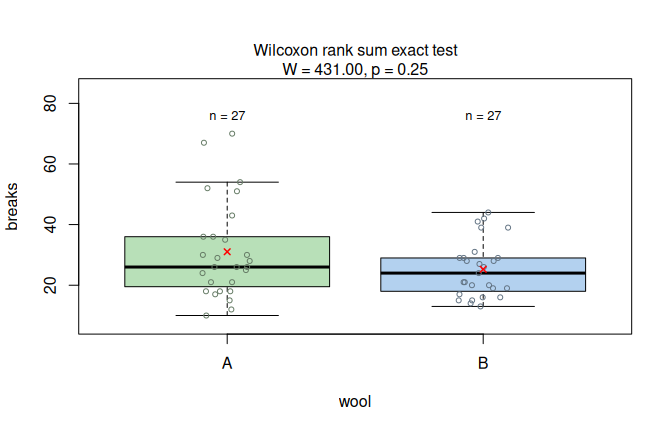
Figure 6.6: Wilcoxon rank-sum test applied to the warpbreaks dataset (breaks vs. wool). Assumption diagnostics (Shapiro–Wilk rejects residual normality; non-parametric path selected) and box plots with the Wilcoxon test result.
6.1.3.2 Kruskal–Wallis rank sum test with Dunn post-hoc comparisons
In the iris data set, Petal.Width by Species follows a different route than Sepal.Length by Species above (Figure 6.4), because the assumption diagnostics differ.
The assumption-diagnostic panel shows clear departures from normality, and both normality tests return very small \(p\) values.
Since Shapiro–Wilk falls below \(\alpha\), visstat() switches to kruskal.test() followed by Holm-adjusted dunn.test().
The result panel shows the box plots and Holm-adjusted significance letters; all three species differ significantly in petal width, as indicated by distinct letters.
kruskal_iris <- visstat(iris$Species, iris$Petal.Width)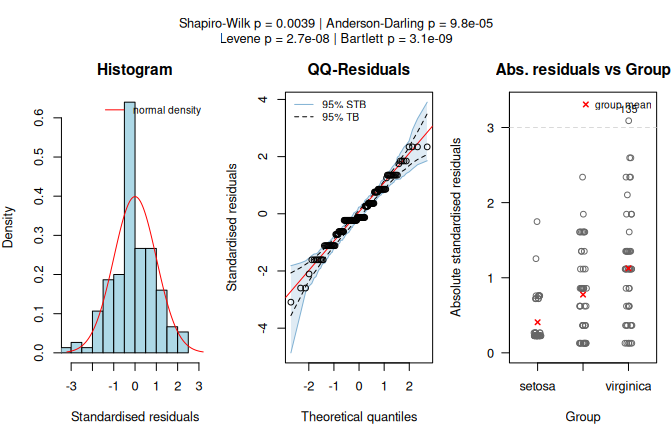
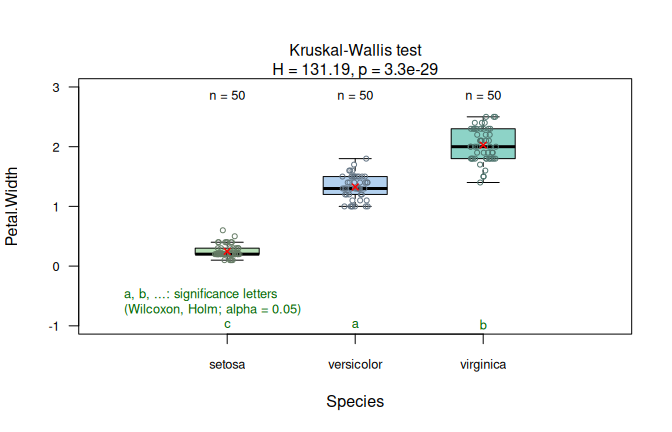
Figure 6.7: Kruskal-Wallis test applied to the iris dataset (Petal.Width vs. Species). Assumption diagnostics (Shapiro–Wilk rejects residual normality; non-parametric path selected) and box plots with Holm-adjusted Dunn significance letters (\(\alpha = 0.05\)).
6.2 Route 2: Ordered response
6.2.1 Ordered response, categorical factor
6.2.1.1 Wilcoxon rank-sum test with ordered response
The Titanic dataset contains passenger counts by, among other variables, passenger class and gender.
After expanding the table to individual rows, passenger class is treated as ordered and gender as a two-level predictor.
visstat() selects the Wilcoxon rank-sum test.
The result panel therefore displays the rank-test comparison on the numeric level scores (see Figure 6.8, left).
titanic_df <- counts_to_cases(as.data.frame(Titanic))
titanic_df$Class <- ordered(titanic_df$Class,
 levels = c("1st", "2nd", "3rd", "Crew")
)
wilcox_ordered <- visstat(titanic_df$Sex, titanic_df$Class)
## Warning: Ordered response detected. Converting to integer level codes for
## non-parametric analysis.6.2.1.2 Kruskal–Wallis test with ordered response
With three predictor groups, visstat() routes to kruskal.test() followed by Holm-adjusted dunn.test().
The result panel shows the Kruskal–Wallis comparison and Holm-adjusted significance letters on the numeric level scores (see Figure 6.8, right).
A synthetic survey records perceived car comfort on a five-point scale across three markets.
set.seed(123)
market <- factor(rep(c("Europe", "North America", "Asia"), each = 50))
comfort_numeric <- c(
 sample(1:5, 50, replace = TRUE, prob = c(0.30, 0.30, 0.20, 0.15, 0.05)),
 sample(1:5, 50, replace = TRUE, prob = c(0.10, 0.20, 0.40, 0.20, 0.10)),
 sample(1:5, 50, replace = TRUE, prob = c(0.05, 0.10, 0.20, 0.35, 0.30))
)
survey_data_3 <- data.frame(
 market = market,
 comfort = ordered(comfort_numeric)
)
kruskal_ordered <- visstat(comfort ~ market, data = survey_data_3)
## Warning: Ordered response detected. Converting to integer level codes for
## non-parametric analysis.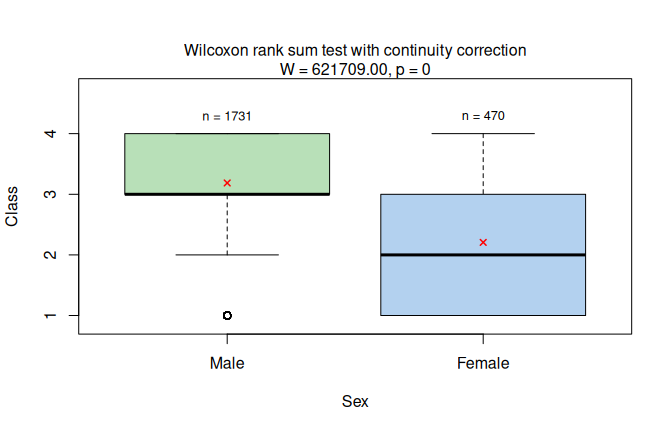
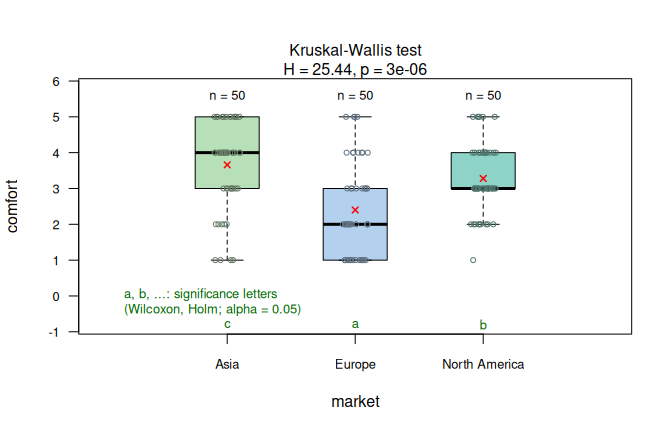
Figure 6.8: Wilcoxon rank-sum test for ordered passenger class by sex in the expanded Titanic data (left) and its multi-group generalisation, the Kruskal-Wallis test for ordered car comfort ratings by market (right). Holm-adjusted Dunn post-hoc comparisons are shown as significance letters for the Kruskal-Wallis example (\(\alpha = 0.05\)).
6.3 Route 3: Numeric response, numeric predictor
6.3.1 Linear regression
The swiss dataset records standardised fertility and socio-economic indicators for 47 French-speaking Swiss provinces in 1888.
We examine how the share of draftees achieving the highest army examination score (Examination) predicts the fertility measure (Fertility), with conf.level = 0.99.
The diagnostic panel in Figure 6.9, left, shows that both normality tests pass and the Breusch–Pagan test confirms homoscedasticity, supporting the linear model.
The assumption-diagnostic panel is displayed, but its checks do not trigger automatic model replacement.
The regression plot shows the fitted line
\[\begin{equation}
\hat{y}_i = b_0 + b_1 x_i
\tag{6.1}
\end{equation}\] with the point estimates \(b_0\) and \(b_1\) for the unknown parameters \(\beta_0\) and \(\beta_1\) of the linear regression model in Eq.
(5.1) with one predictor.
It is displayed with pointwise confidence and prediction bands at the specified conf.level.
The returned object contains the regression statistics, residual-normality tests, pointwise confidence and prediction bands, and the coefficient of determination \(R^2\) (Eq. (F.1)) as effect size.
linreg_swiss <- visstat(swiss$Examination, swiss$Fertility, conf.level = 0.99)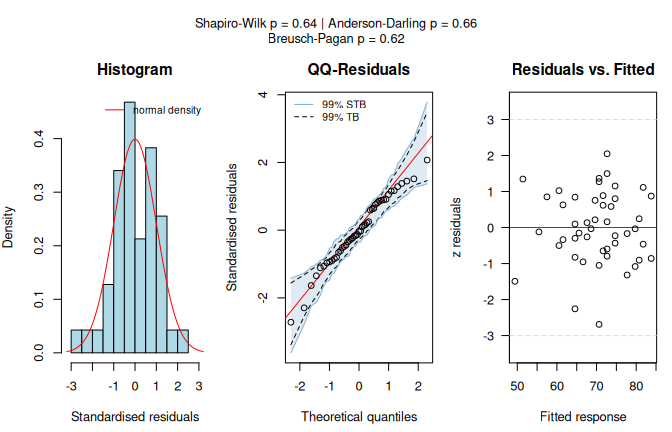
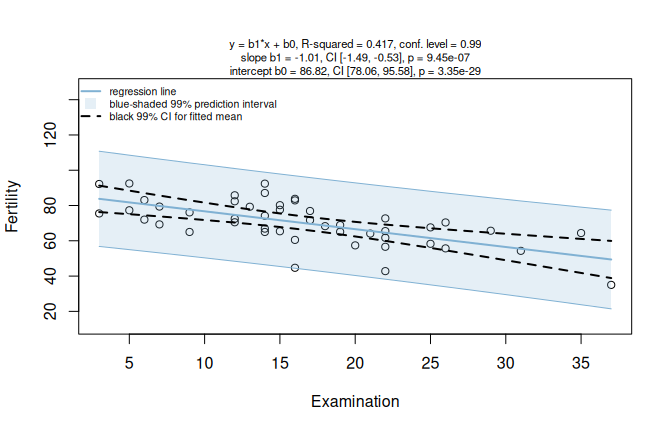
Figure 6.9: Simple linear regression of Fertility on Examination for the swiss dataset (conf.level = 0.99). Left: residual-diagnostic panel with histogram, normal Q-Q plot with simultaneous tolerance band (STB) and point-wise tolerance band (TB), and residuals versus fitted values. Right: scatter plot with fitted regression line, 99% prediction interval for an individual response, and 99% confidence interval for the mean response.
The airquality ozone example shows the limits of the automated approach when the default linear model is not an adequate final model.
visstat() identifies assumption violations and points to analyses outside the automated decision tree.
A default visstat() call for ozone concentration (Ozone) as a function of wind speed (Wind) fits the simple linear model.
ozone_lm <- visstat(airquality$Wind, airquality$Ozone)## Warning: Statistical assumptions violated:
## Normality of residuals violated (Shapiro-Wilk p = 0.00522 )
## Homoscedasticity violated (Breusch-Pagan p = 0.00595 )
## Analysis proceeded but interpret results cautiously.## RECOMMENDATION: Consider exploring alternatives outside visstat() such as data transformations,
## generalised linear models, or robust regression. For a non-causal alternative
## consider rerunning with correlation = TRUE.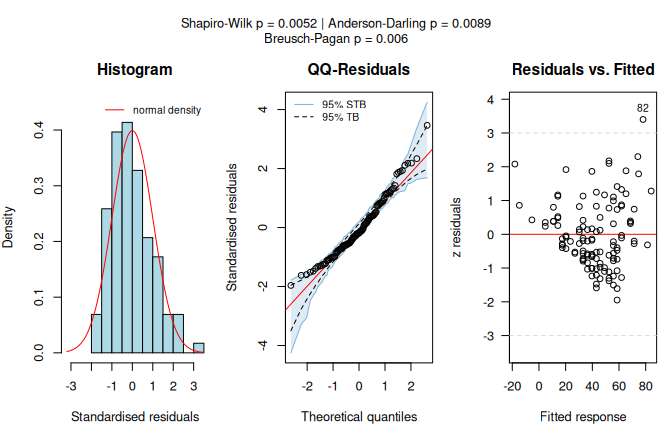
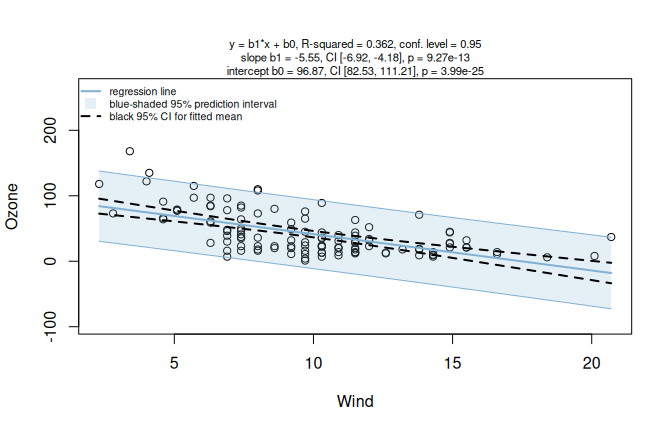
Figure 6.10: Default simple linear regression for Ozone by Wind in the airquality dataset. Assumption diagnostics flag non-normal model residuals and heteroscedasticity before alternative routes are considered.
The diagnostic output flags non-normal model residuals and heteroscedasticity.
In the “Residual vs. fitted” diagnostic panel we observe an increase in spread from left to right, forming a funnel shape that indicates variance increases with fitted values.
The optional Spearman analysis for the same dataset is shown in Section 6.5.
The following example shows a Gamma generalised linear model outside visstat().
6.3.2 Model exploration outside visstat()
As a model outside visstat(), we fit a Gamma generalised linear model with log link.
The Gamma family is suited here because Ozone is strictly positive and continuous, and its variance grows with the fitted values — the structure detected by the Breusch–Pagan test.
The log link guarantees positive fitted values.
# Gamma model with log mapping
model_gamma <- glm(Ozone ~ Wind, data = airquality, family = Gamma(link = "log"))
model_gamma$aic
## [1] 1040.021
# Comparison with AIC of simple linear regression
model_lm <- glm(Ozone ~ Wind, data = airquality)
model_lm$aic
## [1] 1093.187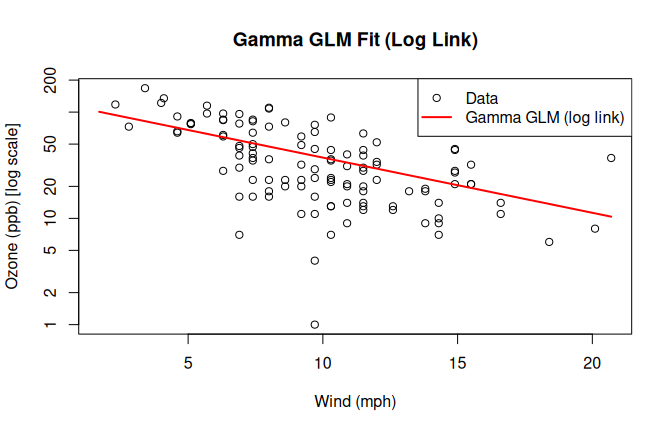
Figure 6.11: Gamma GLM with log link fitted to the airquality dataset Ozone vs. Wind. The red curve shows the fitted Gamma GLM; the y-axis is on a log scale.
For a Gamma generalised linear model with log link, standardised deviance residuals are asymptotically standard normal; we use Shapiro–Wilk and Anderson–Darling as approximate checks of the fitted model:
# Extract standardised deviance residuals
std_dev_res <- rstandard(model_gamma, type = "deviance")
# Validate using the Shapiro-Wilk normality test
shapiro.test(std_dev_res)
##
## Shapiro-Wilk normality test
##
## data: std_dev_res
## W = 0.99245, p-value = 0.7817
# Validate using the Anderson-Darling normality test
nortest::ad.test(std_dev_res)
##
## Anderson-Darling normality test
##
## data: std_dev_res
## A = 0.198, p-value = 0.8853The Gamma model improves the model fit according to the Akaike Information Criterion (Akaike 1974), which decreases from 1093.2 to 1040.0.
The increase in the Shapiro–Wilk \(p\) value from \(p_{SW} = 0.0052\) in the simple linear regression to \(p_{SW} = 0.78\) is more consistent with residual normality.
This comparison illustrates how assumption warnings from visstat() can motivate model exploration outside the automated decision tree.
6.4 Route 4: Two unordered factors
The following examples are based on the HairEyeColor contingency table, which is converted to the column-based data frame expected by visstat() using the helper function counts_to_cases().
6.4.1 Pearson’s \(\chi^2\) test
For a contingency table with \(R\) response levels and \(C\) predictor levels, Pearson’s \(\chi^2\) test (Eq. (E.2)) shows a grouped column plot of row percentages with the \(p\) value in the title, followed by a mosaic plot from vcd (Meyer et al. 2006, 2024).
Each tile corresponds to one cell of the contingency table.
The tile colour represents the Pearson residual value (Eq. (E.1)) on a blue–red colour scale; the tile size reflects the cell count.
With Eye and Hair from HairEyeColor, all expected cell counts exceed the Cochran thresholds (Cochran 1954), so the \(4 \times 4\) \(\chi^2\) approximation is used.
hair_eye_df <- counts_to_cases(as.data.frame(HairEyeColor))
visstat(hair_eye_df$Eye, hair_eye_df$Hair)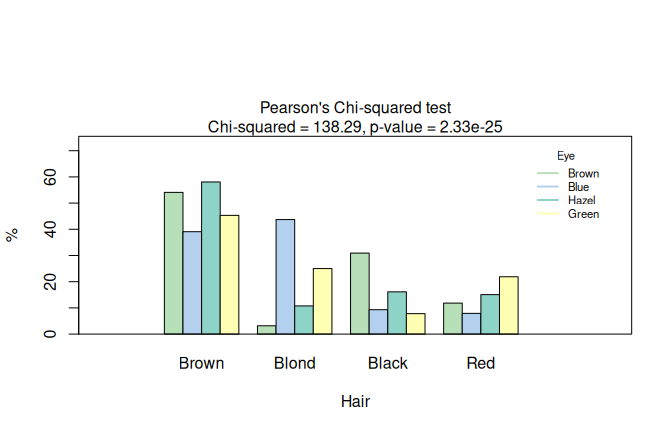
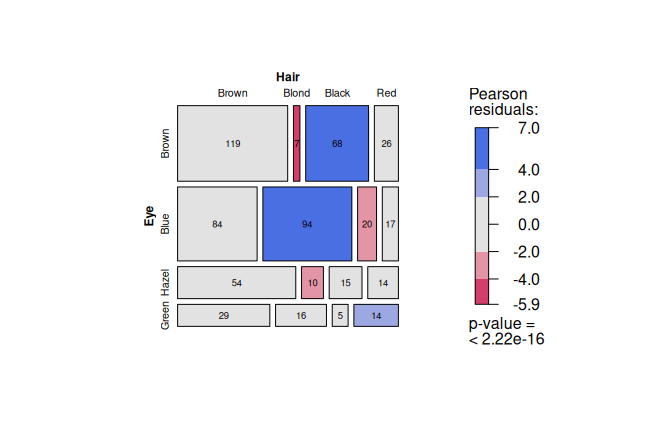
Figure 6.12: Pearson’s \(\chi^2\) test applied to the HairEyeColor dataset. Grouped bar chart of eye colour by hair colour and mosaic plot with tiles coloured by Pearson residuals (blue: over-represented, red: under-represented).
Here, cells for black hair and brown hair, as well as blond hair and blue eyes, show counts above the expectation.
6.4.2 Pearson’s \(\chi^2\) test with Yates’ continuity correction
Restricting HairEyeColor to black or brown hair and brown or blue eyes yields a \(2 \times 2\) table.
Cochran’s rule is still satisfied, so visstat() applies Pearson’s \(\chi^2\) test with Yates’ continuity correction.
The resulting grouped column plot is shown in Figure 6.13, left.
hair_bb_eyes_bb <- HairEyeColor[1:2, 1:2, ]
hair_bb_eyes_bb_df <- counts_to_cases(
 as.data.frame(hair_bb_eyes_bb)
)
yates_stats <- visstat(
 hair_bb_eyes_bb_df$Eye,
 hair_bb_eyes_bb_df$Hair
)
yates_stats$effect_size## $name
## [1] "phi"
##
## $estimate
## [1] 0.1709571
##
## $effect_size_method
## [1] "Phi coefficient for 2 x 2 contingency table"The returned effect size is \(\phi = 0.17\), which, using Cohen’s benchmarks for \(2 \times 2\) tables (Cohen 2013, 227), is a small association. The \(p\) value instead is below \(\alpha = 0.05\) (\(p = 0.0035\)) and thus significant. This example underlines the importance of effect sizes: a significant \(p\) value can be accompanied by a small effect size measure.
6.4.3 Fisher’s exact test
Restricting HairEyeColor to male participants with black or brown hair and hazel or green eyes yields a \(2 \times 2\) table where one expected frequency is less than 5, violating Cochran’s rule (Cochran 1954).
visstat() therefore applies Fisher’s exact test.
The graphical output shows absolute counts with count labels above each bar and the \(p\) value in the title, so the small cell counts that trigger the exact test remain visible (see Figure 6.13, right).
hair_eye_male <- HairEyeColor[, , 1]
black_brown_hazel_green <- hair_eye_male[1:2, 3:4]
black_brown_hazel_green_df <- counts_to_cases(
 as.data.frame(black_brown_hazel_green)
)
fisher_stats <- visstat(
 black_brown_hazel_green_df$Eye,
 black_brown_hazel_green_df$Hair
)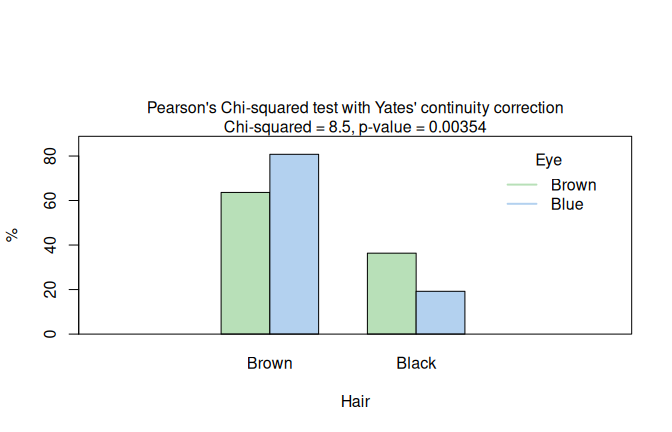
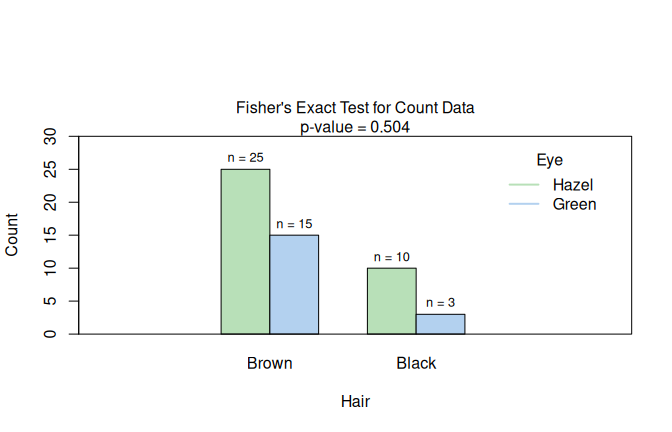
Figure 6.13: Two \(2 \times 2\) categorical routes in HairEyeColor: Yates-corrected Pearson \(\chi^2\) when Cochran’s rule is satisfied (black/brown hair and brown/blue eyes; left), and Fisher’s exact test when expected counts are too small (male participants, black/brown hair, hazel/green eyes; right). The Yates-corrected plot shows row percentages; the Fisher plot shows absolute counts.
6.5 Optional rank-correlation mode
Correlation analysis requires the explicit flag correlation = TRUE.
6.5.1 Kendall rank correlation with correlation = TRUE
A hypothetical survey of 150 secondary-school students records alcohol consumption frequency and academic performance on five-point ordinal scales. A negative monotone association is induced by construction: students who consume alcohol more frequently tend to have lower academic performance. The Kendall result is shown in Figure 6.14, left.
set.seed(42)
n <- 150
xs <- sample(1:5, n, replace = TRUE)
ys <- pmin(5, pmax(1, (6 - xs) + sample(-1:1, n, replace = TRUE)))
likert_alc <- c("never", "rarely", "sometimes", "often", "always")
likert_perf <- c("poor", "fair", "ok", "good", "great")
alcohol <- ordered(likert_alc[xs], levels = likert_alc)
performance <- ordered(likert_perf[ys], levels = likert_perf)
kendall_result <- visstat(performance, alcohol, correlation = TRUE)
spearman_air <- visstat(airquality$Wind, airquality$Ozone, correlation = TRUE)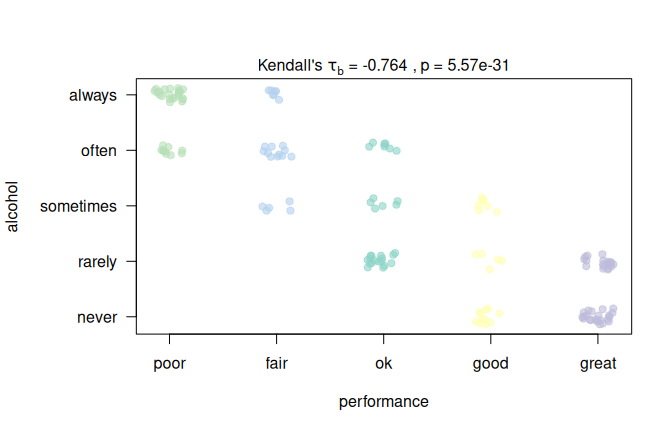
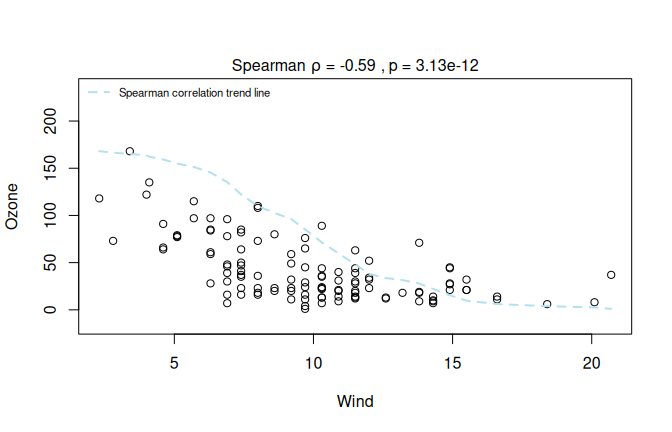
Figure 6.14: Rank-based correlations: Left: Kendall’s \(\tau_b\) for a hypothetical survey (\(n = 150\)): alcohol consumption frequency vs. academic performance. Right: Spearman rank correlation of Wind and Ozone from the airquality dataset (correlation = TRUE; right). Both plots annotate the corresponding effect measure and \(p\) value.
7 Group comparison simulations
Group comparisons (here in Route 1) can answer two different questions: Parametric tests such as Student’s t-test, Fisher’s one-way ANOVA, and their Welch variants test population means (Welch 1951; Rasch et al. 2011; Delacre et al. 2019), whereas non-parametric tests such as Wilcoxon and Kruskal–Wallis test a rank-based distributional target. Parametric test are related to the expected values of the observations, while rank- and pseudo-rank-based methods are related to relative effects comparing the distributions in the different treatment groups to an average distribution (Konietschke and Brunner 2023).
Defaulting to Welch-type tests Welch type mean comparisons assumes normality in the samples, an assumption which can only be safely neglected in larger samples, where the central limit theorem holds. The size required grows with the skewness and the imbalance of the samples, derived for two samples by (Zhou 2005), and depends also on the number of compared groups.
In a empirical study, Delacre et al. (Delacre et al. 2019) established that the Type I error of Welch’s one-way ANOVA remained within Bradley’s liberal robustness bounds of \([2.5\%, 7.5\%]\) (Bradley 1978) across their simulated non-normal distributions (including skewed chi-square cases with skewness 2 and excess kurtosis 6, and symmetric heavy-tailed mixed-normal cases with excess kurtosis about 9.7) for at least about 50 observations per group for up to four groups, and about 100 observations per group for more than four groups.
When the variances in the samples are in fact equal, fixing the analysis to Welch-type tests rather than the corresponding mean group comparisons in the GLM framework (Student’s t-test and Fisher’s test), which assume normality and homoscedasticity in the residuals, costs little; in balanced, homoscedastic group comparisons, where the assumptions of the Fisher One way Anova are met, the relative difference between the Fisher and Welch-F-statistic decreases with increasing sample size by order \(1/n\) (Eq. (B.11)) (Welch 1951; Rasch et al. 2011; Delacre et al. 2019). In the four group-comparisons simulated below this results in a relative difference of \(6.7\;\%\) for \(n = 10\) and only \(0.6\%\) for \(n=100\) (Eq. (B.12)).
Defaulting to rank-based tests Rank-based tests reduce the distributional assumptions and can be more efficient under skewness when the variances are equal (Bridge and Sawilowsky 1999).
Residual-based test selection The default leaves the choice to the residual diagnostics, so its level and power follows from neither fixed strategy.
On exemplary input distributions, the simulations demonstrate
the effect of the three implemented Route 1 test selections. They display fixed tests and routed procedures
side by side for four-group comparisons: fixed Fisher’s one-way ANOVA (F), fixed Welch’s one-way ANOVA (W), a Levene gate
between them (L), fixed Kruskal–Wallis (KW), a Shapiro–Wilk gate
between W and KW (SW), and the full Shapiro–Wilk plus Levene gate
(SW+L) gating to either F or W within the mean branch, otherwise to KW.
In the four-group setting simulated here, W is the test that group_test = "welch" selects, KW the test that group_test = "rank" selects, and SW+L the default routing.
The aim of the simulations is not to re-establish the robustness evidence for Fisher’s one-way ANOVA under homoscedasticity and non-normality (Blanca et al. 2017) or for Welch’s ANOVA under heterogeneous variances (Delacre et al. 2019), but to contrast the three Route 1 strategies in level and in power across combinations of sample size, skewness, excess kurtosis and variance pairing, and to show under which of them the displayed residual diagnostics move the analysis from the mean-based branch to the rank-based one.
The simulations address both homo- and heteroscedastic settings: In the homoscedastic simulations of Figure 7.1, the three-group zero-effect one-way ANOVA setting of Blanca et al. (Blanca et al. 2017) is extended to four groups with identical distributions; here both the equal-means null and the Kruskal–Wallis null are true.
Figure 7.2 keeps the equal-means null and varies the group standard deviations and sample-size pairings following Delacre et al. (Delacre et al. 2019).
The route probabilities are printed in the heatmaps after “|”, so that the final rejection rates can be read together with the path probabilities taken to the final test.
Non-normal data are generated with Fleishman’s polynomial transformation \(Y = a + bX + cX^2 + dX^3\), where \(X \sim N(0,1)\). The coefficients set mean 0, variance 1, and the target skewness and excess kurtosis (Fleishman 1978).
All simulations use four groups and \(B=50{,}000\) Monte Carlo
replications per cell. The scripts, the saved Monte Carlo output and the code
that builds the three figures ship with the package in
system.file("simulations", package = "visStatistics")
For an estimated rejection probability \(p\), the Monte Carlo standard error is (Koehler et al. 2009)
\[SE_{\mathrm{MC}}=\sqrt{p(1-p)/B}.\] This is about 0.10 percentage points at \(p=0.05\), with a maximum of about 0.22 percentage points at \(p=0.50\).
7.1 Type I error simulations: equal means, equal ranks, balanced or unbalanced group sizes
Figure 7.1 shows in panel (A) the density distributions of the four groups only differing in size: The balanced design in panel (B) varies the common group size \(n \in \{20,30,50,100\}\) from top to bottom, whereas the unbalanced designs vary the target mean group size \(\bar n = n\) (panel (C)), again from top to bottom. Within each row, the group-size vector is \(\mathbf n=\bar n\cdot(0.5,0.8,1.2,1.5)\), rounded up component-wise.
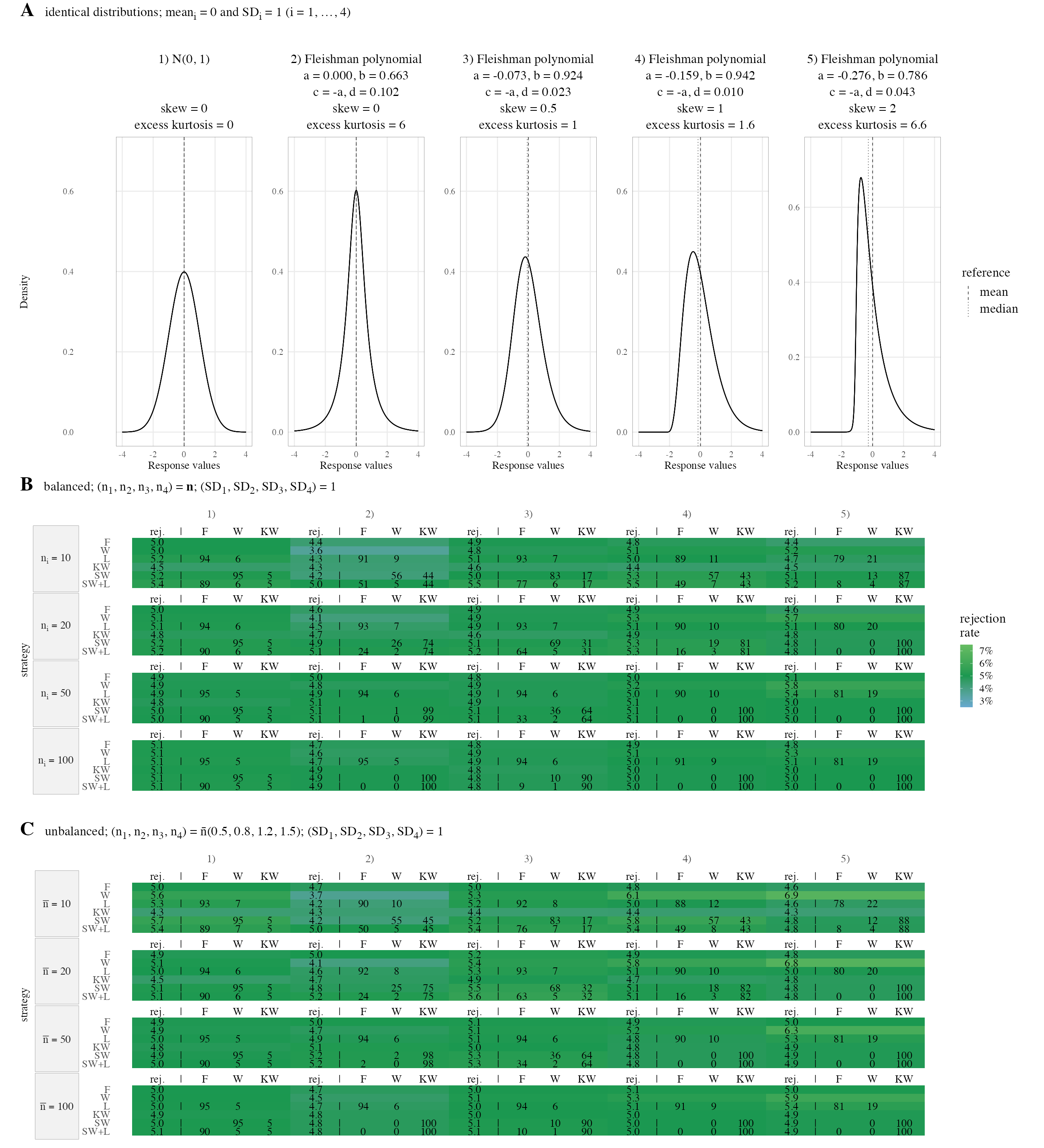
Figure 7.1: Route 1 Type I simulation under identical distributions and identical means, with group mean 0 and SD = 1 in all four groups. (A) input distributions, dashed lines mark means and dotted lines mark medians. (B) balanced design with group sizes, listed from top to bottom, as 20, 30, 50, 100. (C) Unbalanced design with group sizes \(\bar{n} \cdot (0.5, 0.8, 1.2, 1.5)\) with the target mean group size for unbalanced designs \(\bar{n} \in \{20, 30, 50, 100\}\) rounded up to the next integer. The heatmaps in (B) and (C) report final-test rejection rates at \(\alpha = 5\%\). All heatmap numbers are percentages; the first value is the final-test rejection rate, and gated rows additionally list route splits after |.
With all four groups drawn from the same distribution every strategy keeps its nominal level, so what the gates decide here is not the validity of the answer but which question is answered. It is a clean Type I check for all strategies including the automated routing Shapiro (SW) or Shapiro and Levene gate based (SW+L).
The type I error rate stays inside Bradley’s bounds in all scenarios of this homoscedastic setting.
In the balanced (panel B) as in the unbalanced design (panel C), the route probabilities show the Shapiro-Wilk gate responding to kurtosis as well as to skewness: for the symmetric heavy-tailed input, with zero skewness and an excess kurtosis of 6, most replications are routed to the rank branch from a group size of 20 onwards. The same holds for every simulated departure from normality except the mildest, with a skewness of 0.5 and an excess kurtosis of 1, which reaches that point only at a group size of 50; under exact normality the rank branch is taken at the nominal level at every group size. As with any hypothesis test, the power of the gate grows with the sample size.
7.2 Equal means, introducing heteroscedasticity
In Fig. 7.2, all four group means remain zero, but the common standardised input distribution is multiplied by group-specific standard deviation (SD) scale factors introducing heteroscedasticity. The balanced block (panel B) uses \(\mathbf n=(n,n,n,n)\) with \(n \in \{20,30,50,100\}\) and \(\mathbf s = (1.0,\sqrt{2},2.0,\sqrt{5})\). The unbalanced blocks use \(\mathbf n=\bar n\cdot (0.5,0.8,1.2,1.5)\); this group-size vector is paired either with \(\mathbf s = (1.0,\sqrt{2},2.0,\sqrt{5})\), so larger groups have larger SDs (panel C) or with \(\mathbf s = (\sqrt{5},2.0,\sqrt{2},1.0)\), so larger groups have smaller SDs, the reverse pairing (panel D).
The parametric equal-means null is true in all columns.
Kruskal–Wallis tests the group rank distributions, SD scaling leaves them aligned only in two symmetric columns 1 and 2. Therfore these columns remain Type I checks for all fixed strategies alike.
In the skewed columns 3-5,SD scaling shifts the group rank distributions; here KW is expected to reject and only F and W remain under a true null; the gated routingSW+L and SW should therefore reject when routed to Kruskal–Wallis.
A high rejection rate after such a switch `KW is therefore not a Type I error rate for the equal-means nulo, but one minus the type II error rate of the Kruskal-Wallis test the gate has switched to.
In column 5, the input with the highest skewness and excess kurtosis, the scaling separates the group medians by only 0.34 SD between the extreme groups, resulting in a small Kruskal–Wallis population effect size of \(\eta_H^2 \approx 0.02\) (Eq. (G.4)); KW still fails to reject in roughly a third of the replications at the largest group size simulated.
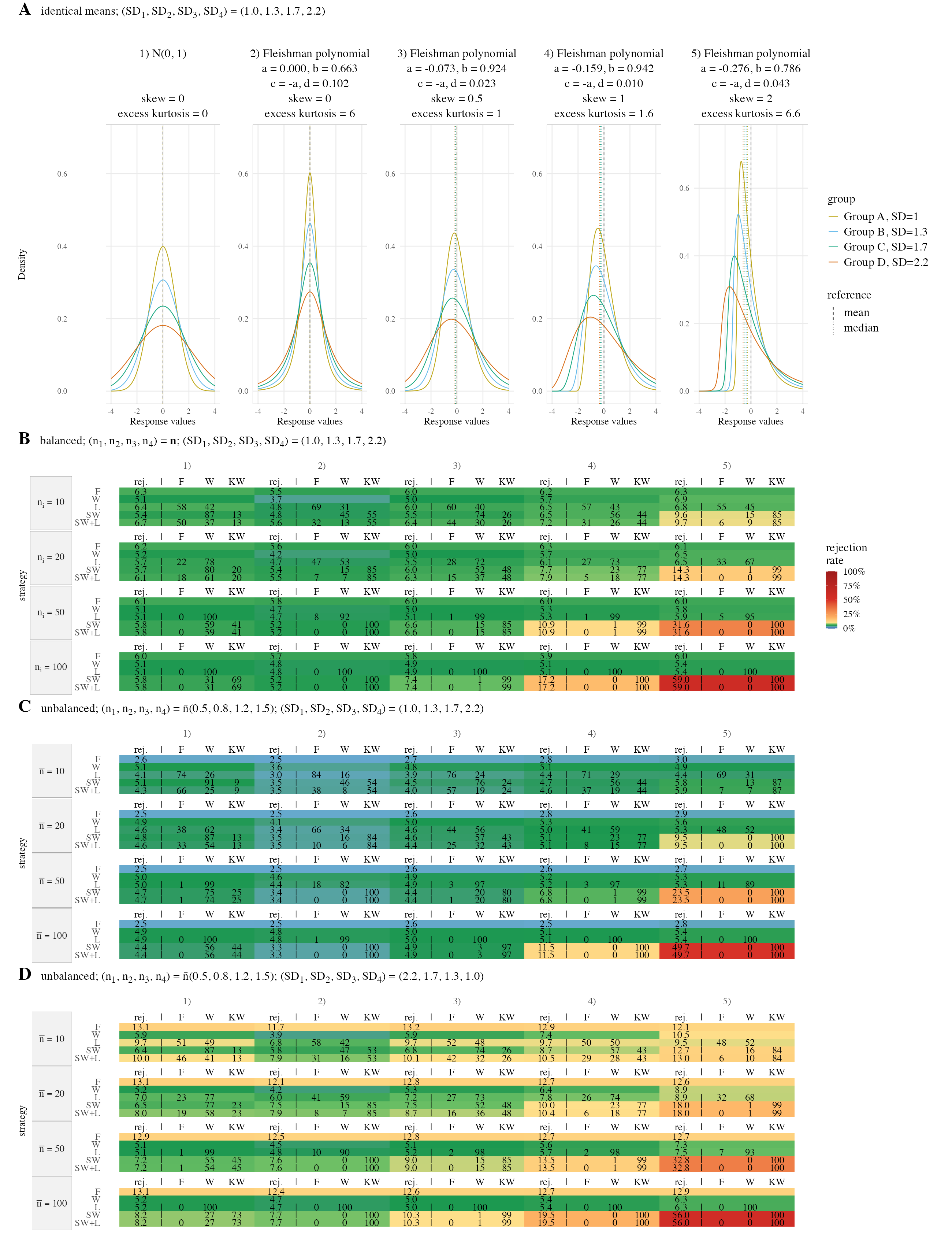
Figure 7.2: Route 1 equal-means simulation with varied group SD and sample-size pairings. (A) input distributions (B) balanced design with group sizes, listed from top to bottom, as 20, 30, 50, 100. (C) unbalanced design with larger groups paired with larger SD. (D) unbalanced design with larger groups paired with smaller SD.
The SW gate also reacts to unequal variances alone. In panel B, column 1 of Fig. 7.2 the balanced four groups are exactly normal and differ only in spread, yet the share of replications that the Shapiro–Wilk gate sends to Kruskal–Wallis rises from 19% at \(n_i=20\) to a majority of \(66\;\%\) at \(n_i=100\) (panel B, column 1, row SW), against 5% in every row of the corresponding column 1 of Fig. 7.1, where all standard deviations are equal. The gate applies one test to the standardised residuals of all four groups at once; mixing the four scales gives this single residual vector a positive excess kurtosis, between 0.6 and 0.8 for group sizes from 20 to 100. This is the expected behaviour of residual-based routing, normally distributed and heteroscedastic group samples result in non-normal residuals.
7.2.1 Bradley’s boundaries in heteroscedastic simulations
F assumes equal variances, and its pooled variance is dominated by the largest groups: it rejects too rarely when those groups also carry the largest standard deviations (panel C), too often in the reverse pairing (panel D), and inside the boundaries when the sizes are equal (panel B).
In contrast, W holds throughout except in the most adverse corner, where the reverse pairing (panel D) meets the strongest departure from normality at group sizes below the minimum of 50 per group that Delacre et al. (Delacre et al. 2019) recommend for comparisons of at most four groups.
In the two symmetric columns 1 and 2 both gated strategies stay within Bradley’s boundaries in the balanced design (panel B) and in the unbalanced positive design of panel C. The adverse pairing of panel D defeats them both, and for different reasons. At the larger group sizes the normality gate is overpowered and sends most replications to KW, whose own level is affected by unequal variances at unequal group sizes (Brunner et al. 2017). At the smallest group sizes the variance gate is underpowered instead and returns nearly half the replications to F, whose rejection rate under a true null is inflated in this pairing.
Taken together, unequal variances push the routing out of the mean branch through the residual kurtosis they induce, so a mean comparison under suspected heteroscedasticity is better requested with group_test = “welch” than left to the default automated routing.
7.3 Type II error (power) simulations
The power simulation uses the same five fixed input distributions and adds location shifts across the four groups in homo- and heteroscedastic designs. In samples of \(n \ge 50\), the test with the higher population effect size — \(\omega^2\) for F and W, \(\eta_H^2\) for KW, both printed in the figures below — has the higher power in every simulated cell. The insets show the share sent to the rank branch: it stays at the nominal level only when the variances are equal and the input is exactly normal, and otherwise grows with the sample size, the skewness, the excess kurtosis and the variance heterogeneity, where introduced..
In the homoscedastic design (Figure 7.3, panel B), balanced groups with equal SD are used: \(n_i=n\), \(\mathrm{SD}_i=1\) for \(i=1,...4\) and group meanswith orderd lactions shits. \(0,0.25,0.50,0.75\).
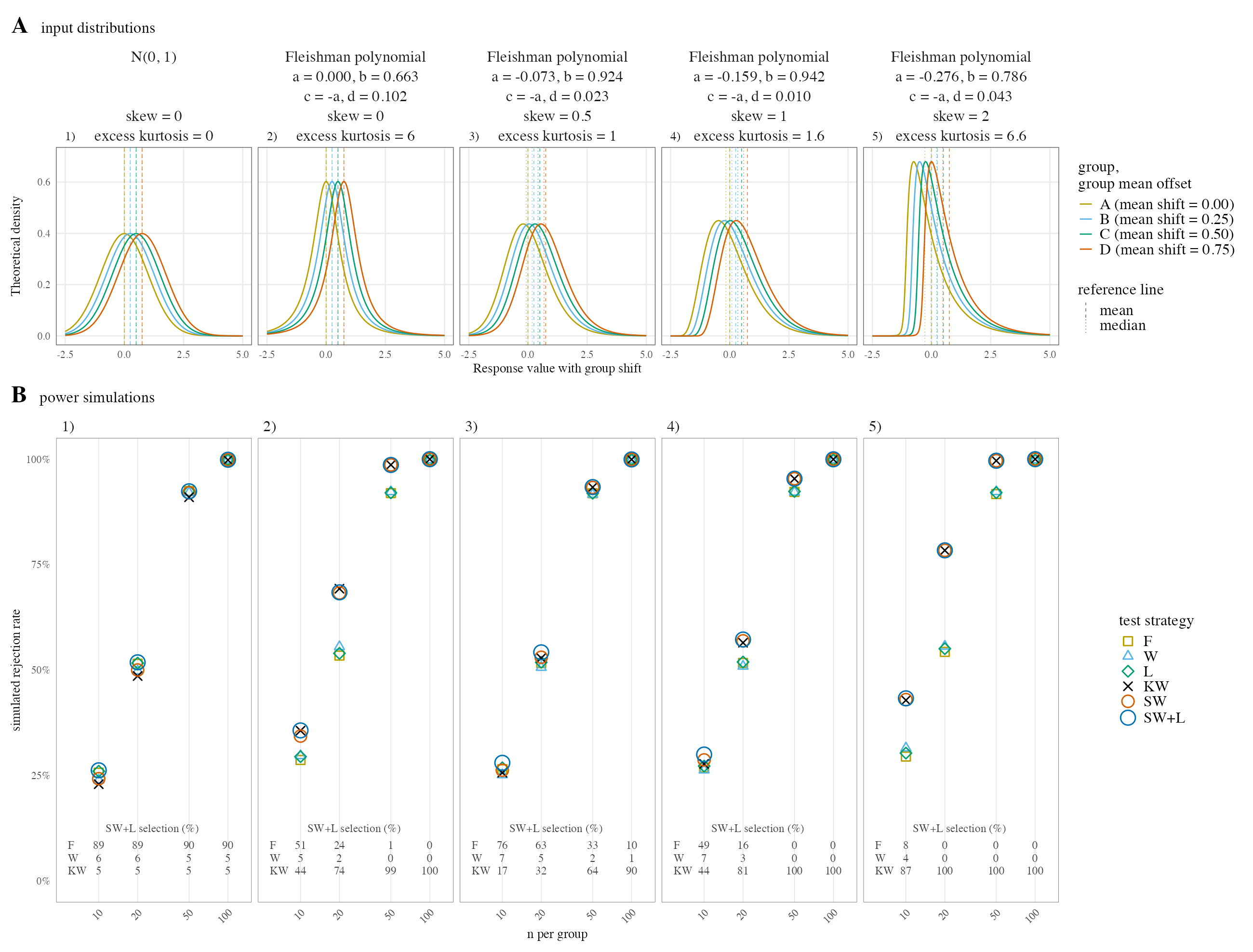
Figure 7.3: Route 1 power simulation with Fleishman input distributions. (A) Input distributions with group mean and median reference lines. (B) Simulated rejection rates for the six testing strategies.
In this homoscedastic designs the routed procedure matches the best fixed strategy throughout. This qualitative result remains unchanged with unbalanced inputs (data not shown).
Replacing the ordered location shift by a one-point shift of a single group, with the other three identical; the routed procedure follows still the fixed test with the highest rejection rate (see Fig. H.1).
We introduced heteroscedasticity both in a balanced design (panel B of Fig. 7.4) and in unbalanced designs with positive (panel C) and negative pairing (panel E).
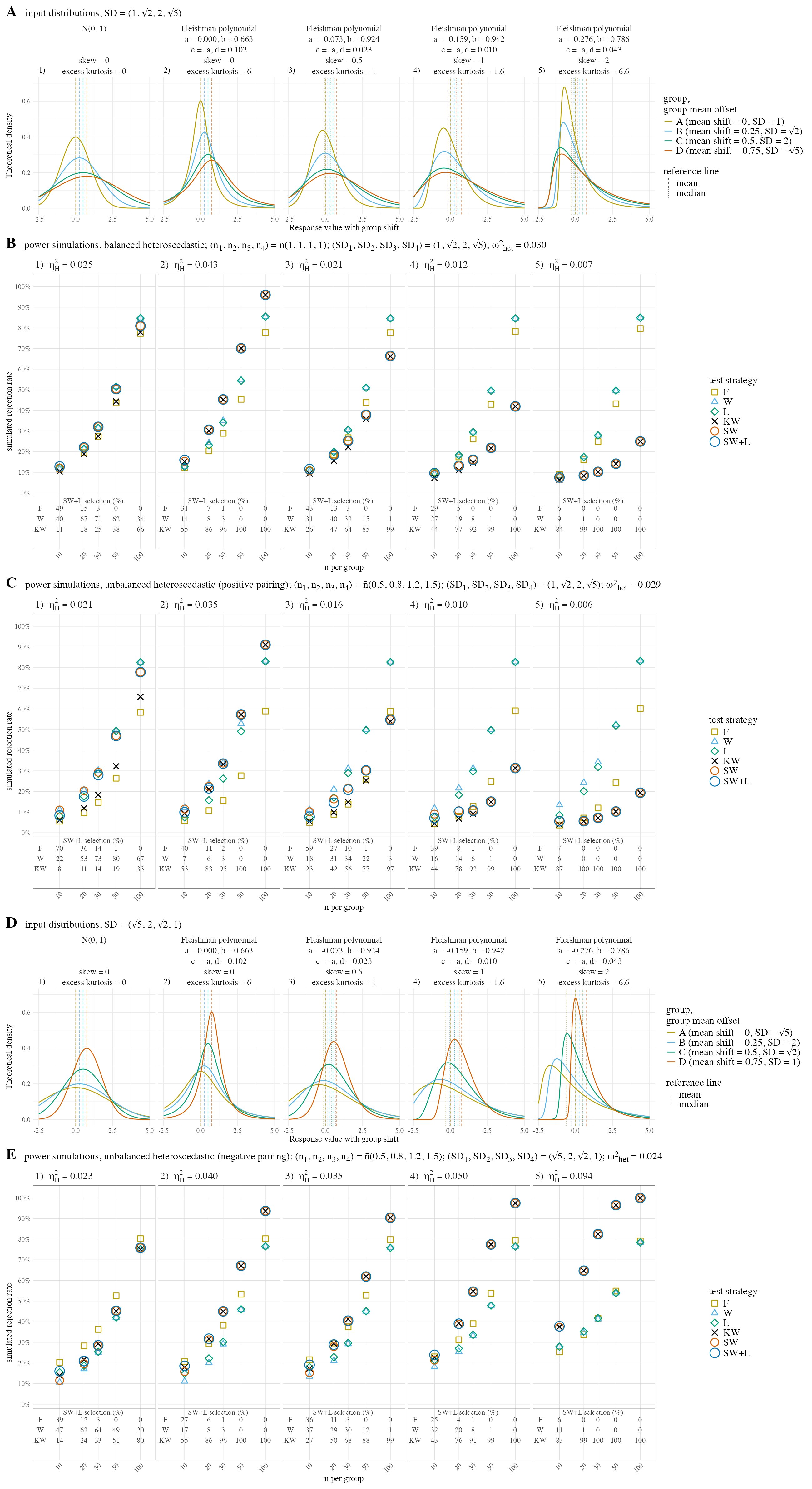
Figure 7.4: Route 1 power simulation with heteroscedastic Fleishman input distributions. (A) input distributions, SD = (1, sqrt 2, 2, sqrt 5). (B) balanced design. (C) unbalanced design, larger groups with larger SD. (D) input distributions, SD = (sqrt 5, 2, sqrt 2, 1). (E) unbalanced design, larger groups with smaller SD.
In the heteroscedastic designs the routed procedure no longer matches the best fixed strategy in most settings: KW has a higher effect size than the parametric tests only in the heavy-tailed simulations (column 2) of all designs and the skewed, unbalanced heteroscedastic simulations with negative pairing (columns 3-5 of panel E), while the routing sends in all cells a growing share to KW with increasing sample size, skewness and excess kurtosis.
8 Discussion
For each selected test, visStatistics provides a visualisation and a comprehensive report on the test itself and, where applicable, its assumption checks and post-hoc comparisons. A sufficiently large sample size can make a negligible difference appear significant, so the \(p\) value should be considered alongside the magnitude of the reported effect size(Levine and Hullett 2002; Cohen 2013, 10).
Therefore, the ‘right’ test is not necessarily the one with the smallest \(p\) value, but rather one whose assumptions are valid and whose effect size is significant.
For tests of central tendency, p-values from assumption tests of normality and homoscedasticity are used as routing criteria in the default settings.
But assumption tests provide no information on the nature of deviations from the expected distribution (Shatz 2024) and cannot replace the visual inspection of the diagnostic plots generated by visstat(), which can indicate cases where the automatic test selection should be overridden.
Assessing assumptions solely through p-values can lead to both type I errors (false positives) and type II errors (false negatives). In large samples, even minor, random deviations from the null hypothesis can result in statistically significant p-values, leading to type I errors. Conversely, in small samples, substantial violations of the assumption may not reach statistical significance, resulting in type II errors (Kozak and Piepho 2018). Robustness is moreover not a property of a test alone: it depends on the sample size, on the shape of the underlying distribution and on how the group sizes are paired with the variances (Glass et al. 1972), as the simulations of Section 7 confirm.
No single assumption test maintains optimal Type I error rates and statistical power across all distributions (Olejnik and Algina 1987) and sample sizes, and p-values obtained from these tests may be unreliable if their assumptions are violated.
In the default routing for tests of central tendencies, up to two assumption tests are concatenated. The Shapiro–Wilk test on the standardised residuals is an omnibus test of normality: it responds to both skewness and to excess kurtosis (see Fig. 7.1) and acts as a proxy for whether the group mean is a faithful summary of the group. Only if the mean-based branch is retained does the Levene test then decide within it, between the equal-variance tests and their Welch counterparts. Both gates can be the source of type I and II errors.
A type I error in the Shapiro–Wilk residual normality test sends input that satisfies the general linear model assumptions to the rank branch. In our simulations, under true normality, this only occurs at the nominal level of about \(\alpha\) of all analyses (see column 1 of Fig. 7.1). As that input is normal and homoscedastic, the Kruskal–Wallis null hypothesis is also true and the general rejection rate remains close to the nominal level. The real impact of such a type I error is that the question being answered changes from a mean comparison to a rank comparison.
In contrast, a type I error in the Levene homoscedasticity assumption t has merely routes homoscedastic data to Welch’s t-test or Welch’s one-way ANOVA, which lose only negligible power relative to Student’s t-test or Fisher’s one-way ANOVA when variances are equal (Figure 7.1) (Rasch et al. 2011; Delacre et al. 2019). In the case of balanced designs and equal variances, Welch’s t-test is even algebraically equivalent to Student’s t-test (see Eqs. (B.7) and (B.8)) and Welch’s one-way ANOVA test statistic converges asymptotically to the Fisher’s one-way ANOVA test statistic (Eq. (B.11)).
In our simulations a type II error of the Shapiro–Wilk assumption test is of limited consequence, too: the retained mean test keeps its Type I error rate within Bradley’s robustness bounds (Fig. 7.1) and forfeits only power. In previous Shapiro–Wilk gated two-group comparison (Rochon et al. 2012) and three-group comparison (Lantz et al. 2016) as well as our four-group comparison (SW), the normality-gated procedure holds the nominal level in all tested input distributions under homoscedasticity (Fig. 7.1). Neither earlier study included a secondary gate to test for variance homogeneity. A type II error of the Levene assumption test in smaller, unbalanced data sets is more consequential, since Fisher’s one-way ANOVA is then applied to heteroscedastic data and rejects a true null hypothesis too often when the smaller groups carry the larger variances (panel D) and too rarely in the reverse case (panel C, Fig. 7.2), only the first leaves Bradley’s bounds, and only at the smaller group sizes, where assumptions tests lack power. But the growth of power of assumptions tests with group sizes (Kozak and Piepho 2018) can be also problematic in automatic testing:
Under exact normality the Shapiro-Wilk test rejects at the nominal level at every group size, but any real departure from normality is eventually detected: at a hundred observations per group the rank branch is taken in 90% of the replications for even the mildest simulated departure, a skewness of 0.5 with an excess kurtosis of 1, and in every replication for the stronger departures from normality (Fig. 7.1). In large samples the mean-based branch is therefore kept only for input that is close to exactly normal, even though mean-based tests become more tolerant of non-normality as the sample grows. Users comparing population means in large samples should therefore set group_test = "welch", whilst carefully studying the assumption diagnostics provided.
Gates and selected test are computed from the same data, so conditioning on the gate outcomes leaves the procedure off the chosen significance level (Rochon et al. 2012; Moser and Stevens 1992). In our simulations the largest departure arises at the smallest group sizes, where the variance gate fails to detect unequal variances and admits Fisher’s one-way ANOVA in the pairing in which it rejects a true null hypothesis most often.
Type-I error inflation can be avoided by dispensing with preliminary assumption tests and fixing the test in advance. Therefore, defaulting to Welch-type mean comparisons or rank-based tests allows the automated gating to be overridden. The case for the mean-based default to Welch type tests rests on comparative studies comparing fixed tests. Fagerland and Sandvik (Fagerland and Sandvik 2009) conducted a comprehensive comparison of five two-sample location tests: Student’s t-test, Welch’s t-test, the Yuen–Welch test on trimmed means, the Wilcoxon rank-sum test and the Brunner–Munzel. These tests were subjected to varying unequal variances and skewness. They recommended the Welch test in most simulated scenarios, yet acknowledged that it is sensitive to skewness. This result is to be expected, as all Welch tests assume that the groups are normally distributed.
For comparisons of more than two groups, Delacre et al. (Delacre et al. 2019) recommend the corresponding Welch’s one-way ANOVA over Fisher’s. Both studies compare fixed tests only; our simulations (Section 7) add the gated strategies and find that Welch’s one-way ANOVA keeps the Type I error rate closer to the nominal level than either gate does.
A Welch default (by the option group_test = "welch") gives directly interpretable estimates and confidence intervals; by the Central Limit Theorem it also remains valid in large samples even when normality within the groups is rejected, provided the observations in each group are independent and drawn from a distribution with a finite standard deviation (Tijms 2012, 163). How large is large enough then depends on skewness, tail weight (Lumley et al. 2002) and balance of the input samples, so that no threshold can be fixed in advance. Welch-type tests can be weak for strongly skewed small samples (Fagerland 2012) and can answer the wrong scientific question when the mean lies in a long tail (Fagerland and Sandvik 2009). On exactly normal input it also forfeits power to Fisher’s one-way ANOVA at group sizes up to 50
(Section 7). The obstacle is not merely that this threshold is unknown: a \(p\) value is read from the tail, and it is there that a test statistic’s approximation by its limiting distribution converges last (Shao et al. 2016).
Alternatively, defaulting to rank-based tests (option group_test = "rank") reduces distributional assumptions and can be more efficient under skew when the variances are equal (Bridge and Sawilowsky 1999), which the power simulations of Section 7 confirm.
Which of the two fixed defaults detects a true difference more often depends on the shape of the input, and the automated routing need not trail either: our power simulations (Section 7) show that the gating matches at least the power of the fixed Welch analysis in all cells of Fig. 7.3 and falls below the fixed Kruskal–Wallis analysis in one cell only. The gating therefore recovers the power of whichever fixed analysis suits the data, without that choice having to be made in advance.
Power, however, is not the only criterion: a maximally powerful test is of little use if it answers the wrong question. This is the argument against fixing either default in advance: visstat() does not know the user’s research question, so the residual diagnostics decide which estimand is tested, and the selected test is reported together with the diagnostics that led to it. Under normality the general linear model tests are uniformly most powerful (Bridge and Sawilowsky 1999) and return effect estimates and confidence intervals on the scale of the original measurements, whereas the rank-based tests buy robustness under skewness at the price of a \(p\) value without a natural-scale effect. visstat() therefore keeps both branches and selects between them, rather than discarding the interpretability of the one or the robustness of the other a priori.
The default is moreover retained because it maintains access to the general linear model and because the sequence it implements — fitting the model, examining the residual assumptions and then selecting the equal-variance test, its Welch variant or a rank-based test — is the two-stage procedure widely accepted in applied practice, and still presented in textbooks and standard software as the method for selecting a test (Rochon et al. 2012; Zimmerman 2004).
9 Limitations
The design of visStatistics prioritises transparent reproducible routing for common two-variable analyses (Strasak et al. 2007; Sato et al. 2017; Chicco et al. 2025) over broad model coverage.
While one of R’s greatest strengths is the sheer volume of statistical methods available, incorporating a wider array of methods would require additional preliminary assumption checks, which in turn would exacerbate the risk of overall Type I error inflation. Furthermore, expanding the pipeline would result in a highly complex decision tree, rendering the underlying statistical logic increasingly opaque to the user.
As a consequence, paired tests, interaction terms, multiple linear regression, generalised linear models and robust regression remain outside the automated workflow.
Bootstrapping represents an alternative to assumption-guided routing.
As implemented for example in the R package boot (Canty and Ripley 2025; Davison and Hinkley 1997), it can provide confidence intervals for a wide range of statistics.
However, bootstrapping often requires thousands of resamples and may perform poorly with very small sample sizes.
This runs counter to the purpose of the visStatistics package, which is designed to offer a rapid overview of the data, laying the groundwork for deeper analysis in subsequent steps.
The default routing in tests of central tendencies (Route 1) is not the Type I optimal one. Section 7 shows that a fixed Welch analysis keeps the Type I error rate within Bradley’s bounds over almost the entire simulated grid, whereas the default gating does not in unbalanced designs whose smallest groups carry the largest standard deviations. What the gating buys in return is power: it matches the fixed Welch analysis in every cell of Fig. 7.3 and trails the fixed rank analysis only in a single one.
Any routing on \(p\) values inherits an arbitrary threshold: the branch changes abruptly at \(\alpha\), so data on either side of it are treated differently while being statistically indistinguishable. In our gating approach, what changes at that boundary is the estimand, not the validity of the result, since near-normal input leaves every strategy at the nominal level (Fig. 7.1).
At the graphical level, the design is also kept deliberately low-dependency.
The package uses mostly R graphics, keeping the transitive dependency footprint minimal.
For more polished, annotated plots of chosen statistical tests, we refer to packages such as ggstatsplot (Patil 2021) or ggpubr (Kassambara 2026).
Taken together, these scope decisions define visStatistics as a rapid, inspectable first-line workflow for routine two-variable inference rather than a replacement for model-specific statistical analysis.
10 Conclusion
A significant proportion of routine statistical analyses can be reduced to a small number of tests implemented in the software package visStatistics.
Among these, parametric tests such as t-tests, analysis of variance, or simple linear regression belong to the family of general linear models, whose assumptions are frequently not tested at all or not tested properly (Hoekstra et al. 2012; Ernst and Albers 2017; Jones et al. 2025; Kéry and Hatfield 2003).
The present study sets out to demonstrate how visStatistics addresses this gap: Its selection of tests of central tendencies takes \(p\) values of assumption tests of the model residuals of a fitted linear model into account.
The package addresses the inherent shortcomings of test selection based on \(p\) values (Lumley et al. 2002; Fagerland 2012; Kozak and Piepho 2018; Shatz 2024) by supplementing the output with diagnostic plots of the assumption tests of the selected test. The design of the study is thus a combination of “assumption checking” (Shatz 2024) by visualisation and “assumption testing” by \(p\) values.
The value of this approach lies not in the removal of the user’s statistical judgment, but rather in the exposure of the assumptions, effect sizes, and plots that should inform that judgment.
Appendix
Notation
In the following, \(k\) denotes the number of groups, \(n_i\) the sample size of group \(i\), and \(N=\sum_{i=1}^{k}n_i\) the total sample size, with group-size ratios \(q_i=n_i/N\). Observations are written as \(x_{ij}\), drawn from the distribution function \(F_i\) of group \(i\), with group mean \(\bar x_i\), grand mean \(\bar x\), and group sample variance \(s_i^2\). The pooled variance is \[\begin{equation} s_p^2=\frac{1}{N-k}\sum_{i=1}^{k}(n_i-1)s_i^2 . \tag{10.1} \end{equation}\]
A Assumption tests
A.1 Normality tests
A.1.1 Shapiro–Wilk test shapiro.test()
The Shapiro–Wilk test evaluates whether a sample \(x_1,\ldots,x_N\) comes from a normal distribution. Let \(x_{(1)}\le \cdots \le x_{(N)}\) be its order statistics. Introduce a reference sample \(Z_1,\ldots,Z_N\) of independent standard normal random variables, i.e. \(Z_i \sim N(0,1)\) for all \(i\), and let \(Z_{(1)}\le \cdots \le Z_{(N)}\) be their order statistics used to construct the Shapiro–Wilk weights.
Let \(m_i = \operatorname{E}(Z_{(i)})\) and \(v_{ij} = \operatorname{Cov}(Z_{(i)}, Z_{(j)})\) for \(i,j = 1,\ldots,N\). Define \(\mathbf{m} = (m_1,\ldots,m_N)^\top\) and \(V = (v_{ij})_{i,j=1}^N\).
The vector \(\mathbf{m}\) contains the expected standard-normal order statistics, and \(V\) is their covariance matrix. Let \(\mathbf{a}=(a_1,\ldots,a_N)^\top\) be the resulting vector of normalised weights for the ordered observed sample values
\[\mathbf{a} =\frac{V^{-1}\mathbf{m}} {\sqrt{\left(\mathbf{m}^\top V^{-1}V^{-1}\mathbf{m}\right)}}.\] Royston (Royston 1982; Royston 1995) describes the algorithmic approximation used for these weights and for the \(p\) value calculation. The Shapiro–Wilk statistic (Shapiro and Wilk 1965) is
\[\begin{equation} W=\frac{\left(\sum_{i=1}^{N} a_i x_{(i)}\right)^2} {\sum_{i=1}^{N} (x_i-\bar{x})^2} \tag{A.1} \end{equation}\]
In R, shapiro.test() calls the compiled C_SWilk implementation; the weights
are not returned at R level. \(W\) takes values in \((0, 1]\); values close to 1
indicate normality.
A.1.2 Anderson–Darling test ad.test()
Let \(z_i = (x_{(i)} - \bar{x})/s,\; i=1,2,\ldots,N\) be the standardised order statistics of \(x_i\), where \(s\) is the sample standard deviation, and let \(\Phi\) denote the standard normal cumulative distribution function. The test statistic is
\[\begin{equation}
A^2 = -N - \frac{1}{N}\sum_{i=1}^{N}(2i-1)
\left[\ln\Phi(z_i) + \ln\!\left(1 - \Phi(z_{N+1-i})\right)\right]
\tag{A.2}
\end{equation}\]
visstat() uses ad.test() from nortest (Gross and Ligges 2015).
A.2 Homoscedasticity tests
A.2.1 The mean-centred Levene test levene.test()
The package implementation uses Levene’s original mean-centred proposal (Levene 1960).
The Levene test statistic is the one-way ANOVA \(F\) statistic, computed on the absolute residuals \(|e_{ij}|\) in place of the responses \(x_{ij}\); the corresponding Fisher ANOVA formula is given in Eq. (B.2):
\[\begin{equation} F_L = \frac{\displaystyle\sum_{i=1}^{k} n_i (\overline{|e|}_i - \overline{|e|})^2\;/\;(k-1)} {\displaystyle\sum_{i=1}^{k}\sum_{j=1}^{n_i}(|e_{ij}| - \overline{|e|}_i)^2\;/\;(N-k)}, \tag{A.3} \end{equation}\]
where \(\overline{|e|}_i\) is the within-group mean of the absolute residuals and \(\overline{|e|}\) is their overall mean.
A.2.2 Bartlett’s test bartlett.test()
Bartlett’s test statistic (Bartlett 1937) is
\[\begin{equation} K^2 = \frac{(N-k)\ln s_p^2 - \displaystyle\sum_{i=1}^k (n_i-1)\ln s_i^2} {1 + \dfrac{1}{3(k-1)}\!\left(\displaystyle\sum_{i=1}^k \frac{1}{n_i-1} - \frac{1}{N-k}\right)}, \tag{A.4} \end{equation}\]
where \(s_p^2\) is the pooled variance from Eq. (10.1).
Under the null hypothesis the statistic approximately follows \(\chi^2(k-1)\).
A.2.3 Breusch–Pagan test bp.test()
For simple linear regression, group-based variance tests are not applicable. The package implementation bp.test() performs the Koenker variant (Koenker 1981) of the Breusch–Pagan test (Breusch and Pagan 1979), which tests whether the \(N\) squared residuals \(e_i^2\) vary systematically with the fitted values from the regression model \(\hat{y}_i\).
The Breusch–Pagan statistic is defined as:
\[\begin{equation} BP = N R^2_\text{aux} \tag{A.5}, \end{equation}\]
where \(R^2_\text{aux}\) denotes the coefficient of determination from regressing \(e_i^2\) on \(\hat{y}_i\):
\[R^2_\text{aux} = 1 - \frac{\sum_{i=1}^{N} (e_i^2 - \widehat{e_i^2})^2} {\sum_{i=1}^{N} (e_i^2 - \overline{e^2})^2}.\]
Here \(\widehat{e_i^2}\) are the fitted values from this auxiliary regression and \(\overline{e^2}\) is the mean of the squared residuals.
Under the null hypothesis of homoscedasticity, \(BP\) is compared asymptotically to a \(\chi^2(k-1)\) distribution.
B Parametric tests
In the numeric-response, categorical-predictor branch (Route 1), parametric tests are selected when residual normality is not rejected, or when all group-specific sample sizes are greater than 50. The Levene variance gate then separates equal-variance tests from Welch-type tests.
B.1 Student’s t-test and Fisher’s one-way ANOVA
B.1.1 Student’s t-test t.test(..., var.equal = TRUE)
Student’s t-test tests the null hypothesis that the population means of two unpaired groups are equal. The test statistic for Student’s t-test (t.test(..., var.equal = TRUE)) is
\[\begin{equation} t = \frac{\bar{x}_1 - \bar{x}_2} {s_p \sqrt{\dfrac{1}{n_1} + \dfrac{1}{n_2}}}, \tag{B.1} \end{equation}\]
where \(s_p\) is the square root of the pooled variance in Eq. (10.1) for \(k=2\). The statistic follows a \(t\)-distribution with \(\nu=n_1+n_2-2\) degrees of freedom.
B.1.2 Fisher’s one-way ANOVA aov()
Fisher’s one-way ANOVA generalises the comparison to more than two groups and tests the null hypothesis that the population means of \(k\) groups are equal. Using the grouped-test notation defined above, the between-group sum of squares is \[ SS_\text{between} = \sum_{i=1}^{k} n_i(\bar{x}_i-\bar{x})^2, \] and the within-group sum of squares is \[ SS_\text{within} = \sum_{i=1}^{k}\sum_{j=1}^{n_i}(x_{ij}-\bar{x}_i)^2. \] Dividing these sums of squares by their degrees of freedom gives the mean squares \[ MS_\text{between}=\frac{SS_\text{between}}{k-1}, \qquad MS_\text{within}=\frac{SS_\text{within}}{N-k}. \] The Fisher ANOVA statistic is \[\begin{equation} F=\frac{MS_\text{between}}{MS_\text{within}}. \tag{B.2} \end{equation}\]
For \(k=2\), the between-group sum of squares can be written as
\[
SS_\text{between}
=
\frac{n_1n_2}{N}(\bar x_1-\bar x_2)^2 .
\]
The within-group mean square is the pooled variance,
\(MS_\text{within}=s_p^2\). Thus
\[
F
=
\frac{SS_\text{between}}{MS_\text{within}}
=
\frac{\frac{n_1n_2}{N}(\bar x_1-\bar x_2)^2}{s_p^2}.
\]
Because
\[
\frac{n_1n_2}{N}
=
\frac{1}{1/n_1+1/n_2},
\]
this becomes
\[
F
=
\frac{(\bar x_1-\bar x_2)^2}
{s_p^2(1/n_1+1/n_2)}
=t^2.
\]
Therefore, in the two-sample case, Student’s \(t\)-test with
var.equal = TRUE and Fisher’s one-way ANOVA return identical \(p\) values.
Under \(H_0: \mu_1 = \cdots = \mu_k\), the statistic follows \(F(k-1, N-k)\).
B.1.2.1 Post-hoc comparison
visstat() follows aov() with Tukey’s Honest Significant Differences procedure TukeyHSD() (Tukey 1949). The procedure is designed for pairwise mean comparisons following ANOVA.
TukeyHSD() returns adjusted \(p\) values and confidence intervals for all pairwise differences between factor-level means. For two groups \(i\) and \(j\), let \(d_{ij} = \bar{x}_i - \bar{x}_j\). The studentised range statistic is
\[\begin{equation} q_{ij} = \frac{|d_{ij}|} {\sqrt{\dfrac{MS_\text{within}}{2} \left(\dfrac{1}{n_i} + \dfrac{1}{n_j}\right)}}, \tag{B.3} \end{equation}\]
where \(MS_\text{within}\) is defined in Eq. (B.2). Adjusted \(p\) values are computed from the studentised range distribution with \(k\) groups and \(N-k\) residual degrees of freedom. For a pair \(i,j\), \(q_{ij}\) is \(\sqrt{2}\) times the absolute value of the Student \(t\)-statistic from Eq. (B.1), with \(s_p^2\) replaced by the ANOVA residual mean square \(MS_\text{within}\).
B.2 Welch’s t-test and Welch’s heteroscedastic ANOVA
Welch’s heteroscedastic ANOVA generalises the unequal-variance mean comparison to more than two groups.
B.2.1 Welch’s t-test t.test()
Welch’s t-test (t.test(..., var.equal = FALSE)) compares the means of two independent groups when homogeneous variances cannot be assumed. Its statistic is
\[\begin{equation} t = \frac{\bar{x}_1 - \bar{x}_2} {\sqrt{s_1^2/n_1 + s_2^2/n_2}} \tag{B.4} \end{equation}\]
with degrees of freedom approximated by the Welch–Satterthwaite equation (Welch 1947; Satterthwaite 1946):
\[\begin{equation} \nu \approx \frac{\left(\dfrac{s_1^2}{n_1} + \dfrac{s_2^2}{n_2}\right)^2} {\dfrac{(s_1^2/n_1)^2}{n_1-1} + \dfrac{(s_2^2/n_2)^2}{n_2-1}}. \tag{B.5} \end{equation}\]
B.2.2 Welch’s heteroscedastic ANOVA oneway.test()
Welch’s heteroscedastic ANOVA (oneway.test()) generalises Welch’s t-test to more than two groups by down-weighting groups with large variance. It compares group means using weights based on sample sizes and variances when homogeneous variances cannot be assumed. Its test statistic is
\[\begin{equation} F_W = \frac{\displaystyle\sum_{i=1}^{k} w_i (\bar{x}_i - \bar{x}_w)^2\;/\;(k-1)} {1 + \dfrac{2(k-2)}{k^2-1} \displaystyle\sum_{i=1}^{k} \dfrac{(1-w_i/w)^2}{n_i-1}}, \tag{B.6} \end{equation}\]
where \(w_i = n_i/s_i^2\) are the inverse-variance weights, \(w = \sum_{i=1}^{k} w_i\), and \(\bar{x}_w = \sum_{i=1}^{k} w_i \bar{x}_i / w\) is the weighted grand mean. The numerator degree of freedom is \(k-1\); the denominator degree of freedom is the Satterthwaite-type approximation returned by oneway.test().
B.2.2.1 Post-hoc comparison games.howell()
Post-hoc comparisons use the package implementation games.howell()
(Games and Howell 1976). It applies the Welch two-sample statistic from
Eq. (B.4), with the degrees of freedom from
Eq. (B.5), to each of the \(k(k-1)/2\) pairwise
group comparisons. The resulting two-sided pairwise \(p\)-values are adjusted
with Holm’s method (Holm 1979).
Welch’s methods outperform their classical counterparts when variances differ (Moser and Stevens 1992; Fagerland and Sandvik 2009; Delacre et al. 2017; Delacre et al. 2019).
Welch’s method in the case of equal variances
When variances are equal, Welch’s methods lose only negligible power relative to their classical counterparts (Moser and Stevens 1992; Delacre et al. 2017; Delacre et al. 2019).
Welch’s method in the case of equal variances and balanced designs
Two-group comparison
If variances are equal and the groups are balanced (the same number in each group), the Welch methods reduce in the case of a two-group comparison algebraically to Student’s t-test (equivalent to Fisher - Anova for two groups):
When \(s_1^2 = s_2^2 = s^2\) and \(n_1 = n_2 = n\), the pooled variance entering Eq. (B.1) becomes
\[\begin{equation} s_p^2 = \frac{(n-1)s^2 + (n-1)s^2}{2n-2} = s^2, \tag{B.7} \end{equation}\]
so the Welch denominator in Eq. (B.4), \(\sqrt{s^2/n + s^2/n} = s\sqrt{2/n}\), equals the Student denominator \(s_p\sqrt{1/n + 1/n} = s\sqrt{2/n}\), and the Welch–Satterthwaite degrees of freedom in Eq. (B.5) reduce to
\[\begin{equation} \nu = \frac{\left(2s^2/n\right)^2} {\dfrac{(s^2/n)^2}{n-1} + \dfrac{(s^2/n)^2}{n-1}} = \frac{4s^4/n^2}{2s^4/[n^2(n-1)]} = 2(n-1) = 2n-2. \tag{B.8} \end{equation}\] Welch’s t-test then coincides with Student’s t-test on \(2n-2\) degrees of freedom.
More than two group comparisons
This exact equivalence does not extend beyond two groups: even under equal variances, the Welch statistic \(F_W\) in Eq. (B.6) is not algebraically identical to the classical \(F\) in Eq. (B.2) for \(k>2\); it nevertheless converges to it as the group sizes grow. Under equal variances, \(s_1^2 = \cdots = s_k^2 = s^2\), so \(w_i = n_i/s^2\), \(w = N/s^2\), \(w_i/w = n_i/N\), and \(\bar{x}_w = \bar{x}\). The numerator of Eq. (B.6) then reduces to \[\begin{equation} \frac{\sum_{i=1}^{k} w_i(\bar{x}_i-\bar{x}_w)^2}{k-1} = \frac{1}{s^2} \frac{\sum_{i=1}^{k} n_i(\bar{x}_i-\bar{x})^2}{k-1} = \frac{MS_\text{between}}{s^2}. \tag{B.9} \end{equation}\]
Because \(MS_\text{within}=s^2\) under the same assumptions, this is the numerator of the classical statistic \(F=MS_\text{between}/MS_\text{within}\). The remaining denominator correction in Eq. (B.6) becomes
\[\begin{equation} 1+ \frac{2(k-2)}{k^{2}-1}\sum_{i=1}^{k}\frac{\left(1-n_i/N\right)^{2}}{n_i-1}. \tag{B.10} \end{equation}\]
Thus
\[\begin{equation} \frac{F}{F_W} - 1 = \frac{2(k-2)}{k^{2}-1}\sum_{i=1}^{k}\frac{\left(1-n_i/N\right)^{2}}{n_i-1}. \tag{B.11} \end{equation}\]
For \(k=2\) the correction term vanishes, so Welch’s ANOVA form gives the same statistic as Fisher’s ANOVA Eq. (B.2), whatever the group sizes. Each summand in Eq. (B.11) is of order \(n_i^{-1}\), so when all group sizes grow in fixed proportion the relative excess is \(O(n^{-1})\); imbalance changes its constant, not its order. For balanced designs \(n_i = n\) the sum equals \((k-1)^2/[k(n-1)]\), giving a relative excess of \(2(k-2)(k-1)/[k(k+1)(n-1)]\).
For the balanced four-group case used in the examples, \(k=4\) and therefore
\[\begin{equation} F_W = \frac{F}{1+\dfrac{3}{5(n-1)}}. \tag{B.12} \end{equation}\]
Equivalently, \(F/F_W = 1 + 3/[5(n-1)]\). The relative excess \(F/F_W - 1\) is therefore \(O(n^{-1})\) and, in this four-group example, already below \(1\%\) for \(n > 61\).
C Non-parametric tests
In contrast to the preceding mean-based tests, the non-parametric group tests below first convert observed values to ranks. Observations from all groups are put into one combined list, ranked together, and then assigned back to their original groups (Hollander et al. 2014). For a two group comparison, the Wilcoxon rank-sum test uses directly these reassigned ranks, whereas the Kruskal–Wallis test uses the mean reassigned rank in each of \(k\) groups. In visstat(), these rank based tests are selected in the numeric-response, categorical-predictor branch when residual normality is rejected or when group_test = "rank" is chosen; they are also always used for an ordered response with a categorical predictor.
C.1 Wilcoxon rank-sum test and Kruskal–Wallis test
C.1.1 Wilcoxon rank-sum test wilcox.test()
For two independent groups, after the combined ranking step described above,
let \(R(x_{1,j})\) be the rank assigned to observation \(j\) in the first
group supplied to wilcox.test(x, y), and let
\[
W_1=\sum_{j=1}^{n_1}R(x_{1,j})
\]
be the rank sum of that first group. The rank sum of the second group is
\(W_2=N(N+1)/2-W_1\). If observations are tied, R assigns the average of the
tied rank positions. The smallest possible rank sum for group 1 is
\(1+\cdots+n_1=n_1(n_1+1)/2\). Subtracting this minimum from the observed
rank sum \(W_1\) gives the number of cross-group wins for group 1, with ties
contributing one half. The statistic returned by wilcox.test() is the
Mann–Whitney statistic (Mann and Whitney 1947):
\[\begin{equation} W = U_1 = W_1 - \frac{n_1(n_1+1)}{2} \tag{C.1} \end{equation}\]
Equivalently, the same statistic can be written as a count over the \(n_1n_2\) possible cross-group pairs. Let \(C_{>}\) be the number of pairs in which the group-1 observation is larger than the group-2 observation, and let \(C_{=}\) be the number of tied pairs. Then \(W=C_{>}+0.5C_{=}\), and dividing by \(n_1n_2\) gives the empirical Mann–Whitney probability: \[\frac{W}{n_1n_2} = \frac{C_{>}+0.5C_{=}}{n_1n_2}.\] Under the null hypothesis that the two groups have the same continuous distribution, neither group is more likely to produce the larger value. Thus, \(W/(n_1n_2)\) is centred at \(1/2\); there are no ties in a continuous distribution, so the tie term is zero. If the two group distributions are the same distribution up to an additive constant, the test can be read as a location test and, because the shift moves all quantiles by the same amount, also as a median test (Fay and Proschan 2010).
Because wilcox.test(x, y) uses the first supplied group for \(W_1\), swapping the two groups uses \(W_2\) and reports \(W_2-n_2(n_2+1)/2=n_1n_2-W\). For each cross-group pair, the two directional contributions always sum to \(1\): group 1 larger gives \(1+0\), group 2 larger gives \(0+1\), and a tie gives \(0.5+0.5\). The two-sided \(p\) value is unchanged, but the reported statistic and one-sided direction change.
The \(p\) value is the tail probability of the observed \(W\) under the null distribution of the rank-sum statistic. With R’s default settings, wilcox.test() obtains this null distribution exactly when both groups have fewer than 50 finite observations, and otherwise uses a normal approximation with continuity correction.
C.1.2 Kruskal–Wallis test kruskal.test()
For \(k\) independent groups, the observations from all groups are ranked together as described above. Let \(\bar R_i\) be the mean rank assigned back to group \(i\). If all groups have the same rank distribution, each group has expected mean rank \[\begin{equation} \bar R=\frac{N+1}{2}. \tag{C.2} \end{equation}\] The Kruskal–Wallis statistic measures how far the group mean ranks \(\bar R_i\) are from this common expected rank (Kruskal and Wallis 1952):
\[\begin{equation} H = \frac{12}{N(N+1)} \sum_{i=1}^{k} n_i \left(\bar{R}_i - \bar{R}\right)^2, \tag{C.3} \end{equation}\]
The prefactor \(12/[N(N+1)]\) rescales the weighted squared deviations of the group mean ranks by the sample variance of the \(N\) pooled ranks.
Large values of \(H\) occur when at least one group has systematically higher or lower ranks than expected under equal rank distributions. kruskal.test() evaluates \(H\) against the asymptotic \(\chi^2(k-1)\) null distribution.
If ties are present, \(H\) is divided by the tie factor
\[\begin{equation} C=1-\frac{\sum_j(t_j^3-t_j)}{N^3-N}, \tag{C.4} \end{equation}\]
where \(t_j\) is the number of observations in tie block \(j\) (Kruskal and Wallis 1952; Hollander et al. 2014, 205). \(C\) is the proportion of the original rank variance that remains after tied observations have been assigned average ranks.
\(H\) depends on the balance of design through its dependence on the group-size ratios \(q_i\); writing
\[\begin{equation} \widehat p_i=\frac{\bar R_i-\tfrac12}{N} \tag{C.5} \end{equation}\]
for the average position of the observations of group \(i\) within the pooled sample, Eq. (C.2) gives \(\bar R_i-\bar R=N(\widehat p_i-\tfrac12)\) exactly, so that, in the absence of ties,
\[\begin{equation} H=\frac{12N^{2}}{N+1}\sum_{i=1}^{k} q_i \left(\widehat p_i-\frac12\right)^{2}. \tag{C.6} \end{equation}\]
\(H\) depends directly on \(q_i\) by the weights in Eq. (C.6), and through \(\widehat p_i\), since a rank taken over all \(N\) observations measures position relative to the pooled sample, in which group \(i\) is represented in proportion \(q_i\). With ties, both sides carry the tie factor \(C\) of Eq. (C.4) and the identity is unchanged.
Pooling the \(k\) groups in the proportions \(q_i\) corresponds, at the population level, to the mixture distribution
\[\begin{equation} \bar F_q(x)=\sum_{i=1}^{k} q_i F_i(x), \tag{C.7} \end{equation}\]
itself a distribution function: it describes a draw obtained by picking group \(i\) with probability \(q_i\) and then drawing from \(F_i\). What \(\widehat p_i\) estimates, unbiasedly and consistently, is the weighted relative effect (Brunner et al. 2021)
\[\begin{equation} p_i=\int_{-\infty}^{\infty}\bar F_q(y)\,\mathrm{d}F_i(y), \tag{C.8} \end{equation}\]
the probability that an observation from group \(i\) exceeds an independent draw from the pooled population.
If the group distributions are the same distribution up to group-specific additive constants, the test can be read as a location test and, because such shifts move all quantiles by the same amount, also as a median test (Hollander et al. 2014).
For \(k=2\), Kruskal–Wallis and Wilcoxon are based on the same pooled ranks. The two group mean ranks are \(\bar R_1=W_1/n_1\) and \(\bar R_2=W_2/n_2\), and \(W=U_1\) is the reported Wilcoxon statistic from Eq. (C.1). In the large-sample approximation, the two-group Kruskal–Wallis statistic \(H\) corresponds to a squared, centred, and rescaled form of the reported Wilcoxon statistic \(W\). Therefore, the two tests give identical two-sided \(p\) values only when Wilcoxon is forced to use the uncorrected large-sample approximation, wilcox.test(..., exact = FALSE, correct = FALSE). In visstat(), wilcox.test() is used with R’s default settings, while kruskal.test() uses the large-sample \(\chi^2\) approximation to \(H\). Therefore, the two routes should not be expected to return identical two-group \(p\) values under the defaults.
C.1.2.1 Post-hoc comparison dunn.test()
dunn.test() compares each pair of factor levels on the mean ranks of a single joint ranking of all groups, the same ranking that enters \(H\) in Eq. (C.3) (Dunn 1964). For groups \(i\) and \(j\) the statistic is \[z_{ij}=(\bar R_i-\bar R_j)/\sigma_{ij}\] with
\[\sigma_{ij}^2=\frac{N(N+1)}{12}\,C\left(\frac{1}{n_i}+\frac{1}{n_j}\right),\]
where \(C\) is the tie factor of Eq. (C.4), over the same tie blocks. The resulting \(p\) values are adjusted for multiplicity using Holm’s step-down method (Holm 1979).
D Rank correlations
Rank correlations are used when correlation = TRUE. Note that the correlation measure are effect size measure and are therefore reported in both roles in the output.
D.1 Kendall rank correlation cor.test(..., method="kendall")
Kendall’s \(\tau_b\) tests the null hypothesis of no monotone association between two ordered variables. For two ordinal variables with \(n\) joint observations, let \(n_c\) denote the number of concordant pairs (those whose ranks agree in both variables) and \(n_d\) the number of discordant pairs. Kendall’s \(\tau_b\) is defined as
\[\begin{equation} \tau_b \;=\; \frac{n_c - n_d} {\sqrt{\left(n_0 - n_1\right)\left(n_0 - n_2\right)}}, \tag{D.1} \end{equation}\]
where \(n_0 = n(n-1)/2\) is the total number of observation pairs, \(n_1 = \sum_i t_i(t_i-1)/2\) is the number of pairs tied in the response, and \(n_2 = \sum_j u_j(u_j-1)/2\) is the number of pairs tied in the predictor. The denominator correction makes \(\tau_b\) attain \(\pm 1\) even with ties, which Spearman’s \(\rho\) does not (Kendall 1945). With few ordered levels (e.g., five-point Likert items), ties are common; this is the principal reason to prefer \(\tau_b\) over Spearman’s \(\rho\) in this setting (Agresti 2010).
visstat() calls cor.test(as.numeric(y), as.numeric(x), method = "kendall", exact = FALSE) and reports \(\tau_b\), the asymptotic test statistic \(z = \tau_b / \operatorname{SE}(\tau_b)\), and the two-sided \(p\) value.
D.2 Spearman rank correlation cor.test(..., method="spearman")
For two numeric variables with correlation = TRUE, visstat() calls cor.test(x, y, method = "spearman") to test for a monotone association between \(x\) and \(y\) using ranks. Spearman’s \(\rho\) is Pearson’s \(r\) applied to the ranks:
\[\begin{equation} \rho = r(\operatorname{rank}(x), \operatorname{rank}(y)), \tag{D.2} \end{equation}\]
where \(r(u, v)\) denotes Pearson’s correlation coefficient:
\[r(u,v) = \frac{\sum_{i=1}^{n}(u_i-\bar u)(v_i-\bar v)} {\sqrt{\sum_{i=1}^{n}(u_i-\bar u)^2}\, \sqrt{\sum_{i=1}^{n}(v_i-\bar v)^2}}.\]
Here \(u_i = \operatorname{rank}(x_i)\) and \(v_i = \operatorname{rank}(y_i)\) are the ranks of the \(n\) paired observations, and \(\bar{u}\) and \(\bar{v}\) are their sample means.
For inference, cor.test(..., method = "spearman") computes an exact \(p\) value for small samples without ties by evaluating all \(n!\) rank permutations. For larger samples or when ties are present, it uses an approximation to the null distribution of the rank association measure or its asymptotic transformation. No distributional assumptions on the original data are required.
A separate Pearson-correlation branch is not implemented. In simple linear regression with an intercept, the two-sided test of zero slope and the two-sided test of zero Pearson correlation return the same \(p\) value. Pearson correlation would therefore not add a separate inferential route to the default regression branch.
E Pearson’s \(\chi^2\) test and Fisher’s exact test
Let \(O_{ij}\) and \(E_{ij}\) denote the observed and expected frequencies in row \(i\) and column \(j\) of an \(R \times C\) contingency table, where rows index the \(R\) levels of the response \(y\) and columns the \(C\) levels of the predictor \(x\). The Pearson residual for cell \((i,j)\) is
\[\begin{equation} r_{ij} = \frac{O_{ij} - E_{ij}}{\sqrt{E_{ij}}}, \quad i = 1,\ldots,R,\quad j = 1,\ldots,C. \tag{E.1} \end{equation}\]
The test statistic of Pearson’s \(\chi^2\) test (Pearson 1900) is
\[\begin{equation} \chi^2 = \sum_{i=1}^{R}\sum_{j=1}^{C} r_{ij}^2 = \sum_{i=1}^{R}\sum_{j=1}^{C} \frac{(O_{ij}-E_{ij})^2}{E_{ij}}. \tag{E.2} \end{equation}\]
The statistic is compared to \(\chi^2((R-1)(C-1))\). For \(2\times 2\)
tables, Yates’ continuity correction (Yates 1934) is applied by default.
For general \(R \times C\) tables, visstat() supplements the bar chart with
a mosaic plot in which tiles are coloured by \(r_{ij}\) (blue: positive,
red: negative).
Fisher’s exact test (Fisher 1970) is applied when Cochran’s rule (Cochran 1954) is violated. It tests independence by conditioning on the observed margins, that is, on the row totals and column totals of the contingency table. In the \(2 \times 2\) case, write the observed table as
\[ \begin{array}{c|cc|c} & C_1 & C_2 & \text{row sums} \\ \hline R_1 & a & b & a + b \\ R_2 & c & d & c + d \\ \hline \text{column sums} & a + c & b + d & N \end{array} \]
Given these fixed margins, the exact null probability of this table is the hypergeometric probability
\[\begin{equation} \operatorname{P}(A=a \mid a+b,c+d,a+c,b+d)= \frac{\dbinom{a+b}{a}\dbinom{c+d}{c}} {\dbinom{N}{a+c}}, \tag{E.3} \end{equation}\]
where \(N = a+b+c+d\). The two-sided \(p\) value is obtained by summing the
probabilities of all tables with the same margins whose probabilities under
the null are less than or equal to the probability of the observed table.
For general \(R \times C\) tables, fisher.test() generalises this calculation
using the multivariate hypergeometric distribution.
For \(2\times 2\) tables, fisher.test() additionally returns the conditional
maximum likelihood estimate of the odds ratio and its confidence interval.
Let \(\pi_{11},\pi_{12},\pi_{21},\pi_{22}\) denote the population probabilities
of the cells holding the counts \(a,b,c,d\), and let
\[\begin{equation} \theta=\frac{\pi_{11}\pi_{22}}{\pi_{12}\pi_{21}} \tag{E.4} \end{equation}\]
be the population odds ratio, with \(\theta=1\) under independence. Let \(A\) denote the upper-left cell count as a random variable, of which the observed count \(a\) is one realisation. Conditional on the margins, \(A\) follows Fisher’s non-central hypergeometric distribution (Agresti 2002, 99–100)
\[\begin{equation} \operatorname{P}_{\theta}(A=k \mid a+b,c+d,a+c,b+d)= \frac{w_k\,\theta^{k}}{\sum_{j=m_-}^{m_+} w_j\,\theta^{j}}, \qquad w_j=\dbinom{a+b}{j}\dbinom{c+d}{a+c-j}, \tag{E.5} \end{equation}\]
for \(m_-\le k\le m_+\), where \(m_-=\max(0,a-d)\) and \(m_+=\min(a+b,a+c)\) are the smallest and largest upper-left counts compatible with the fixed margins. Setting \(\theta=1\) in Eq. (E.5) recovers Eq. (E.3): the powers \(\theta^{k}\) disappear, so the probability at \(A=a\) becomes \(w_a\) over \(\sum_{j=m_-}^{m_+} w_j\), and that sum equals \(\dbinom{N}{a+c}\) by Vandermonde’s identity,
\[\begin{equation} \sum_{j=m_-}^{m_+}\dbinom{a+b}{j}\dbinom{c+d}{a+c-j}=\dbinom{N}{a+c}. \tag{E.6} \end{equation}\]
The conditional maximum likelihood estimate \(\hat\theta_{\mathrm{cond}}\) is the value of \(\theta\) that maximises the probability of Eq. (E.5) at the observed count \(k=a\). With \(k\) fixed at \(a\) and \(\theta\) varying, that probability is the likelihood, abbreviated \(L(\theta)\). The denominator of Eq. (E.5) is the normalising sum, the total of the unnormalised weights \(w_j\,\theta^{j}\) over all counts the margins permit,
\[\begin{equation} Z(\theta)=\sum_{j=m_-}^{m_+} w_j\,\theta^{j}, \tag{E.7} \end{equation}\]
so that the likelihood is
\[\begin{equation} L(\theta)=\operatorname{P}_{\theta}(A=a \mid a+b,c+d,a+c,b+d) =\frac{w_a\,\theta^{a}}{Z(\theta)}. \tag{E.8} \end{equation}\]
Differentiating Eq. (E.8) with respect to \(\theta\) gives
\[\begin{equation} L'(\theta)=\frac{a\,w_a\,\theta^{a-1}Z(\theta)-w_a\,\theta^{a}Z'(\theta)} {Z(\theta)^{2}} =\frac{L(\theta)}{\theta} \left(a-\theta\,\frac{Z'(\theta)}{Z(\theta)}\right). \tag{E.9} \end{equation}\]
By Eq. (E.7), the second term in the bracket of Eq. (E.9) is a sum over the probabilities of Eq. (E.5), that is the conditional expectation of \(A\),
\[\begin{equation} \begin{split} Z'(\theta) &= \frac{\mathrm{d}Z}{\mathrm{d}\theta} = \sum_{j=m_-}^{m_+} j\,w_j\,\theta^{j-1}, \\[2pt] \theta\,\frac{Z'(\theta)}{Z(\theta)} &= \frac{\sum_{j=m_-}^{m_+} j\,w_j\,\theta^{j}} {\sum_{j=m_-}^{m_+} w_j\,\theta^{j}} \\[2pt] &= \sum_{j=m_-}^{m_+} j\, \operatorname{P}_{\theta}(A=j \mid a+b,c+d,a+c,b+d) \\[2pt] &= \operatorname{E}_{\theta}(A \mid a+b,c+d,a+c,b+d). \end{split} \tag{E.10} \end{equation}\]
As \(L(\theta)>0\) and \(\theta>0\), Eq. (E.9) vanishes exactly when
\[\begin{equation} \operatorname{E}_{\theta}(A \mid a+b,c+d,a+c,b+d)=a , \tag{E.11} \end{equation}\]
where the expectation refers to the distribution of Eq. (E.5). The conditional maximum likelihood estimate \(\hat\theta_{\mathrm{cond}}\) is therefore the value of \(\theta\) satisfying
\[\begin{equation} \operatorname{E}_{\hat\theta_{\mathrm{cond}}}(A \mid a+b,c+d,a+c,b+d)=a , \tag{E.12} \end{equation}\]
which has no closed form and is solved numerically by fisher.test(). It is the conditional odds
ratio reported for \(2\times 2\) tables in the effect-size table. Note that this estimator differs from the unconditional
maximum likelihood estimator, the sample odds ratio
\[ \widehat{\mathrm{OR}} = \frac{ad}{bc}. \]
F Effect size table
The following tables summarise the statistical analyses with their respective effect sizes and formulae.
| Analysis | Effect size | Formula | Source |
|---|---|---|---|
| Student’s \(t\)-test | Hedges’ \(g_{s_p}\) (pooled) | \(g_{s_p}=J(N-2)\cdot(\bar{x}_1-\bar{x}_2)/s_p\) | Hedges 1981 |
| Welch’s \(t\)-test | Hedges’ \(g_{s^{*}}\) (non-pooled) | \(g_{s^{*}}=J(\nu^{*})\cdot(\bar{x}_1-\bar{x}_2)/s^{*}\) | Delacre et al. 2021 |
| Wilcoxon rank-sum | rank-biserial \(r\) | \(r=2\cdot W/(n_1\cdot n_2)-1\) | Wendt 1972 |
| Fisher’s ANOVA | \(\widehat{\omega}^2\) | \(\nu_1\cdot(F-1)/(\nu_1\cdot F+\nu_2+1)\) | Albers and Lakens 2018, Appendix A |
| Welch’s ANOVA | \(\widehat{\omega}^2\) (approx.) | \(\nu_1\cdot(F_W-1)/(\nu_1\cdot F_W+\nu_2+1)\) | F-form from Albers and Lakens 2018, Appendix A |
| Kruskal–Wallis | \(\widehat{\eta}_H^2\) | \((H-k+1)/(N-k)\) | Tomczak and Tomczak 2014 |
| Simple linear regression | \(R^2\) | \(R^2=1-SS_\text{res}/SS_\text{tot}\) |
summary(lm())$r.squared
|
| Spearman | \(\rho\) | \(\rho = r(\operatorname{rank}(x), \operatorname{rank}(y))\) Eq. (D.2) |
cor.test(method = “spearman”)$estimate
|
| Kendall | \(\tau_b\) | \(\tau_b = \dfrac{n_c - n_d}{\sqrt{\left(n_0 - n_1\right)\left(n_0 - n_2\right)}}\) Eq. (D.1) |
cor.test(method = “kendall”)$estimate
|
| Pearson \(\chi^2\) (\(R\times C\)) | Cramér’s \(V\) | \(V_{R\times C}=\sqrt{\chi^2/\left(N\cdot(\min(R,C)-1)\right)}\) | Cohen 2013, p. 223 |
| Pearson \(\chi^2\) (\(2\times 2\)) | \(\phi\) | \(\phi=\sqrt{\chi^2/N}\) | Cohen 2013, p. 223 |
| Fisher’s exact (\(2\times 2\)) | conditional odds ratio | \(\hat\theta_{\mathrm{cond}}\) Eq. (E.4) |
fisher.test()$estimate
|
In the \(t\)-tests effect sizes, Hedges’ small-sample correction factor \(J(\nu)\) is defined as
\[\begin{equation*} J(\nu) = \frac{\Gamma(\nu/2)} {\sqrt{\nu/2}\;\Gamma((\nu-1)/2)}. \end{equation*}\]
For Student’s \(t\)-test, \(\nu=N-2\); for Welch’s \(t\)-test, \(\nu=\nu^{*}\) with
\[\begin{equation*} \nu^{*} = \frac{(n_1-1)(n_2-1)(s_1^2+s_2^2)^2} {(n_2-1)s_1^4+(n_1-1)s_2^4}. \end{equation*}\]
The non-pooled average-variance standardizer in Welch’s \(t\)-test is defined as
\[\begin{equation*} s^{*} = \sqrt{\frac{s_1^2+s_2^2}{2}}. \end{equation*}\]
In the ANOVA effect sizes, \(\nu_1\) and \(\nu_2\) denote the numerator and denominator degrees of freedom; for Fisher’s ANOVA, \(\nu_1=k-1\) and \(\nu_2=N-k\); for Welch’s ANOVA, \(\nu_1=k-1\) and \(\nu_2\) is the usually fractional denominator degree of freedom returned by oneway.test().
In the Kruskal–Wallis effect size \(\widehat{\eta}_H^2\), the joint ranking of all \(N\) observations enters \(H\) (Eq. (C.3)), so \(\widehat{\eta}_H^2\) depends on the group-size ratios \(q_i\) and is not comparable across designs whose groups stand in different size ratios (Zimmermann et al. 2021).
In the coefficient of determination \(R^2\),
\[\begin{equation} R^2=1-\frac{SS_\text{res}}{SS_\text{tot}}, \tag{F.1} \end{equation}\]
the residual sum of squares is \(SS_\text{res}=\sum_{i=1}^{N}(y_i-\hat{y}_i)^2\), where \(\hat{y}_i\) is the predicted value, and the total sum of squares is \(SS_\text{tot}=\sum_{i=1}^{N}(y_i-\bar{y})^2\).
All other variables used in the effect-size table are defined in the corresponding “Analysis” section.
G Population effect sizes
All quantities in this section are defined for a fixed set of group-size ratios \(q_i=n_i/N\), \(i=1,\dots,k\), held constant as \(N\) grows. This is a restriction, not a convention: \(\omega^2_{\text{unbal}}\) and \(\omega^2_{\text{het}}\) below depend on the fixed \(q_i\), as does \(\eta_H^2\), so none of them is comparable between designs whose groups stand in different size ratios. Within one such family each is a function of the distributions alone.
G.1 Population effect sizes of parametric tests
To quantify the different designs of the power simulations, we extend the effect size \(\widehat{\omega}^2\) to the population level for the different designs.
balanced homoscedastic In a balanced homoscedastic design, \(\widehat{\omega}^2\) estimates the population parameter \[\begin{equation} \omega^2_{\text{bal}} =\frac{\sigma^2_{\text{between}}}{\sigma^2_{\text{between}}+\sigma^2}, \tag{G.1} \end{equation}\] with \(\sigma^2_{\text{between}}=\frac1k\sum_{j=1}^k(\mu_j-\bar\mu)^2\) and \(\sigma^2\) the constant error variance of the general linear model (Eq. (5.1)) (Steiger 2004).
unbalanced homoscedastic For unbalanced, homoscedastic designs, with \(p_j=n_j/N\) the (fixed) relative size of group \(j\) and \(\bar\mu_p=\sum_{j=1}^k p_j\mu_j\) the allocation-weighted grand mean, the same ratio defines \(\omega^2_{\text{unbal}}\), now with \[\begin{equation} \sigma^2_{\text{between}}=\sum_{j=1}^k p_j(\mu_j-\bar\mu_p)^2, \tag{G.2} \end{equation}\] so that \(\omega^2_{\text{unbal}}=\omega^2_{\text{bal}}\) when \(p_j=1/k\) (Carroll and Nordholm 1975).
unbalanced heteroscedastic
For Welch’s ANOVA, allowing the group variances \(\sigma_j^2\) to differ, \(\widehat\omega^2\) (approx.) estimates the heteroscedastic extension of Eq. (G.2). With \(w_j=n_j/\sigma_j^2\) and \(\tilde\mu_w=\sum_{j=1}^k w_j\mu_j\big/\sum_{j=1}^k w_j\) the inverse-variance-weighted grand mean, \[\begin{equation} \omega^2_{\text{het}}=\frac{\lambda}{1+\lambda},\qquad \lambda=\sum_{j=1}^k p_j\left(\frac{\mu_j-\tilde\mu_w}{\sigma_j}\right)^2, \tag{G.3} \end{equation}\] so that \(\omega^2_{\text{het}}=\omega^2_{\text{unbal}}\) when \(\sigma_j^2=\sigma^2\) for every \(j\) (Shieh 2012).
G.2 Population effect size of the rank-based test
With the group-size ratios \(q_i\) held fixed, \(\widehat\eta_H^2\) converges to a function of the weighted relative effects \(p_i\) of Eq. (C.8):
\[\begin{equation} \widehat\eta_H^2=\frac{H-k+1}{N-k}\;\xrightarrow{N\to\infty}\; \eta_H^2=12\sum_{i=1}^{k} q_i\left(p_i-\frac12\right)^{2}. \tag{G.4} \end{equation}\]
Unlike \(\omega^2\), which sees the group distributions only through \((\mu_j,\sigma_j^2)\), Eq. (G.4) depends on their whole shape through Eq. (C.8).
H Supplementary material
This section reports the simulated results that the figures of Section 7 do not show. All rejection rates come from \(B = 50{,}000\) replications per cell at \(\alpha = 5\%\).
Figure H.1 repeats the design of Section 7 under the one-point alternative, in which three groups are identical and only the fourth is shifted. All designs are balanced and homoscedastic.
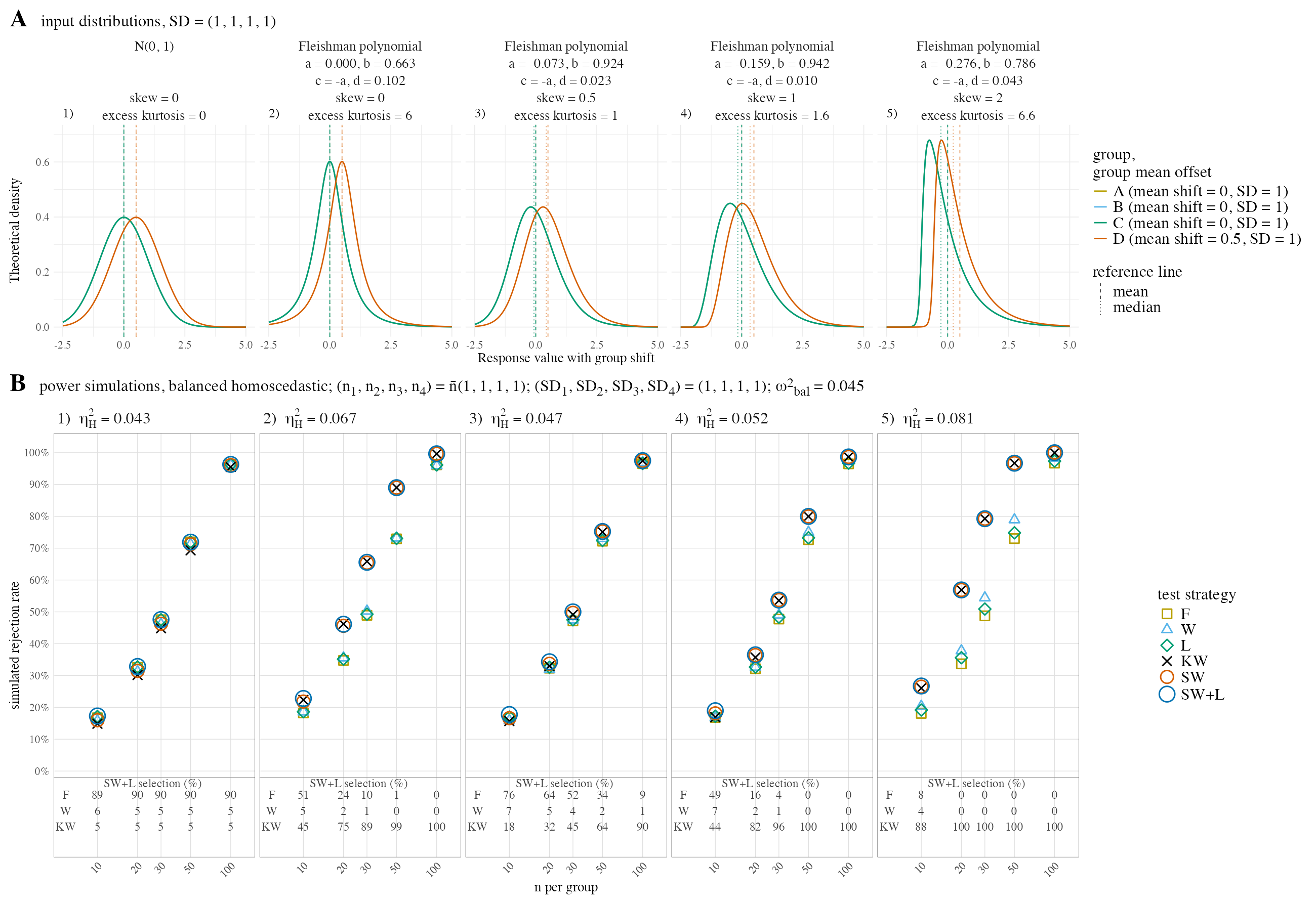
Figure H.1: Power under the one-point alternative, mean shifts (0, 0, 0, 0.50), balanced homoscedastic design. (A) input distributions. (B) power of the six strategies.
H.1 Power against the shift size
Table H.1 varies \(\delta\) at fixed balanced sample sizes, following the power study of Brunner et al. (Brunner et al. 2017, 1480), where \(\delta\) is the horizontal axis and \(n\) is held fixed. It is the only grid presented as a table, because its purpose is a direct comparison of rejection rates with their Table 5. Rates are given to three decimals, which is where the Monte Carlo error of \(B = 50{,}000\) puts the last informative digit.
| Alternative | Distribution | \(n\) | \(\delta\) | F | W | L | KW | SW | SW+L |
|---|---|---|---|---|---|---|---|---|---|
| increasing trend | normal | 10 | 0 | 0.05 | 0.05 | 0.052 | 0.044 | 0.051 | 0.054 |
| increasing trend | normal | 10 | 0.2 | 0.056 | 0.056 | 0.059 | 0.051 | 0.057 | 0.061 |
| increasing trend | normal | 10 | 0.4 | 0.077 | 0.075 | 0.079 | 0.07 | 0.076 | 0.081 |
| increasing trend | normal | 10 | 0.6 | 0.116 | 0.11 | 0.12 | 0.103 | 0.112 | 0.122 |
| increasing trend | normal | 10 | 0.8 | 0.177 | 0.166 | 0.18 | 0.157 | 0.168 | 0.182 |
| increasing trend | normal | 10 | 1 | 0.259 | 0.239 | 0.262 | 0.234 | 0.242 | 0.264 |
| increasing trend | normal | 10 | 1.2 | 0.362 | 0.335 | 0.365 | 0.327 | 0.338 | 0.367 |
| increasing trend | normal | 10 | 1.4 | 0.475 | 0.44 | 0.477 | 0.436 | 0.444 | 0.479 |
| increasing trend | normal | 10 | 1.6 | 0.602 | 0.561 | 0.603 | 0.556 | 0.565 | 0.605 |
| increasing trend | normal | 20 | 0 | 0.05 | 0.049 | 0.051 | 0.047 | 0.05 | 0.052 |
| increasing trend | normal | 20 | 0.2 | 0.064 | 0.063 | 0.065 | 0.06 | 0.065 | 0.066 |
| increasing trend | normal | 20 | 0.4 | 0.115 | 0.112 | 0.116 | 0.106 | 0.114 | 0.117 |
| increasing trend | normal | 20 | 0.6 | 0.201 | 0.193 | 0.203 | 0.188 | 0.195 | 0.205 |
| increasing trend | normal | 20 | 0.8 | 0.339 | 0.329 | 0.342 | 0.319 | 0.331 | 0.343 |
| increasing trend | normal | 20 | 1 | 0.515 | 0.497 | 0.516 | 0.484 | 0.499 | 0.518 |
| increasing trend | normal | 20 | 1.2 | 0.689 | 0.669 | 0.689 | 0.657 | 0.671 | 0.69 |
| increasing trend | normal | 20 | 1.4 | 0.826 | 0.81 | 0.827 | 0.799 | 0.811 | 0.827 |
| increasing trend | normal | 20 | 1.6 | 0.92 | 0.908 | 0.92 | 0.902 | 0.909 | 0.92 |
| increasing trend | normal | 50 | 0 | 0.049 | 0.049 | 0.049 | 0.047 | 0.049 | 0.05 |
| increasing trend | normal | 50 | 0.2 | 0.09 | 0.089 | 0.09 | 0.088 | 0.09 | 0.091 |
| increasing trend | normal | 50 | 0.4 | 0.228 | 0.225 | 0.229 | 0.217 | 0.226 | 0.229 |
| increasing trend | normal | 50 | 0.6 | 0.48 | 0.473 | 0.481 | 0.456 | 0.473 | 0.481 |
| increasing trend | normal | 50 | 0.8 | 0.749 | 0.741 | 0.749 | 0.723 | 0.742 | 0.749 |
| increasing trend | normal | 50 | 1 | 0.922 | 0.918 | 0.922 | 0.908 | 0.918 | 0.922 |
| increasing trend | normal | 50 | 1.2 | 0.986 | 0.984 | 0.985 | 0.98 | 0.984 | 0.985 |
| increasing trend | normal | 50 | 1.4 | 0.998 | 0.998 | 0.998 | 0.997 | 0.998 | 0.998 |
| increasing trend | normal | 50 | 1.6 | 1 | 1 | 1 | 1 | 1 | 1 |
| increasing trend | normal | 100 | 0 | 0.052 | 0.052 | 0.052 | 0.051 | 0.052 | 0.052 |
| increasing trend | normal | 100 | 0.2 | 0.135 | 0.133 | 0.135 | 0.129 | 0.134 | 0.135 |
| increasing trend | normal | 100 | 0.4 | 0.435 | 0.431 | 0.435 | 0.412 | 0.43 | 0.434 |
| increasing trend | normal | 100 | 0.6 | 0.809 | 0.807 | 0.809 | 0.789 | 0.807 | 0.809 |
| increasing trend | normal | 100 | 0.8 | 0.976 | 0.975 | 0.976 | 0.969 | 0.975 | 0.976 |
| increasing trend | normal | 100 | 1 | 0.998 | 0.998 | 0.998 | 0.998 | 0.998 | 0.998 |
| increasing trend | normal | 100 | 1.2 | 1 | 1 | 1 | 1 | 1 | 1 |
| increasing trend | normal | 100 | 1.4 | 1 | 1 | 1 | 1 | 1 | 1 |
| increasing trend | normal | 100 | 1.6 | 1 | 1 | 1 | 1 | 1 | 1 |
| increasing trend | skew 0, excess kurtosis 6 | 10 | 0 | 0.044 | 0.035 | 0.043 | 0.044 | 0.043 | 0.051 |
| increasing trend | skew 0, excess kurtosis 6 | 10 | 0.2 | 0.054 | 0.046 | 0.053 | 0.056 | 0.056 | 0.064 |
| increasing trend | skew 0, excess kurtosis 6 | 10 | 0.4 | 0.077 | 0.071 | 0.078 | 0.087 | 0.085 | 0.094 |
| increasing trend | skew 0, excess kurtosis 6 | 10 | 0.6 | 0.125 | 0.121 | 0.127 | 0.15 | 0.145 | 0.156 |
| increasing trend | skew 0, excess kurtosis 6 | 10 | 0.8 | 0.195 | 0.198 | 0.2 | 0.239 | 0.233 | 0.245 |
| increasing trend | skew 0, excess kurtosis 6 | 10 | 1 | 0.286 | 0.297 | 0.294 | 0.357 | 0.346 | 0.359 |
| increasing trend | skew 0, excess kurtosis 6 | 10 | 1.2 | 0.402 | 0.418 | 0.412 | 0.493 | 0.476 | 0.488 |
| increasing trend | skew 0, excess kurtosis 6 | 10 | 1.4 | 0.522 | 0.539 | 0.532 | 0.627 | 0.608 | 0.62 |
| increasing trend | skew 0, excess kurtosis 6 | 10 | 1.6 | 0.637 | 0.656 | 0.646 | 0.741 | 0.721 | 0.733 |
| increasing trend | skew 0, excess kurtosis 6 | 20 | 0 | 0.048 | 0.042 | 0.048 | 0.049 | 0.051 | 0.053 |
| increasing trend | skew 0, excess kurtosis 6 | 20 | 0.2 | 0.061 | 0.056 | 0.061 | 0.069 | 0.071 | 0.074 |
| increasing trend | skew 0, excess kurtosis 6 | 20 | 0.4 | 0.114 | 0.114 | 0.115 | 0.147 | 0.148 | 0.151 |
| increasing trend | skew 0, excess kurtosis 6 | 20 | 0.6 | 0.215 | 0.223 | 0.219 | 0.291 | 0.29 | 0.293 |
| increasing trend | skew 0, excess kurtosis 6 | 20 | 0.8 | 0.359 | 0.375 | 0.364 | 0.488 | 0.482 | 0.483 |
| increasing trend | skew 0, excess kurtosis 6 | 20 | 1 | 0.536 | 0.552 | 0.541 | 0.691 | 0.679 | 0.683 |
| increasing trend | skew 0, excess kurtosis 6 | 20 | 1.2 | 0.701 | 0.72 | 0.706 | 0.848 | 0.837 | 0.84 |
| increasing trend | skew 0, excess kurtosis 6 | 20 | 1.4 | 0.827 | 0.84 | 0.831 | 0.937 | 0.928 | 0.93 |
| increasing trend | skew 0, excess kurtosis 6 | 20 | 1.6 | 0.911 | 0.918 | 0.913 | 0.978 | 0.973 | 0.974 |
| increasing trend | skew 0, excess kurtosis 6 | 50 | 0 | 0.047 | 0.045 | 0.047 | 0.047 | 0.048 | 0.048 |
| increasing trend | skew 0, excess kurtosis 6 | 50 | 0.2 | 0.089 | 0.089 | 0.089 | 0.112 | 0.112 | 0.112 |
| increasing trend | skew 0, excess kurtosis 6 | 50 | 0.4 | 0.231 | 0.241 | 0.233 | 0.339 | 0.339 | 0.339 |
| increasing trend | skew 0, excess kurtosis 6 | 50 | 0.6 | 0.495 | 0.506 | 0.497 | 0.684 | 0.684 | 0.684 |
| increasing trend | skew 0, excess kurtosis 6 | 50 | 0.8 | 0.755 | 0.767 | 0.758 | 0.911 | 0.91 | 0.91 |
| increasing trend | skew 0, excess kurtosis 6 | 50 | 1 | 0.916 | 0.92 | 0.917 | 0.986 | 0.986 | 0.986 |
| increasing trend | skew 0, excess kurtosis 6 | 50 | 1.2 | 0.98 | 0.98 | 0.981 | 0.999 | 0.999 | 0.999 |
| increasing trend | skew 0, excess kurtosis 6 | 50 | 1.4 | 0.997 | 0.997 | 0.997 | 1 | 1 | 1 |
| increasing trend | skew 0, excess kurtosis 6 | 50 | 1.6 | 1 | 1 | 1 | 1 | 1 | 1 |
| increasing trend | skew 0, excess kurtosis 6 | 100 | 0 | 0.051 | 0.049 | 0.051 | 0.051 | 0.051 | 0.051 |
| increasing trend | skew 0, excess kurtosis 6 | 100 | 0.2 | 0.135 | 0.137 | 0.135 | 0.185 | 0.185 | 0.185 |
| increasing trend | skew 0, excess kurtosis 6 | 100 | 0.4 | 0.444 | 0.449 | 0.445 | 0.637 | 0.637 | 0.637 |
| increasing trend | skew 0, excess kurtosis 6 | 100 | 0.6 | 0.81 | 0.814 | 0.811 | 0.949 | 0.949 | 0.949 |
| increasing trend | skew 0, excess kurtosis 6 | 100 | 0.8 | 0.972 | 0.973 | 0.972 | 0.998 | 0.998 | 0.998 |
| increasing trend | skew 0, excess kurtosis 6 | 100 | 1 | 0.998 | 0.998 | 0.998 | 1 | 1 | 1 |
| increasing trend | skew 0, excess kurtosis 6 | 100 | 1.2 | 1 | 1 | 1 | 1 | 1 | 1 |
| increasing trend | skew 0, excess kurtosis 6 | 100 | 1.4 | 1 | 1 | 1 | 1 | 1 | 1 |
| increasing trend | skew 0, excess kurtosis 6 | 100 | 1.6 | 1 | 1 | 1 | 1 | 1 | 1 |
| increasing trend | skew 0.5, excess kurtosis 1 | 10 | 0 | 0.05 | 0.05 | 0.051 | 0.047 | 0.051 | 0.055 |
| increasing trend | skew 0.5, excess kurtosis 1 | 10 | 0.2 | 0.058 | 0.055 | 0.06 | 0.052 | 0.058 | 0.063 |
| increasing trend | skew 0.5, excess kurtosis 1 | 10 | 0.4 | 0.078 | 0.075 | 0.081 | 0.073 | 0.079 | 0.085 |
| increasing trend | skew 0.5, excess kurtosis 1 | 10 | 0.6 | 0.117 | 0.113 | 0.119 | 0.111 | 0.118 | 0.126 |
| increasing trend | skew 0.5, excess kurtosis 1 | 10 | 0.8 | 0.177 | 0.171 | 0.181 | 0.169 | 0.178 | 0.19 |
| increasing trend | skew 0.5, excess kurtosis 1 | 10 | 1 | 0.262 | 0.251 | 0.267 | 0.253 | 0.261 | 0.278 |
| increasing trend | skew 0.5, excess kurtosis 1 | 10 | 1.2 | 0.37 | 0.352 | 0.375 | 0.361 | 0.366 | 0.39 |
| increasing trend | skew 0.5, excess kurtosis 1 | 10 | 1.4 | 0.49 | 0.464 | 0.494 | 0.482 | 0.481 | 0.511 |
| increasing trend | skew 0.5, excess kurtosis 1 | 10 | 1.6 | 0.612 | 0.584 | 0.615 | 0.604 | 0.601 | 0.631 |
| increasing trend | skew 0.5, excess kurtosis 1 | 20 | 0 | 0.05 | 0.05 | 0.051 | 0.048 | 0.053 | 0.054 |
| increasing trend | skew 0.5, excess kurtosis 1 | 20 | 0.2 | 0.063 | 0.063 | 0.064 | 0.061 | 0.066 | 0.068 |
| increasing trend | skew 0.5, excess kurtosis 1 | 20 | 0.4 | 0.11 | 0.11 | 0.112 | 0.109 | 0.114 | 0.117 |
| increasing trend | skew 0.5, excess kurtosis 1 | 20 | 0.6 | 0.205 | 0.203 | 0.207 | 0.207 | 0.213 | 0.219 |
| increasing trend | skew 0.5, excess kurtosis 1 | 20 | 0.8 | 0.345 | 0.337 | 0.347 | 0.349 | 0.356 | 0.363 |
| increasing trend | skew 0.5, excess kurtosis 1 | 20 | 1 | 0.511 | 0.501 | 0.513 | 0.524 | 0.525 | 0.538 |
| increasing trend | skew 0.5, excess kurtosis 1 | 20 | 1.2 | 0.689 | 0.678 | 0.691 | 0.702 | 0.702 | 0.712 |
| increasing trend | skew 0.5, excess kurtosis 1 | 20 | 1.4 | 0.826 | 0.814 | 0.827 | 0.838 | 0.835 | 0.846 |
| increasing trend | skew 0.5, excess kurtosis 1 | 20 | 1.6 | 0.918 | 0.91 | 0.918 | 0.926 | 0.923 | 0.929 |
| increasing trend | skew 0.5, excess kurtosis 1 | 50 | 0 | 0.05 | 0.051 | 0.05 | 0.049 | 0.052 | 0.052 |
| increasing trend | skew 0.5, excess kurtosis 1 | 50 | 0.2 | 0.085 | 0.085 | 0.085 | 0.088 | 0.091 | 0.091 |
| increasing trend | skew 0.5, excess kurtosis 1 | 50 | 0.4 | 0.231 | 0.23 | 0.232 | 0.241 | 0.244 | 0.246 |
| increasing trend | skew 0.5, excess kurtosis 1 | 50 | 0.6 | 0.485 | 0.481 | 0.486 | 0.505 | 0.508 | 0.51 |
| increasing trend | skew 0.5, excess kurtosis 1 | 50 | 0.8 | 0.752 | 0.749 | 0.753 | 0.773 | 0.774 | 0.776 |
| increasing trend | skew 0.5, excess kurtosis 1 | 50 | 1 | 0.921 | 0.919 | 0.921 | 0.935 | 0.934 | 0.935 |
| increasing trend | skew 0.5, excess kurtosis 1 | 50 | 1.2 | 0.985 | 0.983 | 0.985 | 0.989 | 0.988 | 0.989 |
| increasing trend | skew 0.5, excess kurtosis 1 | 50 | 1.4 | 0.998 | 0.998 | 0.998 | 0.999 | 0.999 | 0.999 |
| increasing trend | skew 0.5, excess kurtosis 1 | 50 | 1.6 | 1 | 1 | 1 | 1 | 1 | 1 |
| increasing trend | skew 0.5, excess kurtosis 1 | 100 | 0 | 0.051 | 0.052 | 0.052 | 0.051 | 0.051 | 0.051 |
| increasing trend | skew 0.5, excess kurtosis 1 | 100 | 0.2 | 0.13 | 0.131 | 0.13 | 0.135 | 0.136 | 0.136 |
| increasing trend | skew 0.5, excess kurtosis 1 | 100 | 0.4 | 0.438 | 0.435 | 0.438 | 0.458 | 0.459 | 0.459 |
| increasing trend | skew 0.5, excess kurtosis 1 | 100 | 0.6 | 0.807 | 0.806 | 0.808 | 0.83 | 0.83 | 0.83 |
| increasing trend | skew 0.5, excess kurtosis 1 | 100 | 0.8 | 0.974 | 0.973 | 0.974 | 0.981 | 0.98 | 0.98 |
| increasing trend | skew 0.5, excess kurtosis 1 | 100 | 1 | 0.999 | 0.999 | 0.999 | 0.999 | 0.999 | 0.999 |
| increasing trend | skew 0.5, excess kurtosis 1 | 100 | 1.2 | 1 | 1 | 1 | 1 | 1 | 1 |
| increasing trend | skew 0.5, excess kurtosis 1 | 100 | 1.4 | 1 | 1 | 1 | 1 | 1 | 1 |
| increasing trend | skew 0.5, excess kurtosis 1 | 100 | 1.6 | 1 | 1 | 1 | 1 | 1 | 1 |
| increasing trend | skew 1, excess kurtosis 1.6 | 10 | 0 | 0.048 | 0.05 | 0.05 | 0.045 | 0.052 | 0.055 |
| increasing trend | skew 1, excess kurtosis 1.6 | 10 | 0.2 | 0.056 | 0.059 | 0.058 | 0.054 | 0.062 | 0.065 |
| increasing trend | skew 1, excess kurtosis 1.6 | 10 | 0.4 | 0.077 | 0.08 | 0.08 | 0.074 | 0.084 | 0.088 |
| increasing trend | skew 1, excess kurtosis 1.6 | 10 | 0.6 | 0.12 | 0.122 | 0.123 | 0.12 | 0.131 | 0.137 |
| increasing trend | skew 1, excess kurtosis 1.6 | 10 | 0.8 | 0.182 | 0.179 | 0.185 | 0.185 | 0.195 | 0.203 |
| increasing trend | skew 1, excess kurtosis 1.6 | 10 | 1 | 0.265 | 0.259 | 0.269 | 0.274 | 0.283 | 0.296 |
| increasing trend | skew 1, excess kurtosis 1.6 | 10 | 1.2 | 0.373 | 0.356 | 0.376 | 0.384 | 0.392 | 0.41 |
| increasing trend | skew 1, excess kurtosis 1.6 | 10 | 1.4 | 0.495 | 0.475 | 0.499 | 0.513 | 0.517 | 0.538 |
| increasing trend | skew 1, excess kurtosis 1.6 | 10 | 1.6 | 0.61 | 0.586 | 0.614 | 0.632 | 0.633 | 0.653 |
| increasing trend | skew 1, excess kurtosis 1.6 | 20 | 0 | 0.048 | 0.05 | 0.049 | 0.048 | 0.051 | 0.052 |
| increasing trend | skew 1, excess kurtosis 1.6 | 20 | 0.2 | 0.064 | 0.068 | 0.065 | 0.064 | 0.069 | 0.069 |
| increasing trend | skew 1, excess kurtosis 1.6 | 20 | 0.4 | 0.113 | 0.116 | 0.114 | 0.12 | 0.125 | 0.126 |
| increasing trend | skew 1, excess kurtosis 1.6 | 20 | 0.6 | 0.206 | 0.205 | 0.207 | 0.223 | 0.228 | 0.229 |
| increasing trend | skew 1, excess kurtosis 1.6 | 20 | 0.8 | 0.351 | 0.345 | 0.352 | 0.383 | 0.388 | 0.391 |
| increasing trend | skew 1, excess kurtosis 1.6 | 20 | 1 | 0.519 | 0.512 | 0.521 | 0.565 | 0.57 | 0.573 |
| increasing trend | skew 1, excess kurtosis 1.6 | 20 | 1.2 | 0.691 | 0.679 | 0.693 | 0.74 | 0.743 | 0.746 |
| increasing trend | skew 1, excess kurtosis 1.6 | 20 | 1.4 | 0.827 | 0.82 | 0.829 | 0.87 | 0.871 | 0.873 |
| increasing trend | skew 1, excess kurtosis 1.6 | 20 | 1.6 | 0.92 | 0.916 | 0.922 | 0.946 | 0.947 | 0.948 |
| increasing trend | skew 1, excess kurtosis 1.6 | 50 | 0 | 0.05 | 0.051 | 0.05 | 0.05 | 0.05 | 0.05 |
| increasing trend | skew 1, excess kurtosis 1.6 | 50 | 0.2 | 0.087 | 0.089 | 0.088 | 0.095 | 0.094 | 0.095 |
| increasing trend | skew 1, excess kurtosis 1.6 | 50 | 0.4 | 0.232 | 0.232 | 0.233 | 0.263 | 0.263 | 0.263 |
| increasing trend | skew 1, excess kurtosis 1.6 | 50 | 0.6 | 0.481 | 0.478 | 0.482 | 0.541 | 0.541 | 0.541 |
| increasing trend | skew 1, excess kurtosis 1.6 | 50 | 0.8 | 0.751 | 0.748 | 0.752 | 0.812 | 0.812 | 0.812 |
| increasing trend | skew 1, excess kurtosis 1.6 | 50 | 1 | 0.921 | 0.92 | 0.922 | 0.953 | 0.953 | 0.953 |
| increasing trend | skew 1, excess kurtosis 1.6 | 50 | 1.2 | 0.984 | 0.983 | 0.984 | 0.993 | 0.993 | 0.993 |
| increasing trend | skew 1, excess kurtosis 1.6 | 50 | 1.4 | 0.998 | 0.998 | 0.998 | 0.999 | 0.999 | 0.999 |
| increasing trend | skew 1, excess kurtosis 1.6 | 50 | 1.6 | 1 | 1 | 1 | 1 | 1 | 1 |
| increasing trend | skew 1, excess kurtosis 1.6 | 100 | 0 | 0.048 | 0.049 | 0.049 | 0.048 | 0.048 | 0.048 |
| increasing trend | skew 1, excess kurtosis 1.6 | 100 | 0.2 | 0.134 | 0.135 | 0.134 | 0.149 | 0.149 | 0.149 |
| increasing trend | skew 1, excess kurtosis 1.6 | 100 | 0.4 | 0.437 | 0.435 | 0.437 | 0.499 | 0.499 | 0.499 |
| increasing trend | skew 1, excess kurtosis 1.6 | 100 | 0.6 | 0.809 | 0.807 | 0.81 | 0.867 | 0.867 | 0.867 |
| increasing trend | skew 1, excess kurtosis 1.6 | 100 | 0.8 | 0.974 | 0.973 | 0.974 | 0.989 | 0.989 | 0.989 |
| increasing trend | skew 1, excess kurtosis 1.6 | 100 | 1 | 0.999 | 0.999 | 0.999 | 1 | 1 | 1 |
| increasing trend | skew 1, excess kurtosis 1.6 | 100 | 1.2 | 1 | 1 | 1 | 1 | 1 | 1 |
| increasing trend | skew 1, excess kurtosis 1.6 | 100 | 1.4 | 1 | 1 | 1 | 1 | 1 | 1 |
| increasing trend | skew 1, excess kurtosis 1.6 | 100 | 1.6 | 1 | 1 | 1 | 1 | 1 | 1 |
| increasing trend | skew 2, excess kurtosis 6.6 | 10 | 0 | 0.043 | 0.051 | 0.045 | 0.043 | 0.049 | 0.049 |
| increasing trend | skew 2, excess kurtosis 6.6 | 10 | 0.2 | 0.051 | 0.061 | 0.054 | 0.057 | 0.063 | 0.064 |
| increasing trend | skew 2, excess kurtosis 6.6 | 10 | 0.4 | 0.077 | 0.094 | 0.081 | 0.101 | 0.106 | 0.107 |
| increasing trend | skew 2, excess kurtosis 6.6 | 10 | 0.6 | 0.126 | 0.143 | 0.13 | 0.18 | 0.184 | 0.186 |
| increasing trend | skew 2, excess kurtosis 6.6 | 10 | 0.8 | 0.198 | 0.22 | 0.205 | 0.295 | 0.296 | 0.3 |
| increasing trend | skew 2, excess kurtosis 6.6 | 10 | 1 | 0.291 | 0.317 | 0.302 | 0.426 | 0.428 | 0.43 |
| increasing trend | skew 2, excess kurtosis 6.6 | 10 | 1.2 | 0.411 | 0.429 | 0.422 | 0.569 | 0.57 | 0.573 |
| increasing trend | skew 2, excess kurtosis 6.6 | 10 | 1.4 | 0.524 | 0.541 | 0.538 | 0.694 | 0.695 | 0.697 |
| increasing trend | skew 2, excess kurtosis 6.6 | 10 | 1.6 | 0.639 | 0.653 | 0.653 | 0.797 | 0.798 | 0.799 |
| increasing trend | skew 2, excess kurtosis 6.6 | 20 | 0 | 0.046 | 0.057 | 0.05 | 0.047 | 0.047 | 0.047 |
| increasing trend | skew 2, excess kurtosis 6.6 | 20 | 0.2 | 0.06 | 0.074 | 0.064 | 0.077 | 0.078 | 0.078 |
| increasing trend | skew 2, excess kurtosis 6.6 | 20 | 0.4 | 0.115 | 0.132 | 0.12 | 0.183 | 0.183 | 0.183 |
| increasing trend | skew 2, excess kurtosis 6.6 | 20 | 0.6 | 0.219 | 0.236 | 0.223 | 0.369 | 0.369 | 0.369 |
| increasing trend | skew 2, excess kurtosis 6.6 | 20 | 0.8 | 0.37 | 0.386 | 0.375 | 0.595 | 0.595 | 0.595 |
| increasing trend | skew 2, excess kurtosis 6.6 | 20 | 1 | 0.541 | 0.557 | 0.55 | 0.784 | 0.784 | 0.784 |
| increasing trend | skew 2, excess kurtosis 6.6 | 20 | 1.2 | 0.7 | 0.714 | 0.71 | 0.906 | 0.906 | 0.906 |
| increasing trend | skew 2, excess kurtosis 6.6 | 20 | 1.4 | 0.828 | 0.841 | 0.838 | 0.966 | 0.966 | 0.966 |
| increasing trend | skew 2, excess kurtosis 6.6 | 20 | 1.6 | 0.911 | 0.921 | 0.918 | 0.989 | 0.989 | 0.989 |
| increasing trend | skew 2, excess kurtosis 6.6 | 50 | 0 | 0.048 | 0.055 | 0.051 | 0.05 | 0.05 | 0.05 |
| increasing trend | skew 2, excess kurtosis 6.6 | 50 | 0.2 | 0.092 | 0.1 | 0.094 | 0.138 | 0.138 | 0.138 |
| increasing trend | skew 2, excess kurtosis 6.6 | 50 | 0.4 | 0.235 | 0.247 | 0.238 | 0.442 | 0.442 | 0.442 |
| increasing trend | skew 2, excess kurtosis 6.6 | 50 | 0.6 | 0.494 | 0.505 | 0.498 | 0.797 | 0.797 | 0.797 |
| increasing trend | skew 2, excess kurtosis 6.6 | 50 | 0.8 | 0.755 | 0.764 | 0.759 | 0.962 | 0.962 | 0.962 |
| increasing trend | skew 2, excess kurtosis 6.6 | 50 | 1 | 0.919 | 0.925 | 0.923 | 0.997 | 0.997 | 0.997 |
| increasing trend | skew 2, excess kurtosis 6.6 | 50 | 1.2 | 0.982 | 0.985 | 0.984 | 1 | 1 | 1 |
| increasing trend | skew 2, excess kurtosis 6.6 | 50 | 1.4 | 0.996 | 0.997 | 0.997 | 1 | 1 | 1 |
| increasing trend | skew 2, excess kurtosis 6.6 | 50 | 1.6 | 1 | 1 | 1 | 1 | 1 | 1 |
| increasing trend | skew 2, excess kurtosis 6.6 | 100 | 0 | 0.049 | 0.052 | 0.05 | 0.05 | 0.05 | 0.05 |
| increasing trend | skew 2, excess kurtosis 6.6 | 100 | 0.2 | 0.134 | 0.139 | 0.135 | 0.236 | 0.236 | 0.236 |
| increasing trend | skew 2, excess kurtosis 6.6 | 100 | 0.4 | 0.443 | 0.45 | 0.445 | 0.765 | 0.765 | 0.765 |
| increasing trend | skew 2, excess kurtosis 6.6 | 100 | 0.6 | 0.808 | 0.812 | 0.811 | 0.983 | 0.983 | 0.983 |
| increasing trend | skew 2, excess kurtosis 6.6 | 100 | 0.8 | 0.972 | 0.974 | 0.973 | 1 | 1 | 1 |
| increasing trend | skew 2, excess kurtosis 6.6 | 100 | 1 | 0.998 | 0.998 | 0.998 | 1 | 1 | 1 |
| increasing trend | skew 2, excess kurtosis 6.6 | 100 | 1.2 | 1 | 1 | 1 | 1 | 1 | 1 |
| increasing trend | skew 2, excess kurtosis 6.6 | 100 | 1.4 | 1 | 1 | 1 | 1 | 1 | 1 |
| increasing trend | skew 2, excess kurtosis 6.6 | 100 | 1.6 | 1 | 1 | 1 | 1 | 1 | 1 |
| one-point | normal | 10 | 0 | 0.049 | 0.05 | 0.052 | 0.044 | 0.051 | 0.053 |
| one-point | normal | 10 | 0.2 | 0.067 | 0.066 | 0.07 | 0.059 | 0.067 | 0.071 |
| one-point | normal | 10 | 0.4 | 0.121 | 0.115 | 0.124 | 0.108 | 0.117 | 0.125 |
| one-point | normal | 10 | 0.6 | 0.23 | 0.215 | 0.234 | 0.205 | 0.217 | 0.236 |
| one-point | normal | 10 | 0.8 | 0.383 | 0.352 | 0.386 | 0.344 | 0.356 | 0.388 |
| one-point | normal | 10 | 1 | 0.57 | 0.525 | 0.571 | 0.523 | 0.529 | 0.573 |
| one-point | normal | 10 | 1.2 | 0.748 | 0.698 | 0.747 | 0.699 | 0.701 | 0.748 |
| one-point | normal | 10 | 1.4 | 0.877 | 0.834 | 0.875 | 0.838 | 0.836 | 0.875 |
| one-point | normal | 10 | 1.6 | 0.95 | 0.921 | 0.948 | 0.926 | 0.922 | 0.948 |
| one-point | normal | 20 | 0 | 0.05 | 0.05 | 0.052 | 0.048 | 0.051 | 0.052 |
| one-point | normal | 20 | 0.2 | 0.085 | 0.084 | 0.087 | 0.08 | 0.085 | 0.088 |
| one-point | normal | 20 | 0.4 | 0.217 | 0.21 | 0.218 | 0.201 | 0.212 | 0.22 |
| one-point | normal | 20 | 0.6 | 0.447 | 0.431 | 0.448 | 0.416 | 0.433 | 0.45 |
| one-point | normal | 20 | 0.8 | 0.719 | 0.693 | 0.719 | 0.685 | 0.695 | 0.72 |
| one-point | normal | 20 | 1 | 0.901 | 0.885 | 0.901 | 0.879 | 0.886 | 0.901 |
| one-point | normal | 20 | 1.2 | 0.978 | 0.971 | 0.978 | 0.97 | 0.971 | 0.978 |
| one-point | normal | 20 | 1.4 | 0.997 | 0.996 | 0.997 | 0.995 | 0.996 | 0.997 |
| one-point | normal | 20 | 1.6 | 1 | 0.999 | 1 | 0.999 | 0.999 | 1 |
| one-point | normal | 50 | 0 | 0.049 | 0.048 | 0.05 | 0.048 | 0.048 | 0.05 |
| one-point | normal | 50 | 0.2 | 0.15 | 0.149 | 0.151 | 0.144 | 0.15 | 0.152 |
| one-point | normal | 50 | 0.4 | 0.508 | 0.501 | 0.508 | 0.484 | 0.501 | 0.508 |
| one-point | normal | 50 | 0.6 | 0.874 | 0.867 | 0.873 | 0.854 | 0.867 | 0.873 |
| one-point | normal | 50 | 0.8 | 0.99 | 0.987 | 0.989 | 0.985 | 0.987 | 0.989 |
| one-point | normal | 50 | 1 | 1 | 1 | 1 | 1 | 1 | 1 |
| one-point | normal | 50 | 1.2 | 1 | 1 | 1 | 1 | 1 | 1 |
| one-point | normal | 50 | 1.4 | 1 | 1 | 1 | 1 | 1 | 1 |
| one-point | normal | 50 | 1.6 | 1 | 1 | 1 | 1 | 1 | 1 |
| one-point | normal | 100 | 0 | 0.05 | 0.05 | 0.051 | 0.049 | 0.051 | 0.051 |
| one-point | normal | 100 | 0.2 | 0.272 | 0.27 | 0.273 | 0.256 | 0.27 | 0.273 |
| one-point | normal | 100 | 0.4 | 0.835 | 0.832 | 0.835 | 0.814 | 0.831 | 0.834 |
| one-point | normal | 100 | 0.6 | 0.996 | 0.995 | 0.996 | 0.993 | 0.995 | 0.995 |
| one-point | normal | 100 | 0.8 | 1 | 1 | 1 | 1 | 1 | 1 |
| one-point | normal | 100 | 1 | 1 | 1 | 1 | 1 | 1 | 1 |
| one-point | normal | 100 | 1.2 | 1 | 1 | 1 | 1 | 1 | 1 |
| one-point | normal | 100 | 1.4 | 1 | 1 | 1 | 1 | 1 | 1 |
| one-point | normal | 100 | 1.6 | 1 | 1 | 1 | 1 | 1 | 1 |
| one-point | skew 0, excess kurtosis 6 | 10 | 0 | 0.044 | 0.036 | 0.043 | 0.045 | 0.044 | 0.051 |
| one-point | skew 0, excess kurtosis 6 | 10 | 0.2 | 0.062 | 0.056 | 0.062 | 0.068 | 0.066 | 0.075 |
| one-point | skew 0, excess kurtosis 6 | 10 | 0.4 | 0.126 | 0.127 | 0.129 | 0.153 | 0.149 | 0.159 |
| one-point | skew 0, excess kurtosis 6 | 10 | 0.6 | 0.251 | 0.255 | 0.257 | 0.307 | 0.299 | 0.311 |
| one-point | skew 0, excess kurtosis 6 | 10 | 0.8 | 0.426 | 0.435 | 0.435 | 0.51 | 0.495 | 0.512 |
| one-point | skew 0, excess kurtosis 6 | 10 | 1 | 0.604 | 0.61 | 0.612 | 0.69 | 0.674 | 0.691 |
| one-point | skew 0, excess kurtosis 6 | 10 | 1.2 | 0.764 | 0.753 | 0.767 | 0.832 | 0.815 | 0.833 |
| one-point | skew 0, excess kurtosis 6 | 10 | 1.4 | 0.87 | 0.853 | 0.871 | 0.914 | 0.903 | 0.917 |
| one-point | skew 0, excess kurtosis 6 | 10 | 1.6 | 0.936 | 0.914 | 0.935 | 0.959 | 0.951 | 0.962 |
| one-point | skew 0, excess kurtosis 6 | 20 | 0 | 0.047 | 0.041 | 0.046 | 0.047 | 0.049 | 0.052 |
| one-point | skew 0, excess kurtosis 6 | 20 | 0.2 | 0.086 | 0.084 | 0.086 | 0.104 | 0.106 | 0.109 |
| one-point | skew 0, excess kurtosis 6 | 20 | 0.4 | 0.226 | 0.235 | 0.229 | 0.307 | 0.305 | 0.308 |
| one-point | skew 0, excess kurtosis 6 | 20 | 0.6 | 0.472 | 0.485 | 0.477 | 0.618 | 0.608 | 0.612 |
| one-point | skew 0, excess kurtosis 6 | 20 | 0.8 | 0.728 | 0.734 | 0.731 | 0.859 | 0.849 | 0.852 |
| one-point | skew 0, excess kurtosis 6 | 20 | 1 | 0.894 | 0.888 | 0.894 | 0.965 | 0.959 | 0.961 |
| one-point | skew 0, excess kurtosis 6 | 20 | 1.2 | 0.969 | 0.959 | 0.968 | 0.994 | 0.991 | 0.993 |
| one-point | skew 0, excess kurtosis 6 | 20 | 1.4 | 0.992 | 0.986 | 0.991 | 0.999 | 0.998 | 0.999 |
| one-point | skew 0, excess kurtosis 6 | 20 | 1.6 | 0.998 | 0.995 | 0.998 | 1 | 1 | 1 |
| one-point | skew 0, excess kurtosis 6 | 50 | 0 | 0.047 | 0.045 | 0.048 | 0.048 | 0.048 | 0.048 |
| one-point | skew 0, excess kurtosis 6 | 50 | 0.2 | 0.153 | 0.156 | 0.153 | 0.214 | 0.214 | 0.214 |
| one-point | skew 0, excess kurtosis 6 | 50 | 0.4 | 0.518 | 0.528 | 0.521 | 0.705 | 0.705 | 0.705 |
| one-point | skew 0, excess kurtosis 6 | 50 | 0.6 | 0.875 | 0.872 | 0.875 | 0.971 | 0.971 | 0.971 |
| one-point | skew 0, excess kurtosis 6 | 50 | 0.8 | 0.986 | 0.982 | 0.986 | 0.999 | 0.999 | 0.999 |
| one-point | skew 0, excess kurtosis 6 | 50 | 1 | 0.999 | 0.998 | 0.999 | 1 | 1 | 1 |
| one-point | skew 0, excess kurtosis 6 | 50 | 1.2 | 1 | 1 | 1 | 1 | 1 | 1 |
| one-point | skew 0, excess kurtosis 6 | 50 | 1.4 | 1 | 1 | 1 | 1 | 1 | 1 |
| one-point | skew 0, excess kurtosis 6 | 50 | 1.6 | 1 | 1 | 1 | 1 | 1 | 1 |
| one-point | skew 0, excess kurtosis 6 | 100 | 0 | 0.051 | 0.049 | 0.051 | 0.051 | 0.051 | 0.051 |
| one-point | skew 0, excess kurtosis 6 | 100 | 0.2 | 0.275 | 0.281 | 0.276 | 0.413 | 0.413 | 0.413 |
| one-point | skew 0, excess kurtosis 6 | 100 | 0.4 | 0.837 | 0.839 | 0.838 | 0.96 | 0.96 | 0.96 |
| one-point | skew 0, excess kurtosis 6 | 100 | 0.6 | 0.995 | 0.993 | 0.994 | 1 | 1 | 1 |
| one-point | skew 0, excess kurtosis 6 | 100 | 0.8 | 1 | 1 | 1 | 1 | 1 | 1 |
| one-point | skew 0, excess kurtosis 6 | 100 | 1 | 1 | 1 | 1 | 1 | 1 | 1 |
| one-point | skew 0, excess kurtosis 6 | 100 | 1.2 | 1 | 1 | 1 | 1 | 1 | 1 |
| one-point | skew 0, excess kurtosis 6 | 100 | 1.4 | 1 | 1 | 1 | 1 | 1 | 1 |
| one-point | skew 0, excess kurtosis 6 | 100 | 1.6 | 1 | 1 | 1 | 1 | 1 | 1 |
| one-point | skew 0.5, excess kurtosis 1 | 10 | 0 | 0.05 | 0.05 | 0.052 | 0.046 | 0.051 | 0.055 |
| one-point | skew 0.5, excess kurtosis 1 | 10 | 0.2 | 0.066 | 0.063 | 0.068 | 0.06 | 0.066 | 0.071 |
| one-point | skew 0.5, excess kurtosis 1 | 10 | 0.4 | 0.122 | 0.117 | 0.126 | 0.115 | 0.122 | 0.132 |
| one-point | skew 0.5, excess kurtosis 1 | 10 | 0.6 | 0.229 | 0.219 | 0.233 | 0.219 | 0.228 | 0.244 |
| one-point | skew 0.5, excess kurtosis 1 | 10 | 0.8 | 0.395 | 0.377 | 0.399 | 0.381 | 0.39 | 0.414 |
| one-point | skew 0.5, excess kurtosis 1 | 10 | 1 | 0.576 | 0.558 | 0.581 | 0.567 | 0.574 | 0.597 |
| one-point | skew 0.5, excess kurtosis 1 | 10 | 1.2 | 0.751 | 0.735 | 0.755 | 0.746 | 0.749 | 0.77 |
| one-point | skew 0.5, excess kurtosis 1 | 10 | 1.4 | 0.879 | 0.868 | 0.881 | 0.878 | 0.878 | 0.892 |
| one-point | skew 0.5, excess kurtosis 1 | 10 | 1.6 | 0.95 | 0.945 | 0.951 | 0.951 | 0.951 | 0.957 |
| one-point | skew 0.5, excess kurtosis 1 | 20 | 0 | 0.049 | 0.049 | 0.049 | 0.047 | 0.051 | 0.053 |
| one-point | skew 0.5, excess kurtosis 1 | 20 | 0.2 | 0.083 | 0.084 | 0.084 | 0.083 | 0.088 | 0.089 |
| one-point | skew 0.5, excess kurtosis 1 | 20 | 0.4 | 0.216 | 0.212 | 0.217 | 0.216 | 0.224 | 0.23 |
| one-point | skew 0.5, excess kurtosis 1 | 20 | 0.6 | 0.454 | 0.453 | 0.457 | 0.465 | 0.473 | 0.478 |
| one-point | skew 0.5, excess kurtosis 1 | 20 | 0.8 | 0.718 | 0.721 | 0.722 | 0.735 | 0.74 | 0.744 |
| one-point | skew 0.5, excess kurtosis 1 | 20 | 1 | 0.903 | 0.907 | 0.905 | 0.915 | 0.917 | 0.918 |
| one-point | skew 0.5, excess kurtosis 1 | 20 | 1.2 | 0.979 | 0.981 | 0.979 | 0.984 | 0.984 | 0.984 |
| one-point | skew 0.5, excess kurtosis 1 | 20 | 1.4 | 0.997 | 0.997 | 0.997 | 0.998 | 0.998 | 0.998 |
| one-point | skew 0.5, excess kurtosis 1 | 20 | 1.6 | 1 | 1 | 1 | 1 | 1 | 1 |
| one-point | skew 0.5, excess kurtosis 1 | 50 | 0 | 0.051 | 0.051 | 0.051 | 0.051 | 0.053 | 0.054 |
| one-point | skew 0.5, excess kurtosis 1 | 50 | 0.2 | 0.151 | 0.152 | 0.152 | 0.156 | 0.159 | 0.16 |
| one-point | skew 0.5, excess kurtosis 1 | 50 | 0.4 | 0.509 | 0.513 | 0.511 | 0.532 | 0.536 | 0.537 |
| one-point | skew 0.5, excess kurtosis 1 | 50 | 0.6 | 0.88 | 0.886 | 0.881 | 0.9 | 0.9 | 0.9 |
| one-point | skew 0.5, excess kurtosis 1 | 50 | 0.8 | 0.99 | 0.992 | 0.991 | 0.993 | 0.993 | 0.993 |
| one-point | skew 0.5, excess kurtosis 1 | 50 | 1 | 1 | 1 | 1 | 1 | 1 | 1 |
| one-point | skew 0.5, excess kurtosis 1 | 50 | 1.2 | 1 | 1 | 1 | 1 | 1 | 1 |
| one-point | skew 0.5, excess kurtosis 1 | 50 | 1.4 | 1 | 1 | 1 | 1 | 1 | 1 |
| one-point | skew 0.5, excess kurtosis 1 | 50 | 1.6 | 1 | 1 | 1 | 1 | 1 | 1 |
| one-point | skew 0.5, excess kurtosis 1 | 100 | 0 | 0.049 | 0.049 | 0.049 | 0.049 | 0.049 | 0.05 |
| one-point | skew 0.5, excess kurtosis 1 | 100 | 0.2 | 0.272 | 0.273 | 0.273 | 0.288 | 0.289 | 0.289 |
| one-point | skew 0.5, excess kurtosis 1 | 100 | 0.4 | 0.838 | 0.845 | 0.84 | 0.864 | 0.864 | 0.864 |
| one-point | skew 0.5, excess kurtosis 1 | 100 | 0.6 | 0.996 | 0.996 | 0.996 | 0.998 | 0.998 | 0.998 |
| one-point | skew 0.5, excess kurtosis 1 | 100 | 0.8 | 1 | 1 | 1 | 1 | 1 | 1 |
| one-point | skew 0.5, excess kurtosis 1 | 100 | 1 | 1 | 1 | 1 | 1 | 1 | 1 |
| one-point | skew 0.5, excess kurtosis 1 | 100 | 1.2 | 1 | 1 | 1 | 1 | 1 | 1 |
| one-point | skew 0.5, excess kurtosis 1 | 100 | 1.4 | 1 | 1 | 1 | 1 | 1 | 1 |
| one-point | skew 0.5, excess kurtosis 1 | 100 | 1.6 | 1 | 1 | 1 | 1 | 1 | 1 |
| one-point | skew 1, excess kurtosis 1.6 | 10 | 0 | 0.049 | 0.052 | 0.051 | 0.046 | 0.054 | 0.055 |
| one-point | skew 1, excess kurtosis 1.6 | 10 | 0.2 | 0.066 | 0.068 | 0.068 | 0.063 | 0.072 | 0.074 |
| one-point | skew 1, excess kurtosis 1.6 | 10 | 0.4 | 0.121 | 0.123 | 0.124 | 0.119 | 0.132 | 0.136 |
| one-point | skew 1, excess kurtosis 1.6 | 10 | 0.6 | 0.229 | 0.226 | 0.234 | 0.231 | 0.245 | 0.255 |
| one-point | skew 1, excess kurtosis 1.6 | 10 | 0.8 | 0.392 | 0.389 | 0.4 | 0.405 | 0.421 | 0.433 |
| one-point | skew 1, excess kurtosis 1.6 | 10 | 1 | 0.581 | 0.588 | 0.591 | 0.608 | 0.627 | 0.632 |
| one-point | skew 1, excess kurtosis 1.6 | 10 | 1.2 | 0.752 | 0.771 | 0.764 | 0.788 | 0.804 | 0.802 |
| one-point | skew 1, excess kurtosis 1.6 | 10 | 1.4 | 0.882 | 0.901 | 0.89 | 0.91 | 0.921 | 0.917 |
| one-point | skew 1, excess kurtosis 1.6 | 10 | 1.6 | 0.951 | 0.966 | 0.957 | 0.969 | 0.975 | 0.971 |
| one-point | skew 1, excess kurtosis 1.6 | 20 | 0 | 0.049 | 0.052 | 0.05 | 0.049 | 0.052 | 0.053 |
| one-point | skew 1, excess kurtosis 1.6 | 20 | 0.2 | 0.088 | 0.091 | 0.089 | 0.09 | 0.095 | 0.095 |
| one-point | skew 1, excess kurtosis 1.6 | 20 | 0.4 | 0.216 | 0.219 | 0.219 | 0.232 | 0.24 | 0.241 |
| one-point | skew 1, excess kurtosis 1.6 | 20 | 0.6 | 0.456 | 0.467 | 0.464 | 0.506 | 0.514 | 0.513 |
| one-point | skew 1, excess kurtosis 1.6 | 20 | 0.8 | 0.722 | 0.749 | 0.731 | 0.787 | 0.794 | 0.79 |
| one-point | skew 1, excess kurtosis 1.6 | 20 | 1 | 0.904 | 0.93 | 0.911 | 0.946 | 0.949 | 0.947 |
| one-point | skew 1, excess kurtosis 1.6 | 20 | 1.2 | 0.98 | 0.989 | 0.983 | 0.992 | 0.993 | 0.992 |
| one-point | skew 1, excess kurtosis 1.6 | 20 | 1.4 | 0.997 | 0.999 | 0.998 | 0.999 | 0.999 | 0.999 |
| one-point | skew 1, excess kurtosis 1.6 | 20 | 1.6 | 1 | 1 | 1 | 1 | 1 | 1 |
| one-point | skew 1, excess kurtosis 1.6 | 50 | 0 | 0.05 | 0.052 | 0.05 | 0.05 | 0.05 | 0.05 |
| one-point | skew 1, excess kurtosis 1.6 | 50 | 0.2 | 0.151 | 0.152 | 0.152 | 0.167 | 0.167 | 0.167 |
| one-point | skew 1, excess kurtosis 1.6 | 50 | 0.4 | 0.511 | 0.527 | 0.516 | 0.58 | 0.58 | 0.58 |
| one-point | skew 1, excess kurtosis 1.6 | 50 | 0.6 | 0.88 | 0.903 | 0.885 | 0.933 | 0.933 | 0.933 |
| one-point | skew 1, excess kurtosis 1.6 | 50 | 0.8 | 0.991 | 0.995 | 0.992 | 0.997 | 0.997 | 0.997 |
| one-point | skew 1, excess kurtosis 1.6 | 50 | 1 | 1 | 1 | 1 | 1 | 1 | 1 |
| one-point | skew 1, excess kurtosis 1.6 | 50 | 1.2 | 1 | 1 | 1 | 1 | 1 | 1 |
| one-point | skew 1, excess kurtosis 1.6 | 50 | 1.4 | 1 | 1 | 1 | 1 | 1 | 1 |
| one-point | skew 1, excess kurtosis 1.6 | 50 | 1.6 | 1 | 1 | 1 | 1 | 1 | 1 |
| one-point | skew 1, excess kurtosis 1.6 | 100 | 0 | 0.05 | 0.051 | 0.05 | 0.05 | 0.05 | 0.05 |
| one-point | skew 1, excess kurtosis 1.6 | 100 | 0.2 | 0.277 | 0.28 | 0.278 | 0.314 | 0.314 | 0.314 |
| one-point | skew 1, excess kurtosis 1.6 | 100 | 0.4 | 0.837 | 0.856 | 0.841 | 0.899 | 0.899 | 0.899 |
| one-point | skew 1, excess kurtosis 1.6 | 100 | 0.6 | 0.996 | 0.998 | 0.997 | 0.999 | 0.999 | 0.999 |
| one-point | skew 1, excess kurtosis 1.6 | 100 | 0.8 | 1 | 1 | 1 | 1 | 1 | 1 |
| one-point | skew 1, excess kurtosis 1.6 | 100 | 1 | 1 | 1 | 1 | 1 | 1 | 1 |
| one-point | skew 1, excess kurtosis 1.6 | 100 | 1.2 | 1 | 1 | 1 | 1 | 1 | 1 |
| one-point | skew 1, excess kurtosis 1.6 | 100 | 1.4 | 1 | 1 | 1 | 1 | 1 | 1 |
| one-point | skew 1, excess kurtosis 1.6 | 100 | 1.6 | 1 | 1 | 1 | 1 | 1 | 1 |
| one-point | skew 2, excess kurtosis 6.6 | 10 | 0 | 0.043 | 0.052 | 0.046 | 0.045 | 0.051 | 0.052 |
| one-point | skew 2, excess kurtosis 6.6 | 10 | 0.2 | 0.063 | 0.073 | 0.066 | 0.073 | 0.079 | 0.08 |
| one-point | skew 2, excess kurtosis 6.6 | 10 | 0.4 | 0.127 | 0.148 | 0.137 | 0.178 | 0.184 | 0.186 |
| one-point | skew 2, excess kurtosis 6.6 | 10 | 0.6 | 0.249 | 0.283 | 0.267 | 0.36 | 0.365 | 0.367 |
| one-point | skew 2, excess kurtosis 6.6 | 10 | 0.8 | 0.421 | 0.478 | 0.452 | 0.589 | 0.597 | 0.594 |
| one-point | skew 2, excess kurtosis 6.6 | 10 | 1 | 0.607 | 0.689 | 0.642 | 0.787 | 0.794 | 0.792 |
| one-point | skew 2, excess kurtosis 6.6 | 10 | 1.2 | 0.768 | 0.852 | 0.8 | 0.908 | 0.913 | 0.911 |
| one-point | skew 2, excess kurtosis 6.6 | 10 | 1.4 | 0.875 | 0.936 | 0.898 | 0.965 | 0.967 | 0.966 |
| one-point | skew 2, excess kurtosis 6.6 | 10 | 1.6 | 0.943 | 0.979 | 0.955 | 0.989 | 0.99 | 0.989 |
| one-point | skew 2, excess kurtosis 6.6 | 20 | 0 | 0.046 | 0.056 | 0.049 | 0.048 | 0.048 | 0.048 |
| one-point | skew 2, excess kurtosis 6.6 | 20 | 0.2 | 0.084 | 0.1 | 0.088 | 0.121 | 0.121 | 0.121 |
| one-point | skew 2, excess kurtosis 6.6 | 20 | 0.4 | 0.226 | 0.252 | 0.237 | 0.384 | 0.384 | 0.384 |
| one-point | skew 2, excess kurtosis 6.6 | 20 | 0.6 | 0.473 | 0.534 | 0.497 | 0.742 | 0.742 | 0.742 |
| one-point | skew 2, excess kurtosis 6.6 | 20 | 0.8 | 0.732 | 0.814 | 0.758 | 0.944 | 0.944 | 0.944 |
| one-point | skew 2, excess kurtosis 6.6 | 20 | 1 | 0.902 | 0.956 | 0.92 | 0.993 | 0.993 | 0.993 |
| one-point | skew 2, excess kurtosis 6.6 | 20 | 1.2 | 0.974 | 0.994 | 0.981 | 0.999 | 0.999 | 0.999 |
| one-point | skew 2, excess kurtosis 6.6 | 20 | 1.4 | 0.995 | 1 | 0.997 | 1 | 1 | 1 |
| one-point | skew 2, excess kurtosis 6.6 | 20 | 1.6 | 0.999 | 1 | 0.999 | 1 | 1 | 1 |
| one-point | skew 2, excess kurtosis 6.6 | 50 | 0 | 0.047 | 0.053 | 0.049 | 0.048 | 0.048 | 0.048 |
| one-point | skew 2, excess kurtosis 6.6 | 50 | 0.2 | 0.149 | 0.161 | 0.154 | 0.272 | 0.272 | 0.272 |
| one-point | skew 2, excess kurtosis 6.6 | 50 | 0.4 | 0.52 | 0.567 | 0.537 | 0.844 | 0.844 | 0.844 |
| one-point | skew 2, excess kurtosis 6.6 | 50 | 0.6 | 0.878 | 0.929 | 0.894 | 0.996 | 0.996 | 0.996 |
| one-point | skew 2, excess kurtosis 6.6 | 50 | 0.8 | 0.99 | 0.998 | 0.994 | 1 | 1 | 1 |
| one-point | skew 2, excess kurtosis 6.6 | 50 | 1 | 1 | 1 | 1 | 1 | 1 | 1 |
| one-point | skew 2, excess kurtosis 6.6 | 50 | 1.2 | 1 | 1 | 1 | 1 | 1 | 1 |
| one-point | skew 2, excess kurtosis 6.6 | 50 | 1.4 | 1 | 1 | 1 | 1 | 1 | 1 |
| one-point | skew 2, excess kurtosis 6.6 | 50 | 1.6 | 1 | 1 | 1 | 1 | 1 | 1 |
| one-point | skew 2, excess kurtosis 6.6 | 100 | 0 | 0.049 | 0.053 | 0.051 | 0.051 | 0.051 | 0.051 |
| one-point | skew 2, excess kurtosis 6.6 | 100 | 0.2 | 0.274 | 0.286 | 0.281 | 0.534 | 0.534 | 0.534 |
| one-point | skew 2, excess kurtosis 6.6 | 100 | 0.4 | 0.839 | 0.88 | 0.85 | 0.994 | 0.994 | 0.994 |
| one-point | skew 2, excess kurtosis 6.6 | 100 | 0.6 | 0.996 | 0.999 | 0.998 | 1 | 1 | 1 |
| one-point | skew 2, excess kurtosis 6.6 | 100 | 0.8 | 1 | 1 | 1 | 1 | 1 | 1 |
| one-point | skew 2, excess kurtosis 6.6 | 100 | 1 | 1 | 1 | 1 | 1 | 1 | 1 |
| one-point | skew 2, excess kurtosis 6.6 | 100 | 1.2 | 1 | 1 | 1 | 1 | 1 | 1 |
| one-point | skew 2, excess kurtosis 6.6 | 100 | 1.4 | 1 | 1 | 1 | 1 | 1 | 1 |
| one-point | skew 2, excess kurtosis 6.6 | 100 | 1.6 | 1 | 1 | 1 | 1 | 1 | 1 |